28 (E)
Time data (cont.)
You can record a value of your choice as the initial set-
ting for the time code to be used at the start of record-
ing.
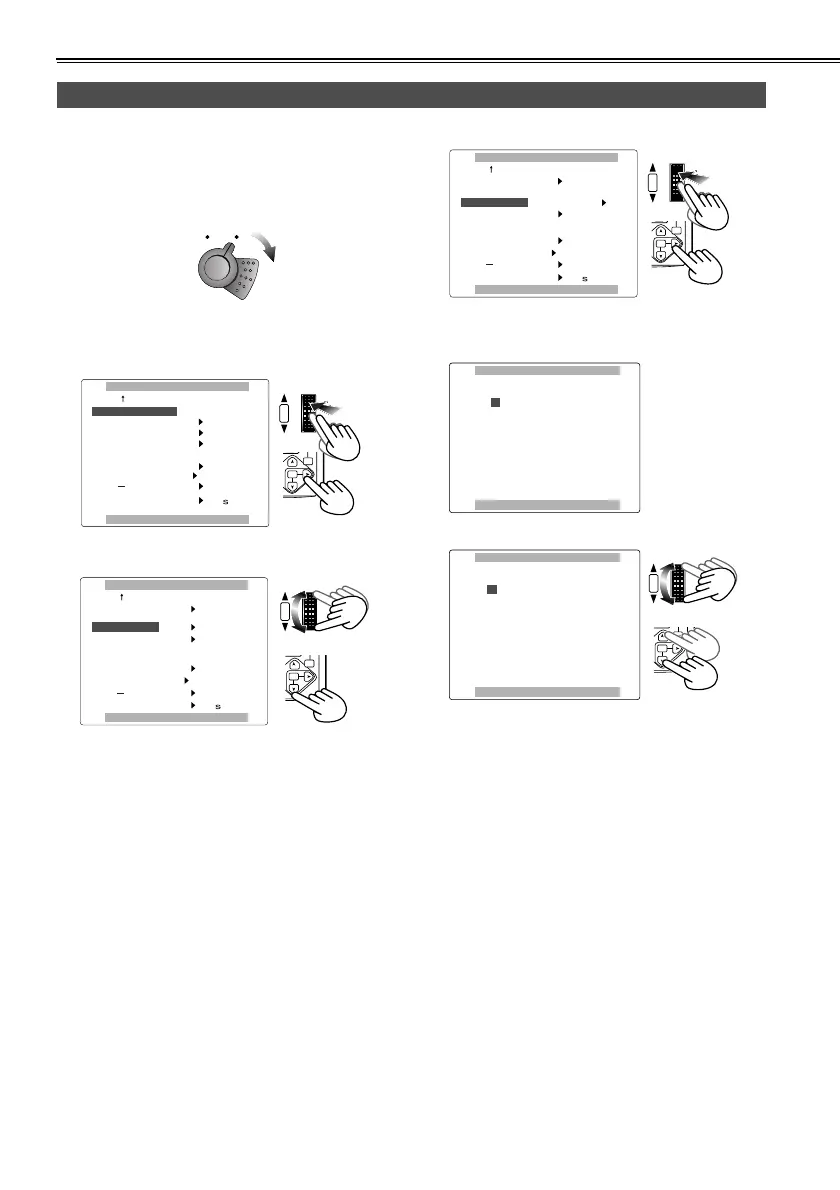
1 Set the POWER lever to the ON position.
2 Use the menus (P62-64) to select “PRESET” as the
FIRST REC TC item setting on the RECORDING
SETUP screen.
3 Turn the multi dial to move to the TC PRESET item.
4 Press the multi dial to move q to “YES”.
5 The screen shown below appears. Use the multi
dial to set the time code.
Turn the multi dial to specify the time code.
Specifying the time code
POWER
lcc
lk
POWER
lcc
lk
ob`loafkd==pbqrm
mrpe==jbkr==ql==obqrok
cfopq==ob`==q`
r_==mobpbq
q`==mobpbq
lkb
pelq==ob`
ob`==qfjb
obdbk
MKR
lcc
mobpbq
r_==jlab
||||
||||
rpbo
bccb`q
lcc
PB.
ZOOM
MENU
SET
ITEM
HUTTER/IRIS
VOL/JOG
PUSH
ob`loafkd==pbqrm
mrpe==jbkr==ql==obqrok
cfopq==ob`==q`
r_==mobpbq
q`==mobpbq
lkb
pelq==ob`
ob`==qfjb
MKR
lcc
mobpbq
r_==jlab
rpbo
vbp
||||
||||
bccb`q
lcc
PB.
ZOOM
MENU
SET
ITEM
HUTTER/IRIS
VOL/JOG
PUSH
ob`loafkd==pbqrm
mrpe==jbkr==ql==obqrok
cfopq==ob`==q`
r_==mobpbq
q`==mobpbq
lkb
pelq==ob`
ob`==qfjb
MKR
lcc
mobpbq
r_==jlab
rpbo
vbp
||||
||||
bccb`q
lcc
PB.
ZOOM
MENU
SET
ITEM
HUTTER/IRIS
VOL/JOG
PUSH
q`==mobpbq
mrpe==jbkr==ql==obqrok
M=M=Ü=M=M=ã=M=M=ë=M=M=Ñ=
q`==mobpbq
mrpe==jbkr==ql==obqrok
N=M=Ü=M=M=ã=M=M=ë=M=M=Ñ=
PB.
ZOOM
MENU
SET
ITEM
HUTTER/IRIS
VOL/JOG
PUSH
AG-DVC60E_En.fm 28 ページ 2004年9月2日 木曜日 午後1時43分










 To Next Page