54 (E)
Dubbing
Using the dubbing function, you can dub (copy) the
contents of S-VHS (or VHS) cassettes onto DV cas
-
settes or record TV programs. (P50)
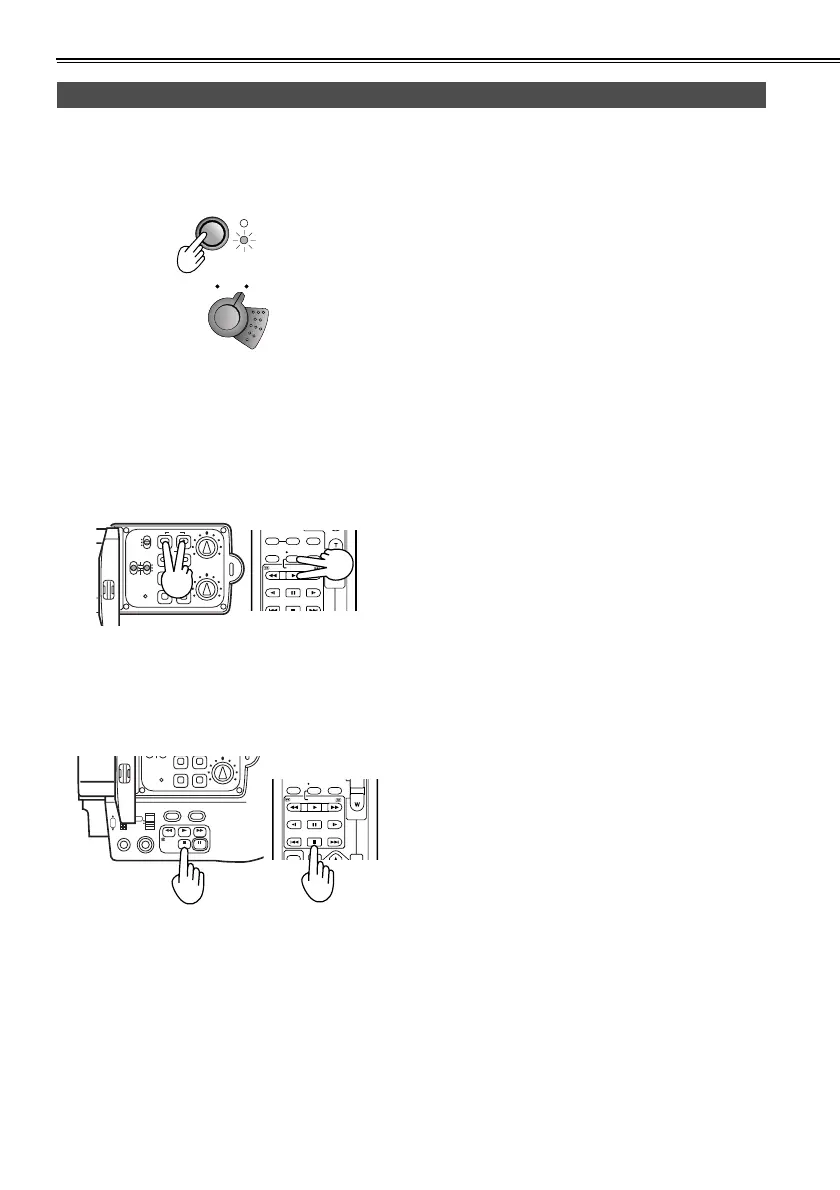
1 Press the MODE button to set the camera-recorder
to the VCR mode.
2 Turn on the power of the external unit, and play
back the tape.
3 To start recording, press the REC button while hold-
ing down the REC sub button on the camera-
recorder.
If you are using the remote control unit, press the
PLAY button while holding down the REC button.
• If you do this during still-picture playback (P45),
the camera-recorder will be set to the rec pause
status.
To resume recording from the rec pause status,
press the h button.
4 Press the g button to stop the recording.
5 Stop play back on the external unit.
Analog input
POWER
lcc
lk
lcc
lk
CA
VC
COUNTER
RESET TITLE
STILL ADV
PAUSE
STILL ADV
INDEX
Ð VOL +
STOP INDEX
MULTI/
P-IN-P
REC A.DUB
PLAY/REW FF/
ZOOM
CH1
CH2
AUDIO LEVEL
REC
MODE CHKSNS
OISZEBRA
RESETCOUNTER
ZOOM SPEED
OFF/M
H
L
AUDIO IN
FRONT
REAR
CH1 CH2
MIC
MIC
LINE
RESET
STILL ADV
PAUSE
STILL ADV
INDEX
SELECT
VAR.
VOL +
PB.
STOP INDEX
P-IN-P
REC A.DUB
PLAY/REW FF/
OISZEBRA
REAR
CH1 CH2
RESET
FOCUS USER 2
SEARCH
MANUAL
MENU
VOL/JOG
SEARCHD.ZOOM
USER 3
STILL
WHITE BAL
AUTO
PUSH
SHUTTER/IRIS
-
AG-DVC60E_En.fm 54 ページ 2004年9月2日 木曜日 午後1時43分










 To Next Page