50 (E)
Connecting external units (cont.)
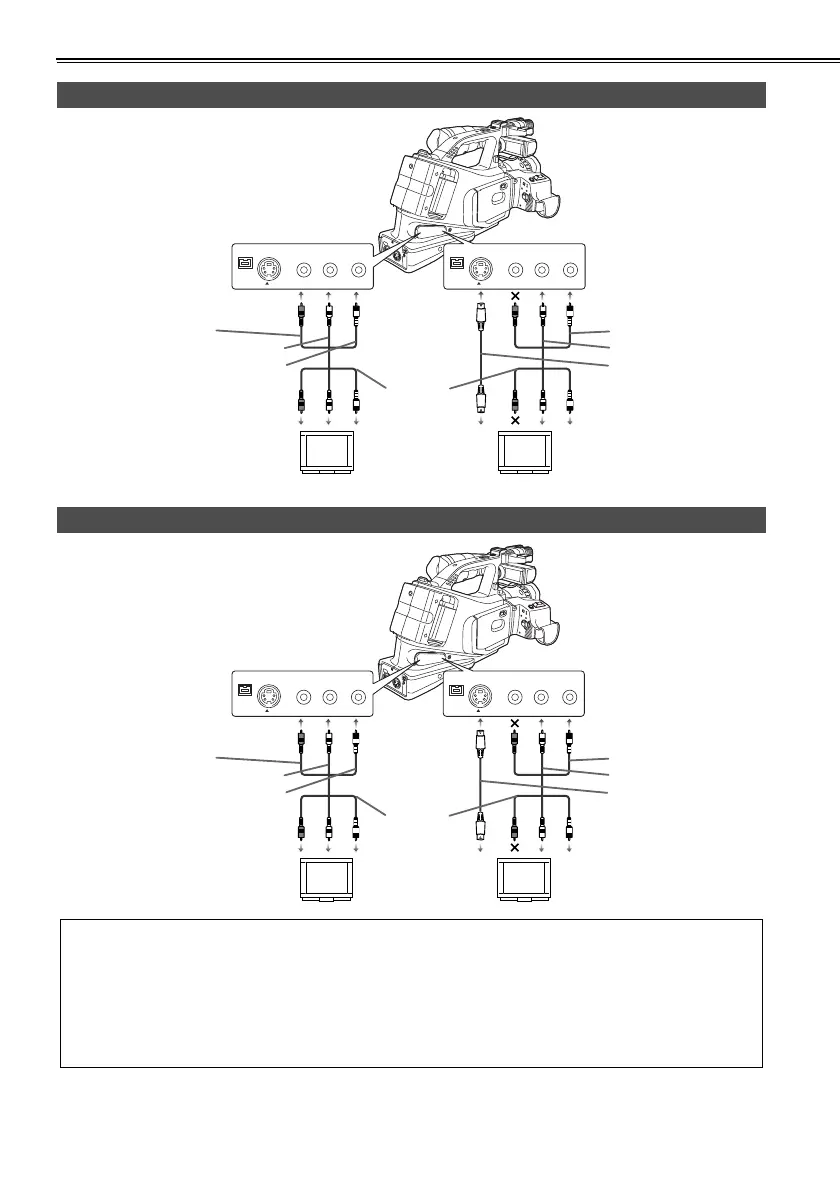
TV set
Video deck
as
S-VIDEO
IN/OUT
VIDEO
IN/OUT
CH1
CH2
AUDIO
IN/OUT
as
S-VIDEO
IN/OUT
VIDEO
IN/OUT
CH1
CH2
AUDIO
IN/OUT
S-video connector supported
Yellow: Video
White: CH1 (L ch) audio
Red: CH2 (R ch) audio
AV cable
(option)
Red: CH2 (R ch) audio
White: CH1 (L ch) audio
S-video cable (option)
as
S-VIDEO
IN/OUT
VIDEO
IN/OUT
CH1
CH2
AUDIO
IN/OUT
S-VIDEO
IN/OUT
VIDEO
IN/OUT
CH1
CH2
AUDIO
IN/OUT
as
S-video connector supported
Yellow: Video
White: CH1 (L ch) audio
Red: CH2 (R ch) audio
AV cable
(option)
Red: CH2 (R ch) audio
White: CH1 (L ch) audio
S-video cable (option)
• When connecting an external unit to the camera-recorder and inputting the video and audio signals of that unit
to the camera-recorder, connect the camera-recorder to the output connectors on the external unit.
• When connecting an external unit to the camera-recorder and outputting the video and audio signals of the
camera-recorder to that unit, connect the camera-recorder to the input connectors on the external unit.
• When video signals are input to both the S-VIDEO IN/OUT connector and VIDEO IN/OUT jack, the signals of
the S-VIDEO IN/OUT connector take precedence.
• Except when performing audio dubbing on existing recordings, audio signals cannot be recorded unless video
signals are input to the S-VIDEO IN/OUT connector and/or VIDEO IN/OUT jack.
AG-DVC60E_En.fm 50 ページ 2004年9月2日 木曜日 午後1時43分










 To Next Page