55 (E)
EDITING
ENGLISH
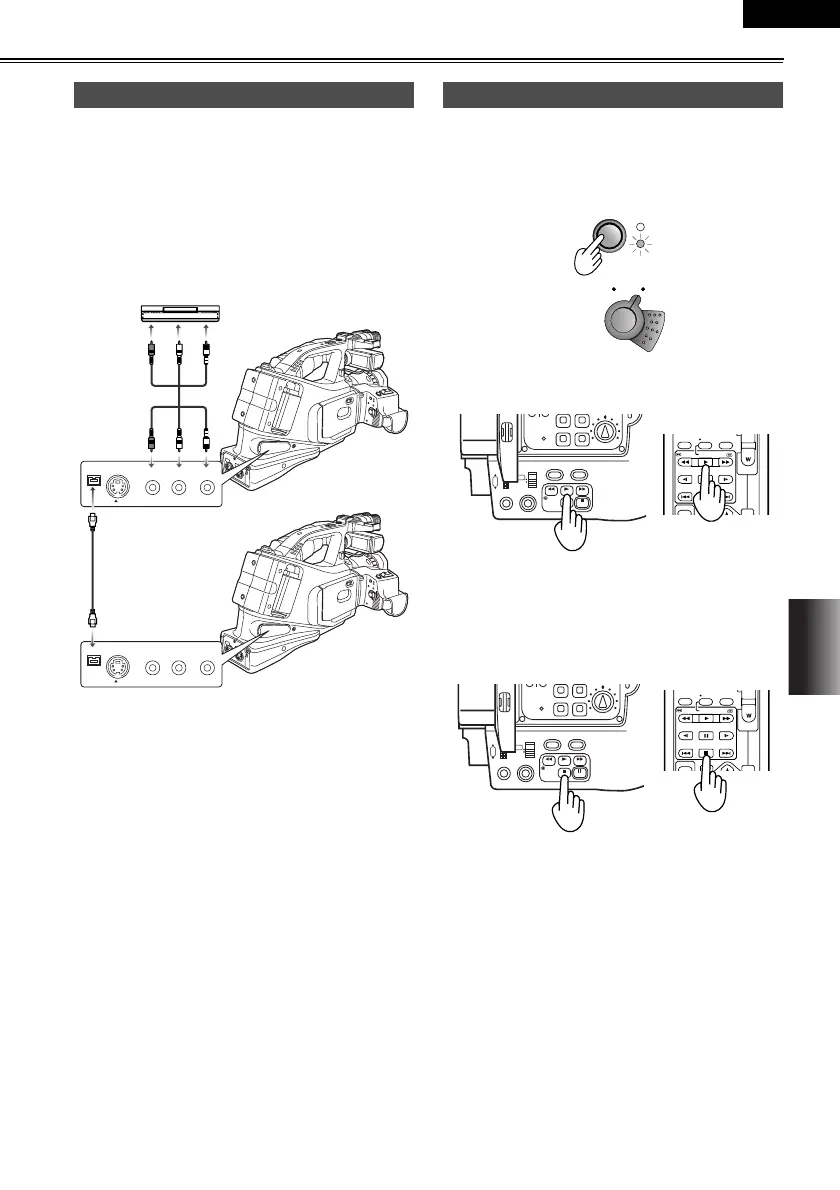
g Analog/digital (AD) conversion
You can use the camera-recorder as an analog-dig-
ital (AD) converter by using the menus (P62-64) to
select “ON” as the DV OUT item setting on the AV
IN/OUT SETUP screen. (P71)
This function enables you to output images, which
were input as analog signals from an external unit,
as digital signals through the camera-recorder’s DV
connector to another digital video unit.
• Normally, use the “OFF” setting for the DV OUT item.
If “ON” is selected, the images may be disrupted.
• You can also use an S-video cable. (You cannot use
an S-video cable that has a lock.)
You can use a video deck to dub the images you have
shot using this camera-recorder onto an S-VHS (or
VHS) cassette tape. (P50)
1 Press the MODE button to set the camera-recorder
to the VCR mode.
2 Press the q button to play back the tape in the
camera-recorder.
3 Start recording on the video deck.
4 Stop recording on the video deck.
5 Press the g button to stop playing back the tape in
the camera-recorder.
Analog input
as
S-VIDEO
IN/OUT
VIDEO
IN/OUT
CH1
CH2
AUDIO
IN/OUT
as
S-VIDEO
IN/OUT
VIDEO
IN/OUT
CH1
CH2
AUDIO
IN/OUT
External unit
Analog signals
Digital signals
Another digital
video unit
Analog output
POWER
lcc
lk
lcc
lk
CAM
VC
STILL ADV
PAUSE
STILL ADV
INDEX
SELECT
VAR.
VOL +
PB.
STOP INDEX
P-IN-P
REC A.DUB
PLAY/REW FF/
OISZEBRA
REAR
CH1 CH2
RESET
FOCUS USER 2
SEARCH
MANUAL
MENU
VOL/JOG
SEARCHD.ZOOM
USER 3
STILL
WHITE BAL
AUTO
PUSH
SHUTTER/IRIS
-
STILL ADV
PAUSE
STILL ADV
INDEX
SELECT
VAR.
VOL +
PB.
STOP INDEX
P-IN-P
REC A.DUB
PLAY/REW FF/
OISZEBRA
REAR
CH1 CH2
RESET
FOCUS USER 2
SEARCH
MANUAL
MENU
VOL/JOG
SEARCHD.ZOOM
USER 3
STILL
WHITE BAL
AUTO
PUSH
SHUTTER/IRIS
-
AG-DVC60E_En.fm 55 ページ 2004年9月2日 木曜日 午後1時43分










 To Next Page