41
RQTV0136
[RAM] [-RW‹VR›] (Play only)
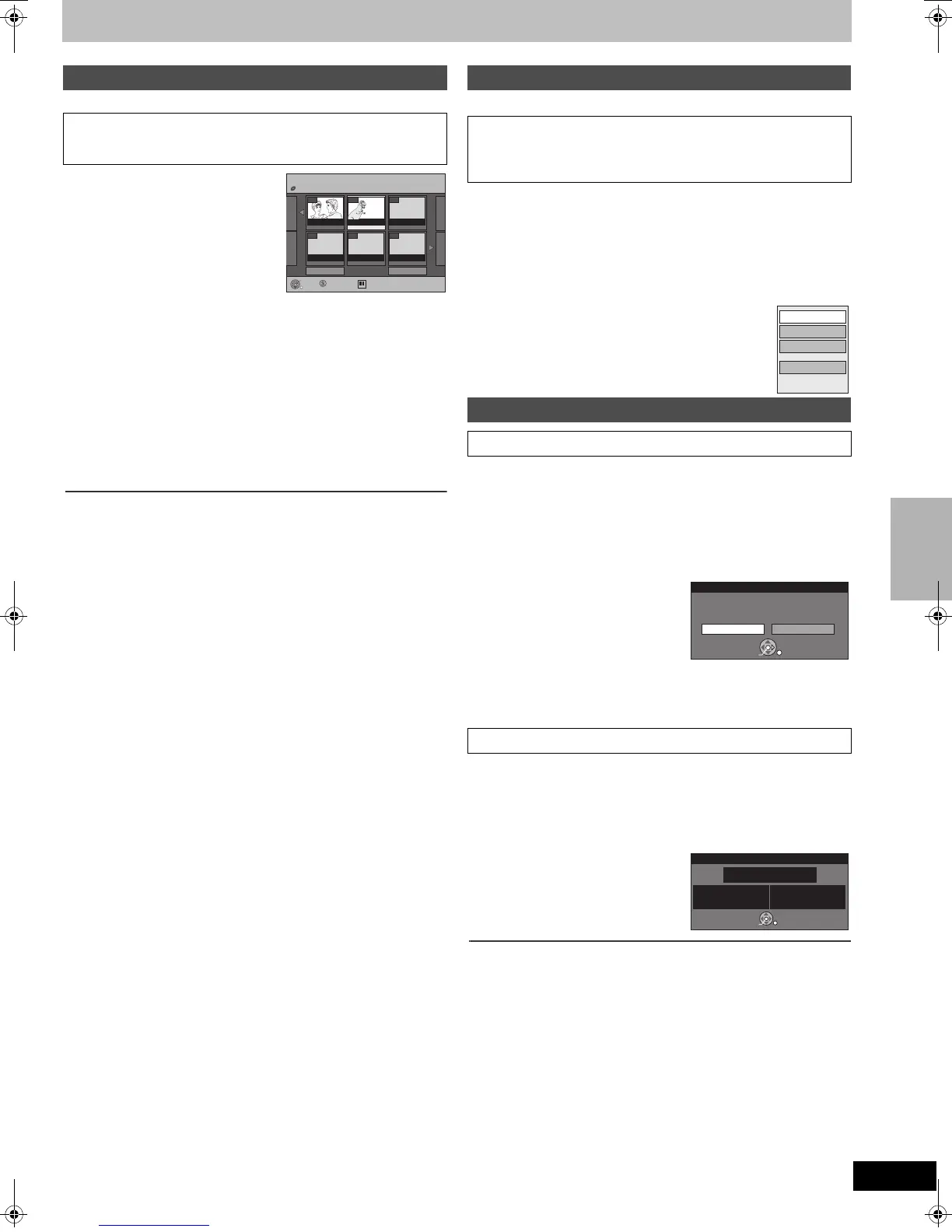
[1] While stopped
Press [FUNCTIONS].
[2] Press [3, 4] to select “To
Others” and then press
[ENTER].
[3] Press [3, 4] to select
“Playlists” and then press
[ENTER].
[4] Press [3, 4, 2, 1] to select a playlist and then
press [ENTER].
≥Playlists are not displayed if you have not created any playlist on the
inserted disc.
≥You can also select a playlist from the Playlist View screen by
entering a 2-digit number with the numbered buttons.
e.g.: “5”: [0] )[5]
“15”: [1] )[5]
≥To show other pages l 37
≥If you enter a number that is larger than the total number of playlists,
“Create” is selected.
∫To stop playlist play
Press [∫, STOP].
≥The Playlist View screen appears.
∫To return to the previous screen
Press [RETURN].
∫To exit the screen
Press [RETURN] several times.
∫To delete a playlist during play
[1] Press [DELETE].
≥A confirmation message is displayed.
[2] Press [2] to select “Delete” and then press [ENTER].
For your reference
≥You can use fast-forward, rewind, pause and slow-motion while playing
playlists just as you can during normal play.
[RAM] [-RW‹VR›] (Properties only)
[1] While stopped
Press [FUNCTIONS].
[2] Press [3, 4] to select “To Others” and then press
[ENTER].
[3] Press [3, 4] to select “Playlists” and then press
[ENTER].
[4] Press [3, 4, 2, 1] to select a playlist.
≥To show other pages l 37
[5] Press [SUB MENU].
[6] Press [3, 4] to select a desired item
and then press [ENTER].
[RAM] (Multiple editing, l 37)
≥Follow steps 1 to 5 of “Editing playlists with SUB MENU button”.
(l Above)
[6] Press [3, 4] to select “Delete” and then press
[ENTER].
[7] Press [2] to select “Delete” and then press
[ENTER].
≥The playlist is deleted.
≥Once deleted, the playlists cannot be restored.
Make certain before proceeding.
≥Even if you delete a playlist, the original title is not deleted.
[RAM] [-RW‹VR›]
≥Follow steps 1 to 5 of “Editing playlists with SUB MENU button”.
(l Above)
[6] Press [3, 4] to select “Properties” and then press
[ENTER].
Playlist information (e.g., date and length) is shown.
∫To return to the previous screen
Press [RETURN].
∫To exit the screen
Press [RETURN] several times.
Playing playlists
Preparation
≥Create playlists. (l 40)
≥Press [DRIVE SELECT] to select the DVD.
- -
Playlists
Previous Page 01/01 Next
DVD-RAM
- -
- -- -- -
0201
24.10. MON 0:30 24.10. MON 0:01
Create
SelectSUB MENU Previous Next
Playlist View
ENTER
RETURN
Editing playlists with SUB MENU button
Preparation
≥Create playlists. (l 40)
≥[RAM] Release protection (disc l 55, cartridge l 55).
≥Press [DRIVE SELECT] to select the DVD.
Playlist operations
∫ Delete
∫ Properties
Properties
Edit
Chapter View
Delete
Delete
Delete Cancel
Delete playlists ?
ENTER
SELECT
RETURN
No. 03
Chapters 004
Date 22
.7.2006 SAT
Total 0:05.51
Dinosaur
Properties
ENTER
RETURN
Creating, editing and playing playlists
e.g.,[RAM]
RQTV0136.book 41 ページ 2006年4月19日 水曜日 午後1時28分


 To Next Page
 Loading...