22
2-3-1-1
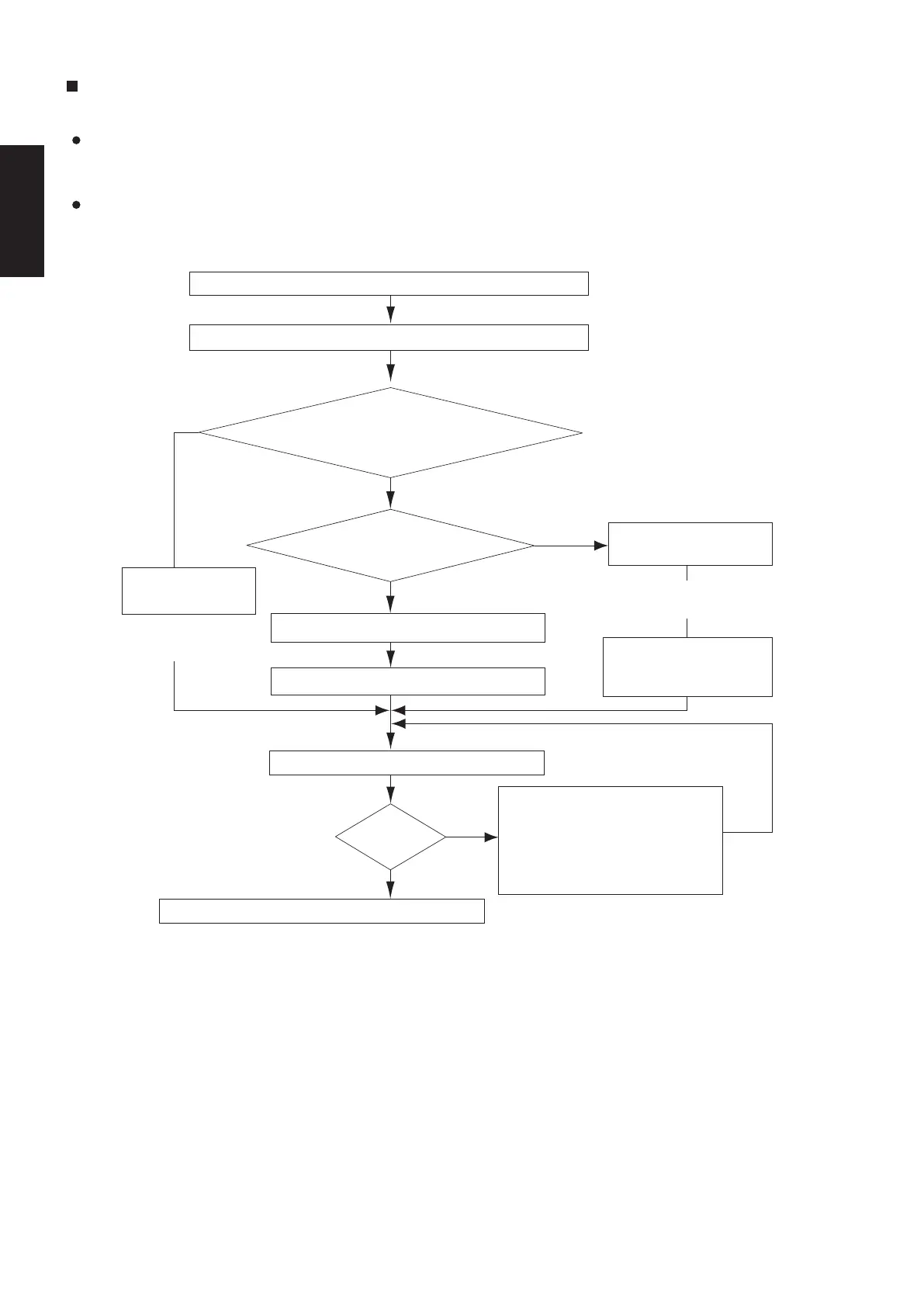
1-2. Test Run Procedure
2-3. Indoor Units
Type E3
1-1. Caution
The indoor and outdoor unit control PCB utilizes a semiconductor memory element (EEPROM).
The settings required for operation were made at the time of shipment.
Only the correct combinations of indoor and outdoor units can be used.
This test run section describes primarily the procedure when using the wired remote controller.
Fig. 2-3-1-1
YES
YES
YES
NO
NO
NO
Recheck the items to check before the test run.
Check the combination (wiring) of indoor and outdoor units. (See 1-6-1)
(See 1-3)
Is system “single-type”?
(1 indoor unit is connected to 1 outdoor unit
and remote controller)
Is group control with
multiple outdoor units used?
Turn ON the indoor and outdoor power.
Indicate (mark) the combination number.
(See 1-6-3)
Automatic address
Set the remote controller to “test run”.
(See 1-4)
Can
operation be
started?
Return the remote controller to normal control.
Turn ON the indoor
and outdoor power.
(Automatic
Address)
(See 1-6-2)
Setting the Outdoor
Unit System Address
Set the outdoor
unit system address.
(See 1-6-3)
Automatic Address Setting
Use the remote controller
to perform automatic
address setting.
See “Contents of Remote
Controller Switch Alarm Display”
to check the system.
In addition, see 1-6-1 to 4 and
correct any items that need to be
corrected.
Note: Check the indoor-side drainage.
(*1) Required for simultaneous-operation
multi systems and for group control.
(*1)
SM830281-00_欧州向け R32シングル TD&SM.indb 1 20/01/09 15:02:44






 To Next Page