88
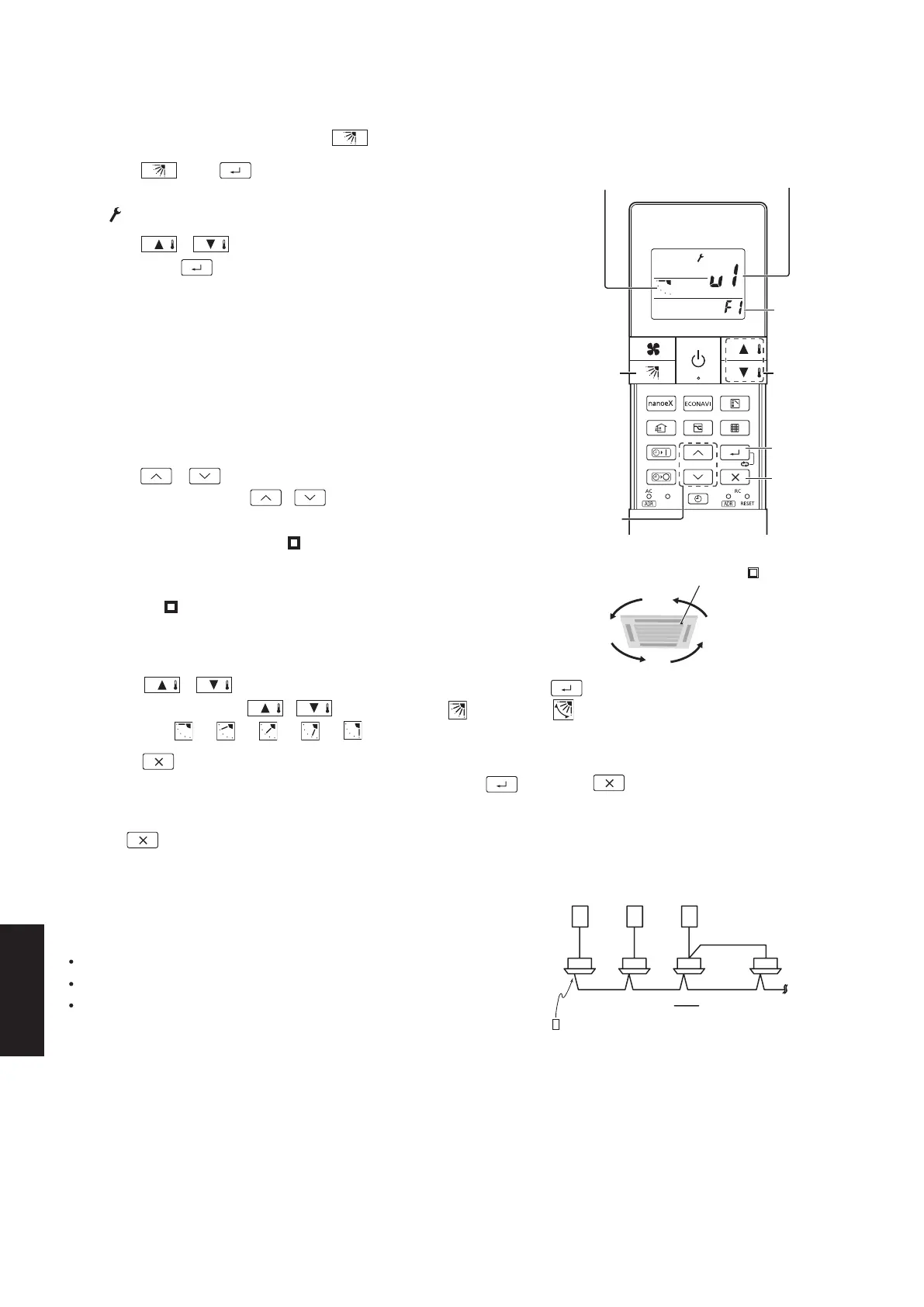
1. Press and at the same time for 4 seconds
or longer.
• “ ” starts blinking and the setting screen is displayed.
2. Press / to select the indoor unit to set,
then press .
• Every time you press / to switch between “U1 ↔ U2 ↔ …
↔ U8 ↔ AL (All indoor units that are connected to the remote
controller)”, the buzzer sounds from the corresponding receiver.
• When settable: 1 short beep
• When not settable*: 1 short beep followed by 1 long beep
* When the indoor unit is not connected or does not support
this function.
3. Press / to select the air outlet.
• Every time you press / , it cycles from “F1 ↔ F2 ↔ F3
↔ F4 ↔ AL (All the air outlets)”.
• The square mark (indented ) on the panel of the indoor unit
indicates air outlet No. 1.
There are some models that do not have a square mark
(indented ).
• The air outlet No. changes according to the installation direction.
Check by actual operation.
1
1, 2, 4
5
2, 4
3
Indoor unit
Air outlet
Flap
F1
F2
F3
F4
Square mark (indented )
4. Press / to select the flap direction, then press .
• Every time you press / , it cycles from “ (Unlock) ↔
(Swing) ↔ ↔ ↔ ↔ ↔ ”.
5. Press .
• You can return to Step 2 to continue setting if you press instead of .
Note
• Press to stop operation in the middle.
8-2-1-6. Lock Individual Flap
8-2-1-7. Operating Multiple In/Outdoor Units Simultaneously (Group Control)
You can set the flap for each air outlet individually according to the room condition.
• Even if the flap setting is changed with (Page 8-5), the flap directions set here are not changed.
1 remote controller can operate up to 8 indoor units.
All the indoor units have identical settings.
Set temperature sensing to the indoor unit (Main sensor).
(See page 8-2-1-1)
Group control works well for providing air conditioning to 1
large room with more than 1 air conditioning units.
Outdoor unit
Indoor unit
Signal line
Receiver
Wireless (Infrared) remote controller
(Supported models: 4-way ceiling cassette type)
8-2-1-6
SM830281-00_欧州向け R32シングル TD&SM.indb 6 20/01/09 15:07:34






 To Next Page