77
<Procedure of CZ-RTC5B>
Fig. 7-4
1
Keep pressing the , and
buttons
simultaneously for 4 or more seconds.
The “Maintenance func” screen appears on the
LCD display.
2
Press the or button to see each
menu.
If you wish to see the next screen instantly, press
the or button.
Select “8. Detailed settings” on the LCD display
and press the button.
The “Detailed settings” screen appears on the
LCD display.
Select the “Unit no.” by pressing the or
button for changes.
3
Select the “Code no.” by pressing the or
button.
Change the “Code no.” by pressing the or
button (or keeping it pressed).
4
Select the “Set data” by pressing the or
button.
Select one of the “Set data” by pressing the
or button.
Then press the button.
5
Select the “Unit no.” by pressing the or
button and press the
button.
The “Exit detailed settings and restart?” (Detailed
setting-end) screen appears on the LCD display.
Select “YES” and press the button.
SM830255-00_Single_欧州4方向 TD&SM.indb 7 16/09/21 13:54:48
20:30 (THU)
START
[ ]
Maintenance func
1. Outdoor unit error data
2. Service contact
3. RC setting mode
4. Test run
Sel. Page [ ] Confirm
20:30 (THU)
Maintenance func
5. Sensor info.
6. Servicing check
8. Detailed settings
Sel. Page [ ] Confirm
20:30 (THU)
7. Simple settings
Detailed settings
Unit no. Code no. Set data
101-1 0001
Sel. Next
20:30 (THU)
Detailed settings
Unit no. Code no. Set data
1-1 0001
Sel. Next
20:30 (THU)
10
Detailed settings
Unit no. Code no. Set data
ALL
Sel. Next
20:30 (THU)
01 0002
Exit detailed settings
and restart?
NOYES
Detailed settings
Unit no. Code no. Set data
1-1
Sel.
20:30 (THU)
10 0001
[ ] Confirm
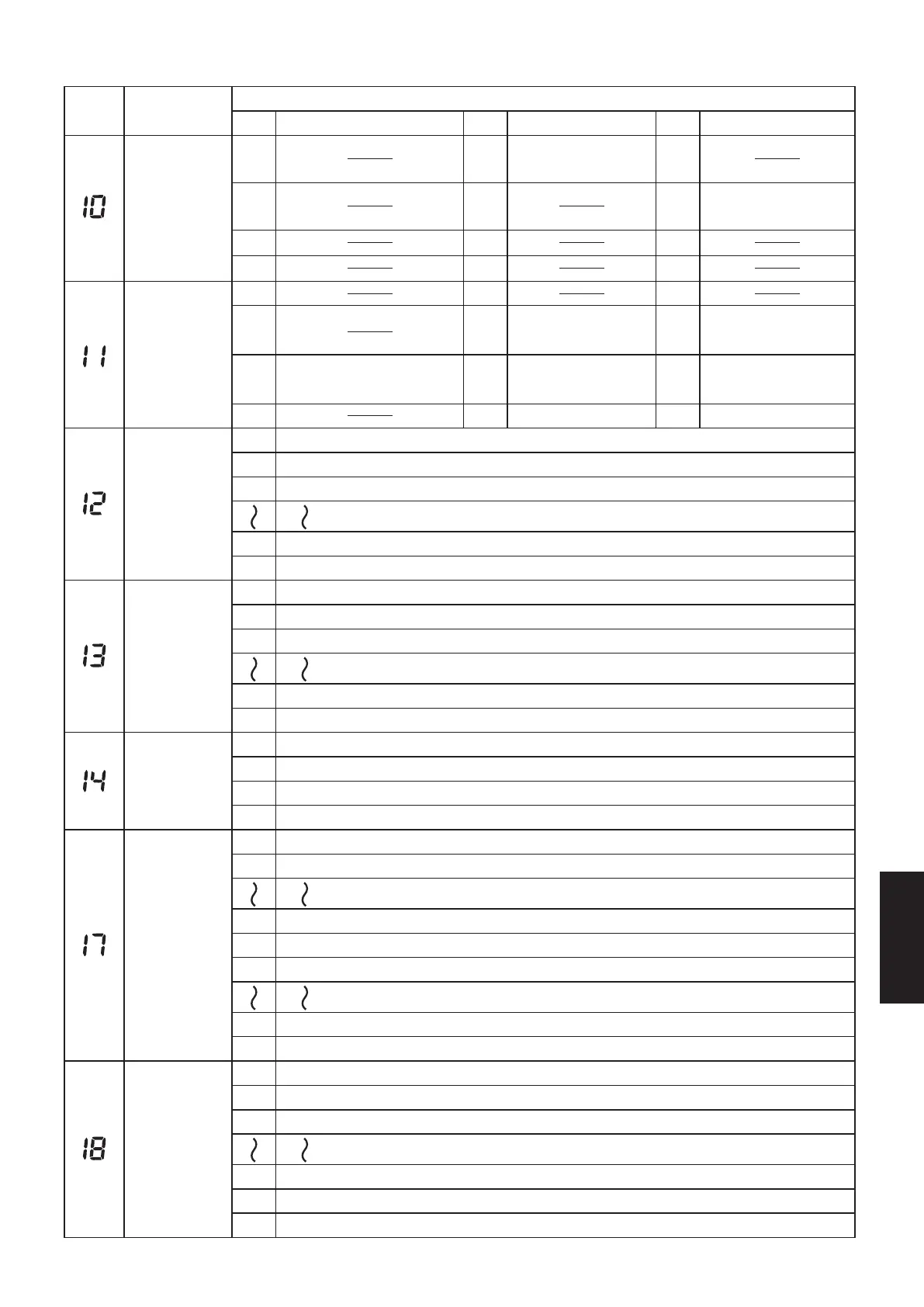
code
Item
Item
Setting data
No. Description No. Description No. Description
Type
0000 0001 0002
0003 0005 0006
0007
High Static Pressure
Ducted (E3)
0008 0010
0011
Indoor unit
capacity
0001 0003 0005
0007 0009 0011
0012 0015 0017
0020 0021 224 (Type 200)
112
(S-1014PU3E(100))
4-Way Cassette (U3)
80 (S-6071PU3E(71))
140
(S-1014PU3E(125))
56
(S-3650PU3E(50))
71
(S-6071PU3E(60))
0023 280 (Type 250)
address
System
0001
0002
Unit No. 1
0003
Unit No. 2
Unit No. 3
0030
0099 Not set
Unit No. 30
Indoor unit
address
0001
0002
Unit No. 1
0003
Unit No. 2
Unit No. 3
0064
0099
Unit No. 64
Not set
0000
Group control
address
Individual (1:1 = Indoor unit with no group wiring)
0001 Main unit (One of the group-control indoor units)
0002
0099 Not set
Sub unit (All group-control indoor units except for main unit)
–010
Cooling intake
temperature
shift
–009
Shifts intake temperature 10°C down.
Shifts intake temperature 9°C down.
–001
0000
Shifts intake temperature 1°C down.
0001
No intake temperature shift
Shifts intake temperature 1°C up.
0009
0010
Shifts intake temperature 9°C up.
Shifts intake temperature 10°C up.
0000 Function disabled
0001
Automatic
stop time after
operation start
0002
Stops automatically 5 minutes after operation starts.
Stops automatically 10 minutes after operation starts.
Can be set
in 5-minute
units.
*
0123
0124
Stops automatically 615 minutes after operation starts.
0125
Stops automatically 620 minutes after operation starts.
Stops automatically 625 minutes after operation starts.
7-4. List of Detailed Setting Items
7-6
SM830281-00_欧州向け R32シングル TD&SM.indb 6 20/01/06 11:59:36






 To Next Page