How to set the external static pressure
1. Keep pressing the , and buttons
simultaneously for 4 or more seconds.
The “Maintenance func” screen appears on the LCD display.
2. Press the or button to see beach menu. If
you wish to see the next screen instantly, press the
or button.
Select “8. Detailed settings” on the LCD display and press the
button.
The “Detailed settings” screen appears on the LCD display.
Select the “Unit no.” by pressing the or button
for changes.
3. Select the “Code no.” by pressing the or
button.
Change the “Code no.” to “5D” by pressing the or
button (or keeping it pressed).
4. Select the “Set data” by pressing the or
button.
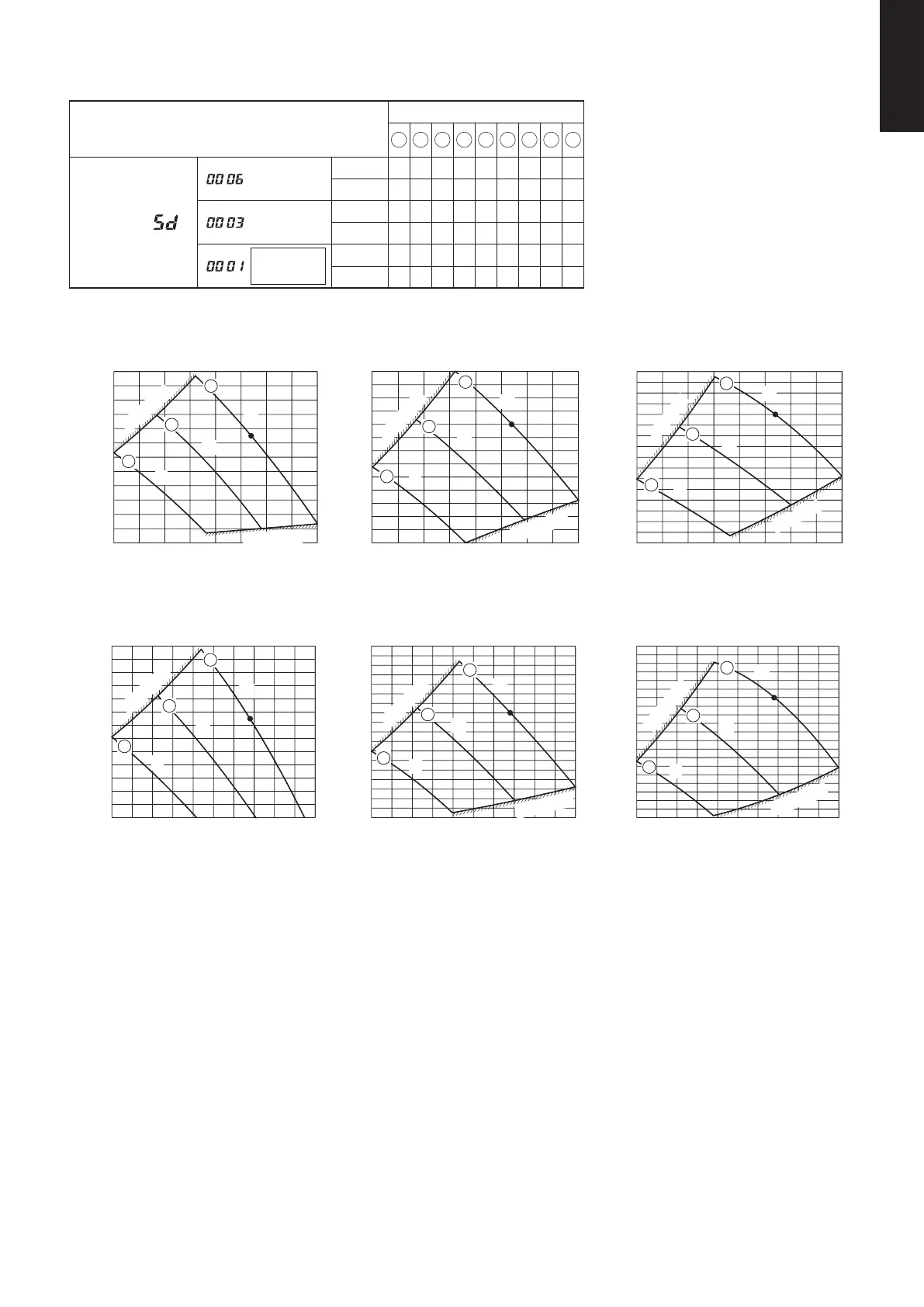
Select one of the “Set data” among “0006”, “0003” or “0001”
according to the desired external static pressure setting by
pressing the or button.
(See Table 1-12-1-1-4 and Fig. 1-12-1-1-4.)
Then press the button.
5. Select the “Unit no.” by pressing the or
button and press the button.
The “Exit detailed settings and restart?”
(Detailed setting-end) screen appears on the LCD display.
Select “YES” and press the button.
Table 1-12-1-1-4 Setting the external static pressure
Indoor unit Item code
200 250
5D
External static pressure of the rated
air flow volume
180 Pa 200 Pa 0006
120 Pa 130 Pa 0003
75 Pa 75 Pa 0001
1-3. Operating the High-spec Wired Remote Controller (CZ-RTC5B)
20:30 (THU)
[ ]
START
Maintenance func
Sel.
20:30 (THU)
Page [ ] Confirm
0. ECONAVI info.
1. Outdoor unit error data
2. Service contact
3. RC setting mode
Maintenance func
Sel.
20:30 (THU)
5. Sensor info.
6. Servicing check
7. Simple settings
8. Detailed settings
Page [ ] Confirm
Detailed settings
Unit no. Code no. Set data
3-1
10
0006
Sel. Next
20:30 (THU)
Detailed settings
Unit no. Code no. Set data
3-1 5D 0001
20:30 (THU)
Sel. Next
Unit no.
Detailed settings
xit detailed settings
Code no. Set data
ALL
20:30 (THU)
01
Sel. Next
0002
Exit detailed settings
and restart?
NOYES
1-4. Indoor Fan Performance
Fig. 1-12-1-1-4






 To Next Page