Alignment Procedures
Pedestal Setting
Equipment required: RF Video Gray Scale Generator
Panel Settings; Picture = Normal, White Balance = Cool, Aspect Ratio = 16:9
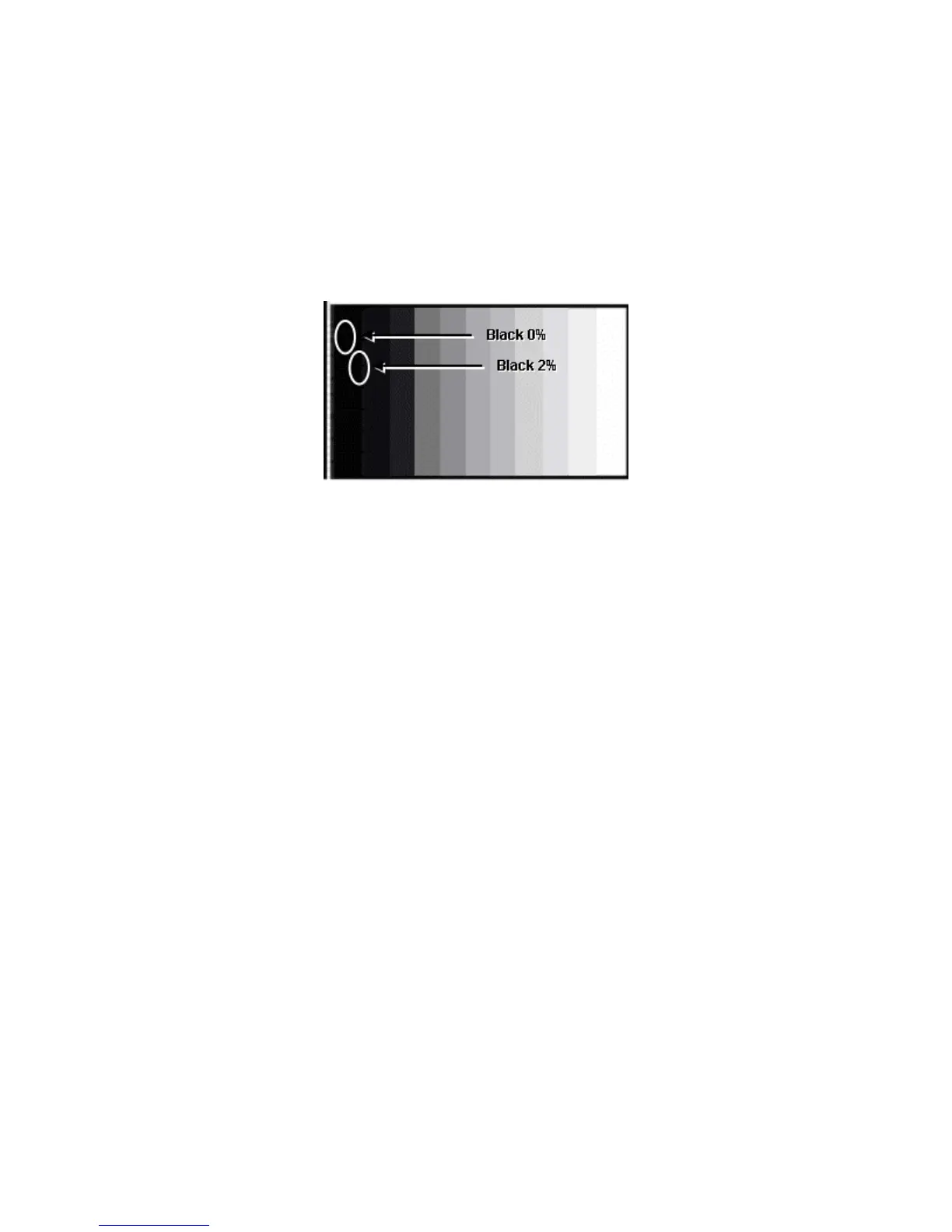
Figure 51 - Pattern Display
tep 1- Access the R, G and B cutoff settings and set them to “80”.
reen pixels
cess the RGB Sub Adjust, G Sub Bright setting and adjust G Sub
ntrol setting, Set Gun off to "3". (Only blue pixels
cess the RGB Sub Adjust, B Sub Bright setting and adjust B Sub
curs
oma Control setting, Set Gun off to "6". (Only red pixels
cess the RGB Sub Adjust, R Sub Bright setting and adjust R Sub
to PC / RGB signal. Repeat procedure (1 to 7) using PC
S
Step 2- Under the Chroma Control setting, Set Gun off to "5" (Only g
emitting).
Step 3- Ac
bright so that green pixel emission starts at black 2% area and no emission
occurs in the black 0% area.
Step 4- Under the Chroma Co
emitting.)
Step 5- Ac
bright so that blue pixel emission starts at black 2% area and no emission oc
in the black 0% area.
Step 6- Under the Chr
emitting.)
Step 7- Ac
bright so that Red pixel emission starts at black 2% area and no emission occurs
in the black 0% area.
Step 8- Change input
input signal.
114



 To Next Page