NTSC White Balance Adjustment
Equipment required: NTSC Pattern Generator, Colorimeter
Panel Settings; Picture = Standard, Color Temperature = Cool, Aspect Ratio =
16:9
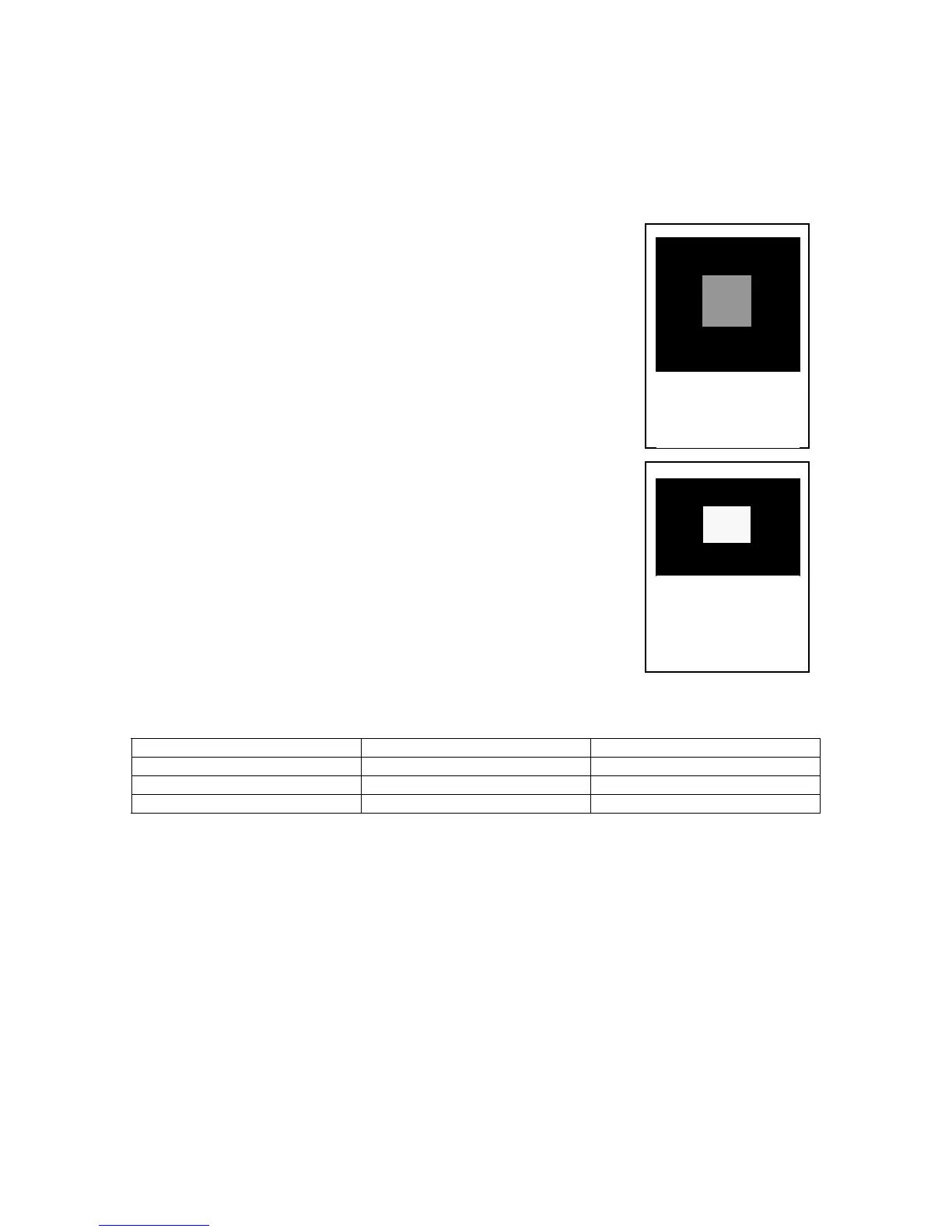
Figure 52 -
20 IRE Window
pattern
Step 1 - Using the Pattern generator; apply a 20 IRE
Window pattern signal to the panel. Apply the color sensor
to the panel and monitor the values.
Step 2 - Adjust the Sub Bright Setting to 10 cd/m
2
.
Step 3 - Set the G Cutoff Setting Value to 80.
Step 4 - Adjust the Red and Blue Cutoff settings to match
the values in Table 10.
Step 5 - Readjust the Sub Bright setting to 10 cd/m
2
.
Step 6 - Apply an 80 IRE window pattern signal to the
Panel.
Step 7 - Set the G Drive Setting value to E8.
Figure 53 -
80 IRE Window
pattern
Step 8 - Adjust the Red and Blue Drive settings to match
the values in Table 10.
Step 9 - Reapply the 20 IRE pattern and 80 IRE patterns
and verify that the drive and cutoff settings match the
settings in Table 10. Adjust as necessary.
Step 10 - Adjust the All Drive Settings value to FC.
Step 11 - Reapply the 20 IRE pattern and verify the light
settings to match with the table below, adjust as necessary.
Reference Values
Color Temperature X Y
Cool (High) 0.276 0.276
Normal (Mid) 0.288 0.296
Warm (Low) 0.313 0.329
Table 10
Step 12 - Press the R button and then the Picture button on the remote control.
Change the color temperature to Normal. Press the R button again, and then the
Action button to re-access the IIC mode.
Step 13 - Repeat steps 2 to 11 for Normal Color Temperature.
Step 14 - Press the R button and then the Picture button on the remote control.
Change the color temperature to Warm. Press the R button again, and then the
Action button to re-access the IIC mode.
Step 15 - Repeat steps 2 to 11 for Warm Temperature.
Step 16 - Change the Color temperature to Cool Mode, then re-adjust the Sub
bright value to “30”.
115








 To Next Page