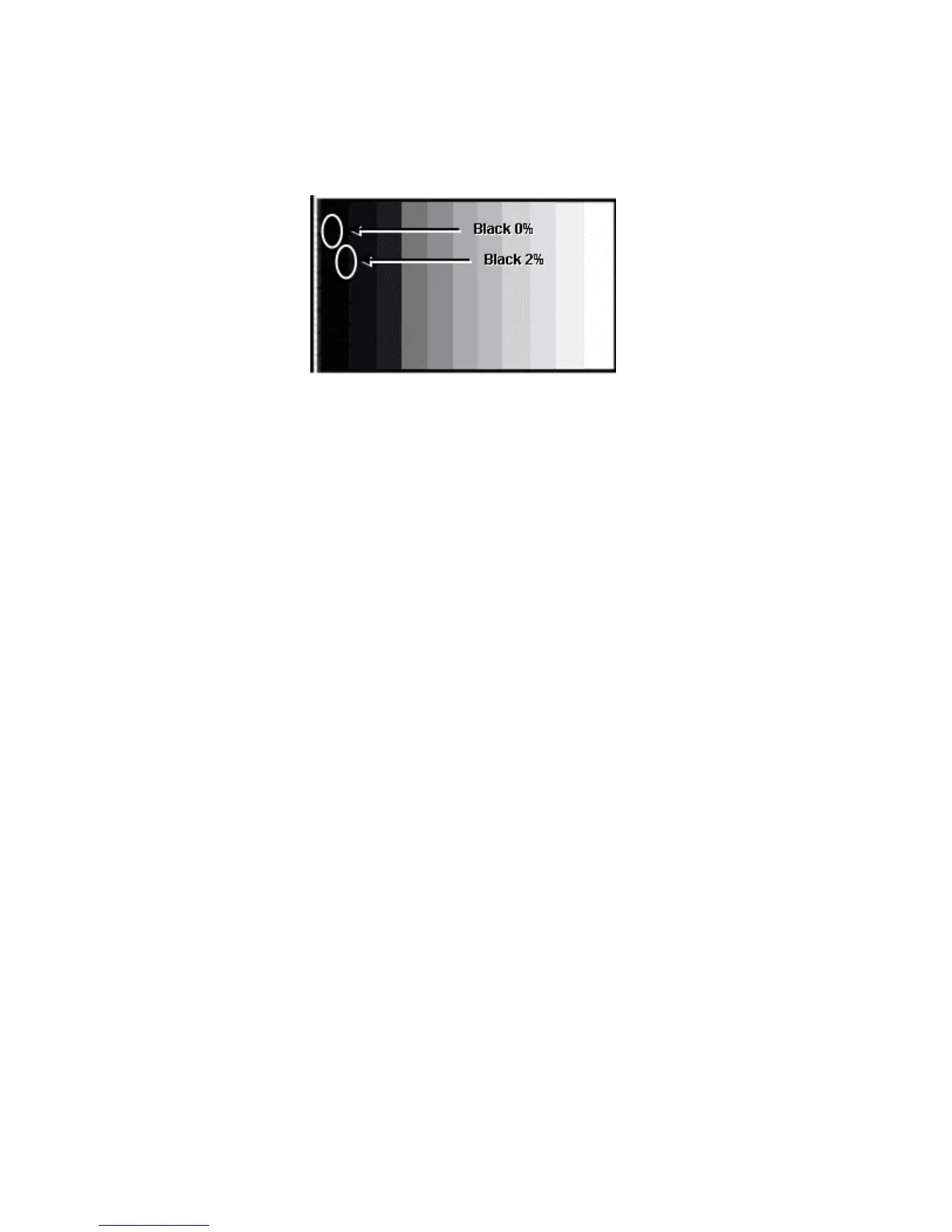
Sub Brightness Setting
Equipment required: NTSC grayscale pattern Generator
Figure 56 - Pattern Display
Panel Settings; Picture = Normal, Aspect Ratio = 16:9
Note: Adjust in a Dark room.
Step 1 - Set the white balance to Cool.
Step 2 - Access the All cutoff setting in service mode and adjust it so that pixel
emission starts in the 2% area and there is no emission in the 0% area.
Step 3 - Write down all cut off data.
Step 4 - Set the white balance settings to Normal.
Step 5 - Adjust all the cut off values to the same data values of the Cool mode
settings.
Step 6 - Set the white balance settings to Warm.
Step 7 - Adjust all the cut off values to the same data values of the Cool mode
settings.
Step 8 - Change the pattern to HD and apply it to the to the component input.
Step 9 - Copy PAL all cutoff data to HD Mode.
117





 To Next Page