115
VQT2M51
With a PC
Setup
1
Installation
When installing the software, log on to your computer as the Administrator or with a user
name with equivalent authorization. (If you do not have authorization to do this, consult your
manager.)
≥ Before starting the installation, close all applications that are running.
≥ Do not perform any other operations on your PC while the software is being installed.
≥ Explanation of operations and screens is based on Windows Vista.
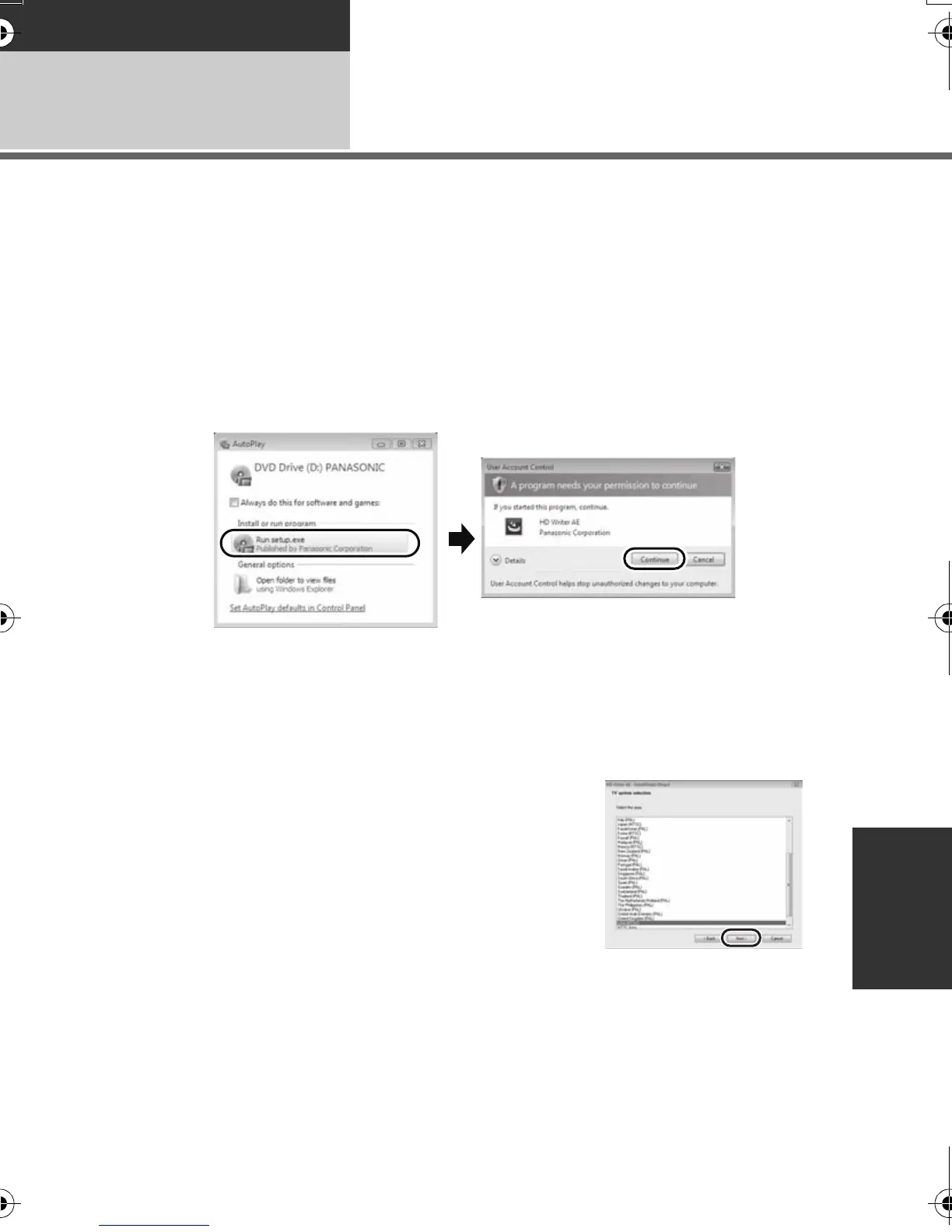
1 Insert the CD-ROM into the PC.
≥ The following screen is displayed automatically. Click [Run setup.exe] # [Continue].
≥ If the following screen is not displayed automatically, select [Start] # [Computer] (or
double-click on [Computer] on the desktop), and then double-click [PANASONIC].
2 Click [Next].
3 Read the [End User License Agreement], then place a check beside
[I accept the terms of the license agreement] if you agree to them
and click [Next].
4 Select the country or region where you
live, then click [Next].
≥ If the country or region cannot be selected, select
[NTSC Area].
≥ When the confirmation message appears, click [Yes].
HDCSD60_TM60_HS60-P_PC-VQT2M51_eng.book 115 ページ 2010年1月18日 月曜日 午前11時33分















 To Next Page