106
VQT3K35
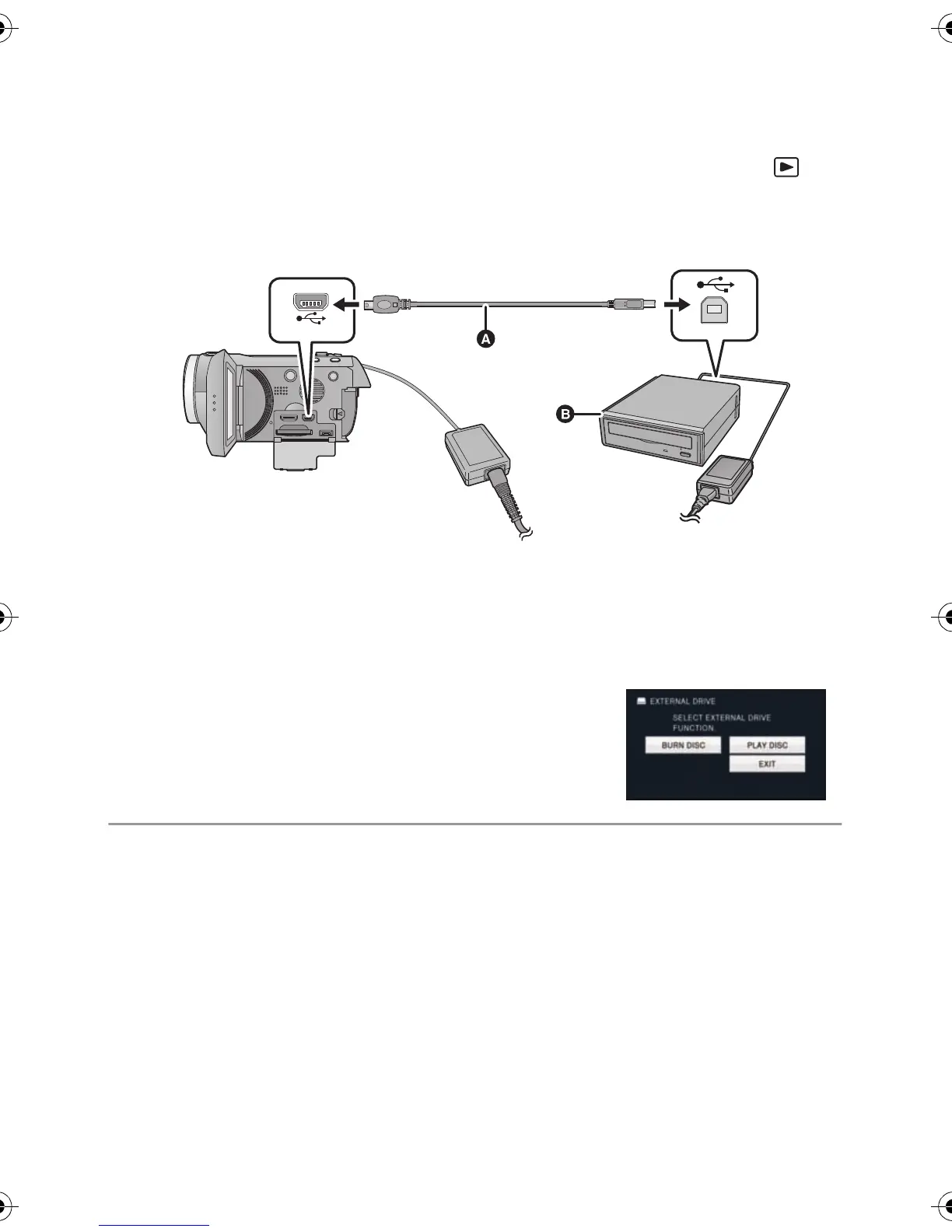
1 Connect the AC adaptor (supplied with DVD burner) to the DVD
burner.
≥ You cannot supply power to the DVD burner from this unit.
2 Connect this unit to the AC adaptor and change the mode to .
3 Connect this unit to the DVD burner with the USB Connection Cable
(supplied with DVD burner).
A USB Connection Cable (supplied with DVD burner)
B DVD burner (optional)
≥ Insert the plugs as far as they will go.
4 Insert the disc in the DVD burner.
≥ Insert the DVD disc with the recording side down when using the DVD burner.
5 Touch the desired item.
[BURN DISC]:
Refer to page 107 for how to copy discs.
[PLAY DISC]:
Refer to page 110 for how to play back the copied discs.
To terminate the connection with the DVD burner
Touch [EXIT].
≥ Disconnect the USB Connection Cable from this unit.
HDCSD800P-VQT3K35_mst.book 106 ページ 2010年12月20日 月曜日 午前9時4分















 To Next Page