63
VQT3K35
Face Recognition is a function for finding faces that resemble faces which have already been
registered and automatically prioritizing focus and exposure for those faces. This function
makes it possible to keep the face of your loved ones in focus even when they are at the
back or on the end of a line in a group picture.
∫ Registering a face for face recognition
≥ Up to a maximum of 6 people can be registered.
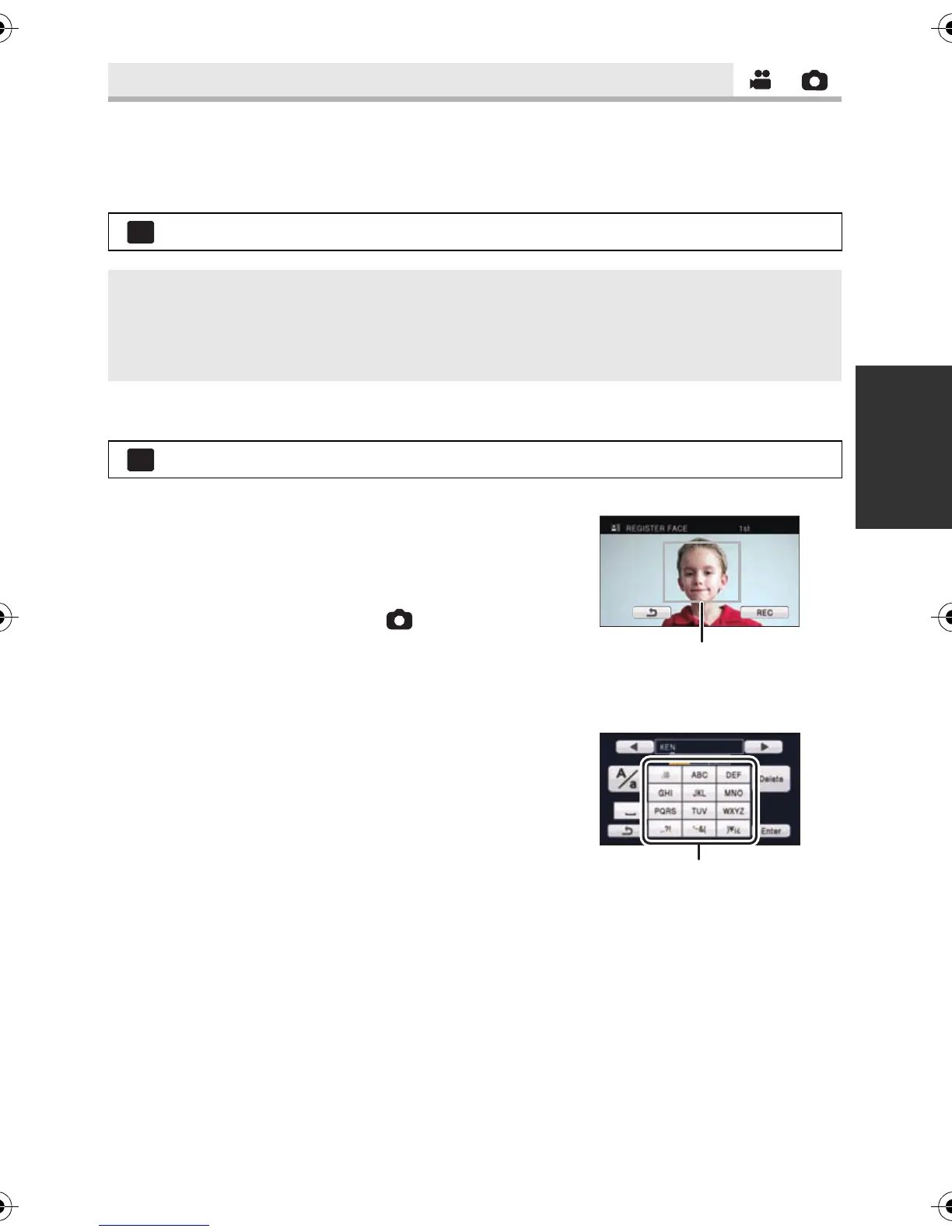
1 Align the person’s face with the guide.
≥ Take a picture of the persons face from the front,
ensuring that their hair does not hide the outline of
their face, their eyes or their eyebrows.
2 Touch [REC] or press the button fully.
≥ Touch [ENTER].
≥ It may not be possible to register a face depending
on the recording conditions. In this case, try
recording the face again.
3 Entering the person’s name.
≥ Touch the text entry icon in the center of the screen
and enter the name.
≥ After entering the name, touch [Enter].
[FACE RECOG.]
: [RECORD SETUP] # [FACE RECOG.] # desired setting
[OFF]: Cancel the setting
[ON]: The Face Recognition function is available
[SET]: Face Recognition registration/editing/cancellation
: [RECORD SETUP] # [FACE RECOG.] # [SET] # [SET]
HDCSD800P-VQT3K35_mst.book 63 ページ 2010年12月20日 月曜日 午前9時4分















 To Next Page