39
Chapter 5
Useful Information
Replacing the Batteries
If “ ” flashes after a few telephone calls even when the handset batteries have been fully
charged, it is time to replace the batteries with new ones. Remember to charge the new
batteries after replacement.
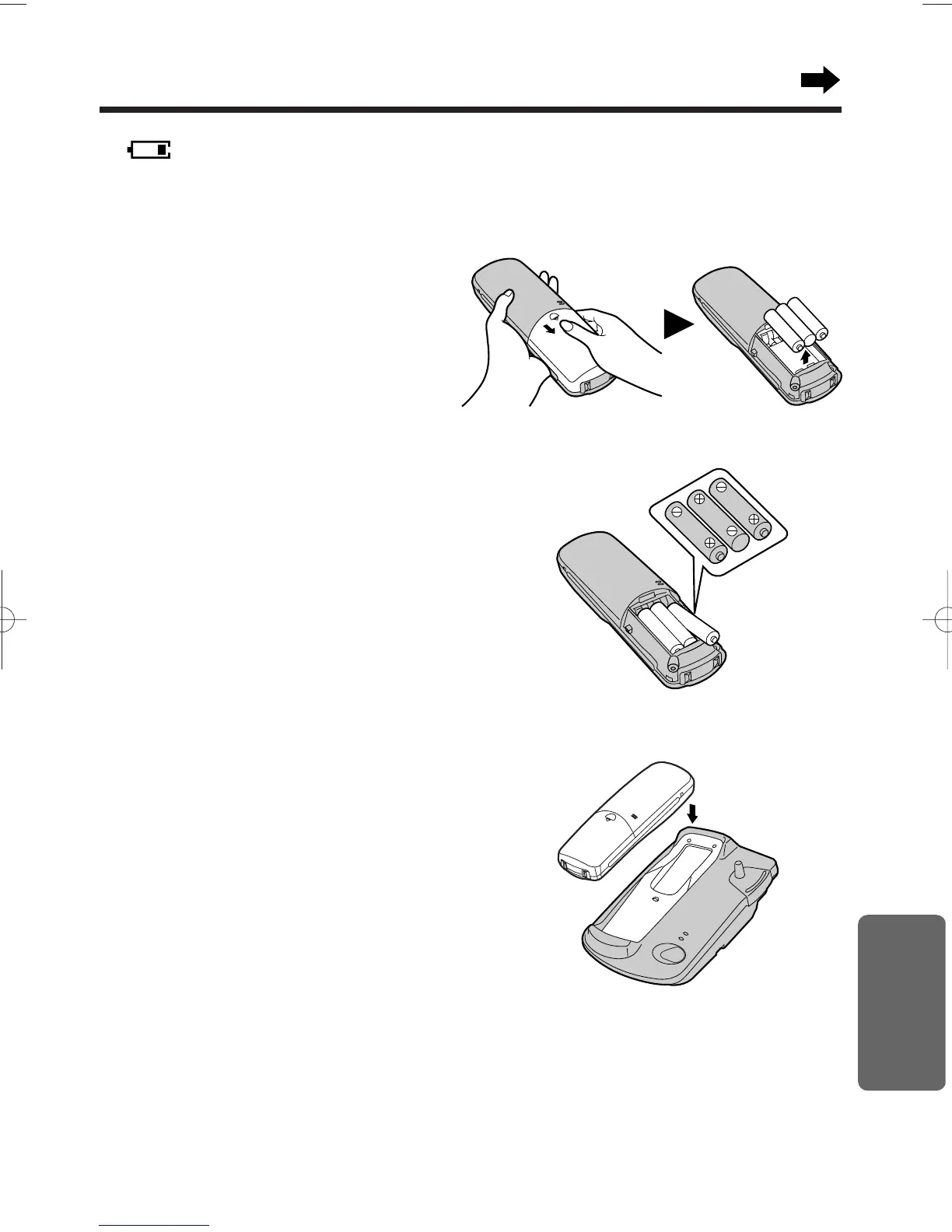
1
Turn the power OFF to prevent memory
loss (p. 12).
Remove the cover by sliding while
pressing in the direction of the arrow,
then take out the batteries.
2
Replace the batteries with new ones as
shown.
• When you finish, close the
handset cover and turn the
power ON (p. 12).
3
Be sure to charge the new batteries fully
in order to display the battery icon
correctly (p. 11).
Ni-Cd battery: For about 4 hours
Ni-MH battery: For about 8 hours
•Discard defective batteries as soon as possible. Defective batteries may leak into the unit.
•Please use only Panasonic P-03H or P-P03S batteries.
•If the rechargeable batteries are not inserted correctly, the handset will not work.
•At the end of its useful life, the Nickel-Cadmium battery must be disposed of properly.
•Nickel metal hydride (Ni-MH) rechargeable batteries (AAA size) are available.
Please use only Panasonic HHR-P03H batteries.











 To Next Page