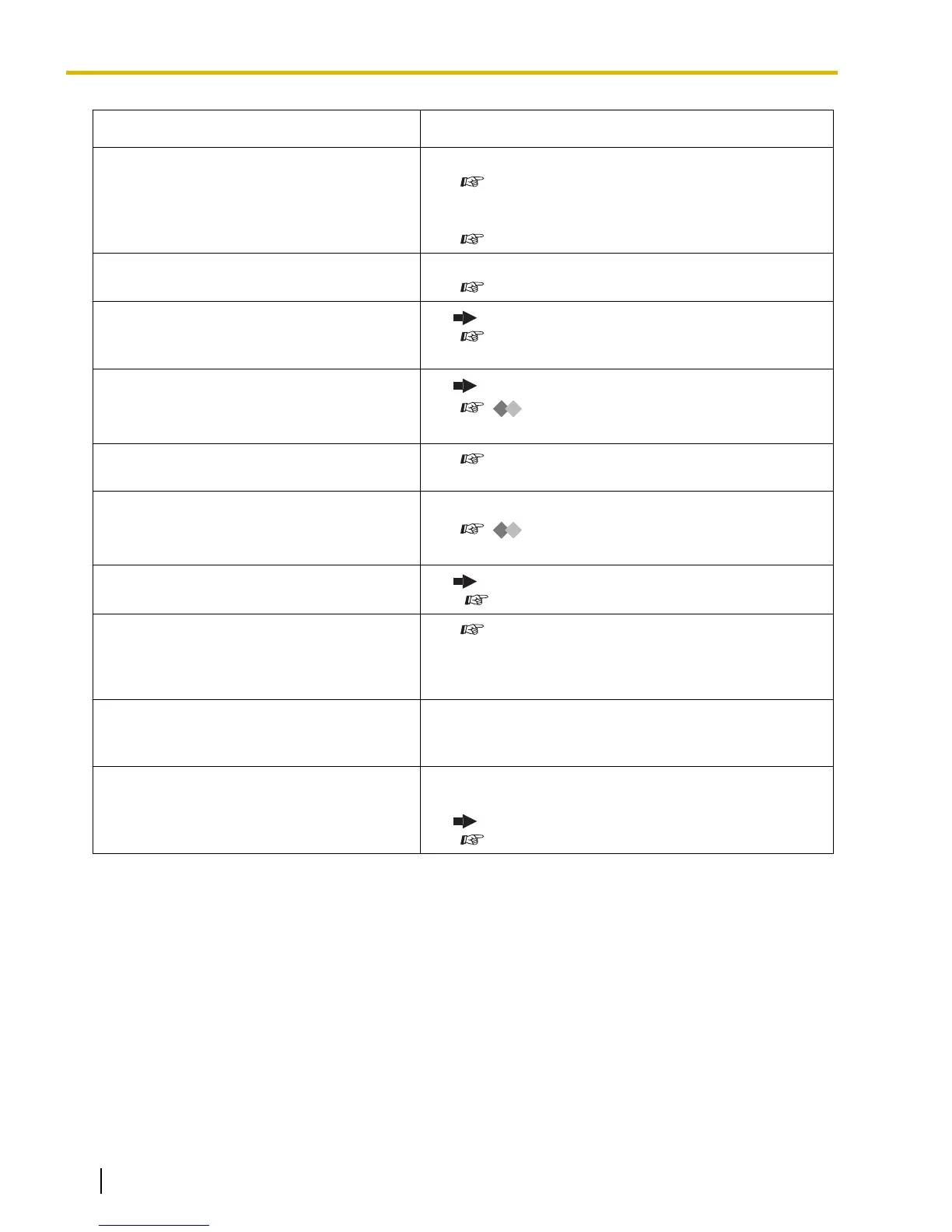
Problem Remedy
I cannot send a call waiting tone to the
dialed extension.
• The other party has not set the Call Waiting feature.
( 1.3.13 Call Waiting Tone, 1.3.45 OHCA (Off-hook
Call Announcement), 1.3.74 Whisper OHCA)
• The other party has set Data Line Security.
( 1.3.17 Data Line Security)
I forgot the password.
• Ask the manager to assist you.
( 2.1.1 Dial Tone Transfer)
The background music started suddenly.
• Turn off the music.
( 1.3.5 BGM (Background Music), 2.1.2 External
BGM (Background Music))
I do not want to display a number which is
stored in memory.
• Conceal the number.
( Storing New Names and Numbers,
3.1.4 Customizing the Buttons)
I want to confirm my extension number.
• ( Your Extension Number in 1.1.1 Before Operating
the Telephones)
The date and time are not correct.
• Set the date and time by system programming.
(
[000] Date & Time in 3.3.2 System
Programming)
The display is not shown well.
•
Change the Display contrast level.
( 3.1.2 Personal Programming)
I want to distinguish the tones.
• ( To distinguish the ringing tones for each CO, ICD
Group, PDN, SDN, or INTERCOM button (Digital
proprietary telephone only)
, 3.1.4 Customizing the
Buttons)
The MESSAGE button light lit.
• Another extension left you a message waiting
indication while you were on the phone or away
from your desk.
An SDN button on my extension does not
work.
• A PDN button is not assigned on the extension
corresponding to your SDN button.
Create a PDN button on the desired extension.
( 3.1.4 Customizing the Buttons)
190 Operating Manual Document Version 2008-10
4.1.1 Troubleshooting











 To Next Page