1.5 Before Leaving Your Desk
User Manual 73
1.5.4 Leaving a Group (Log-in/Log-out)
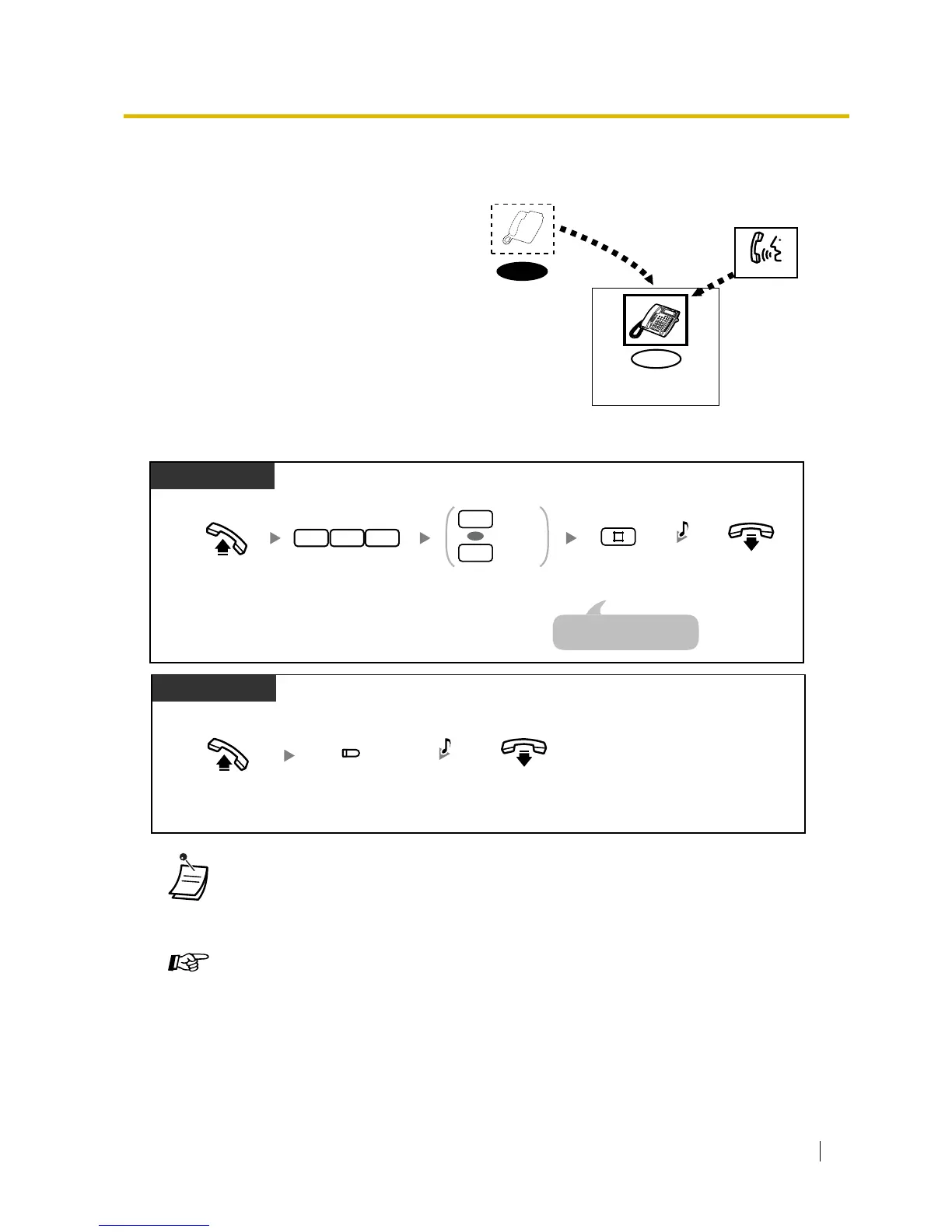
To set Log-in/Log-out
You can change your status in an extension
group. When you log out, incoming calls to the
group will not ring at your extension. When you
log back in, calls will again ring at your
extension. (Default: Log-in)
• The Log-in/Log-out button light shows the current status as follows:
Off: Log-in mode
Red on: Log-out mode
• The last member of a group cannot log out.
Customising Your Phone
• 3.1.3 Customising the Buttons
Create or edit a Log-in/Log-out button.
Log-in
Log-out
Call
Extension Group
Log-in
Log-out
0
1
OR
7 3 6
C.Tone
Off-hook. On-hook.
Enter 0 to log-in
or 1 to log-out.
Enter #.Enter 736.
PT/SLT
An SLT user can enter "0"
instead of "#".
Off-hook.
On-hook.
Press Log-in/
Log-out.
PT
C.Tone
(Log-in/Log-out)










 To Next Page