1.6 Making/Answering a Paging Announcement
User Manual 85
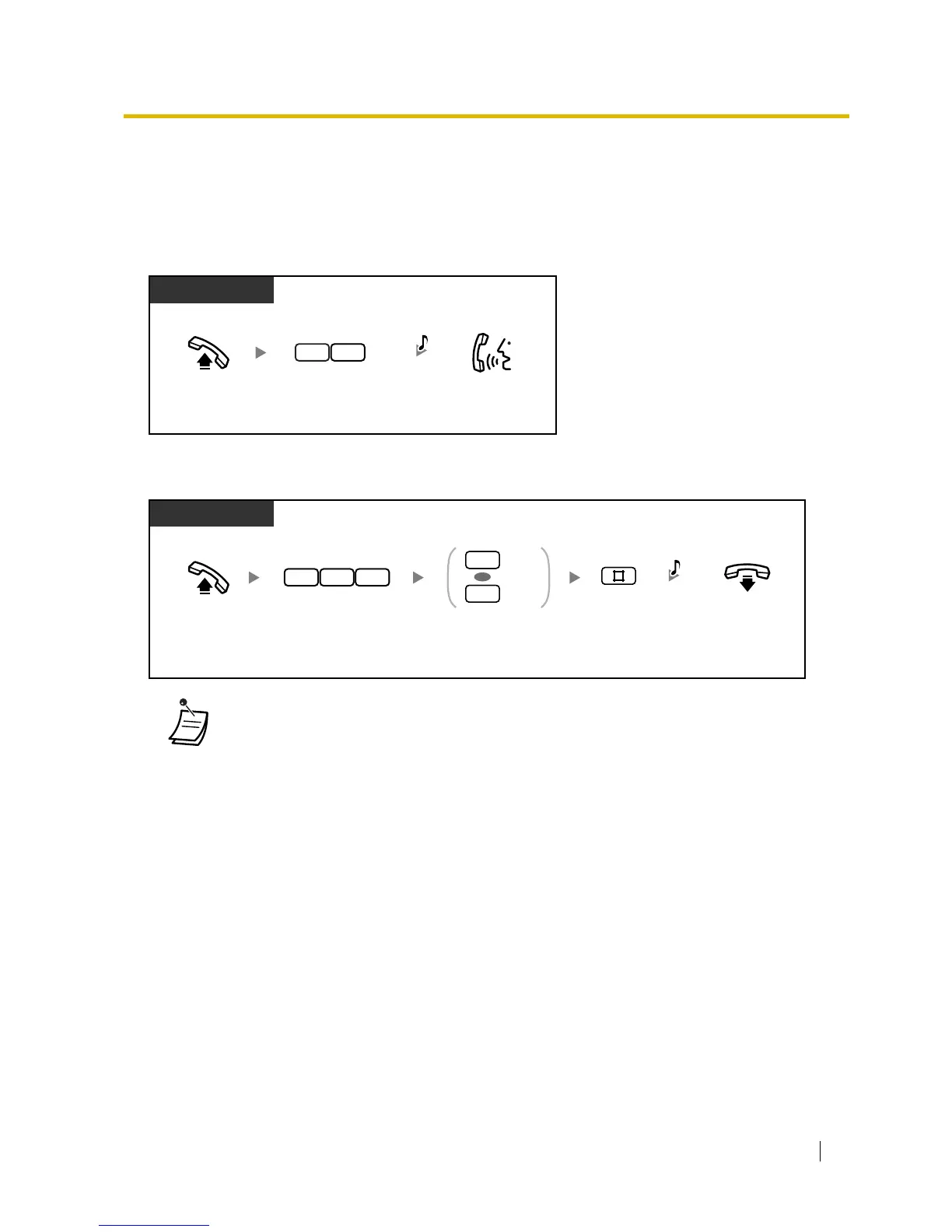
1.6.2 Answering/Denying a Paging Announcement
You can answer a paging announcement from any extension. You can also set your proprietary telephone
(PT) to not receive paging announcements.
To answer
To refuse/accept paging announcements (Paging Deny)
• * Enter "#43" when "Plan 2" or "Plan 3" is selected as the numbering plan through system
programming.
• When an outside (CO) line call is paged and transferred, you can answer the call by
pressing the corresponding CO button whose indicator is flashing slowly.
• The following are extensions that cannot receive paging announcements:
— a PT that is ringing or busy
— a PT in Paging Deny mode
— a PT in Do Not Disturb (DND) mode
PT/SLT
Enter 43.
Talk.
Off-hook.
34
C.Tone
*
Off-hook.
On-hook.
PT
Enter 734.
Refuse
Accept
1
0
OR
Enter 1 to refuse
or 0 to accept.
Enter #.
7 3 4
C.Tone









 To Next Page