1.6 Making/Answering a Paging Announcement
84 User Manual
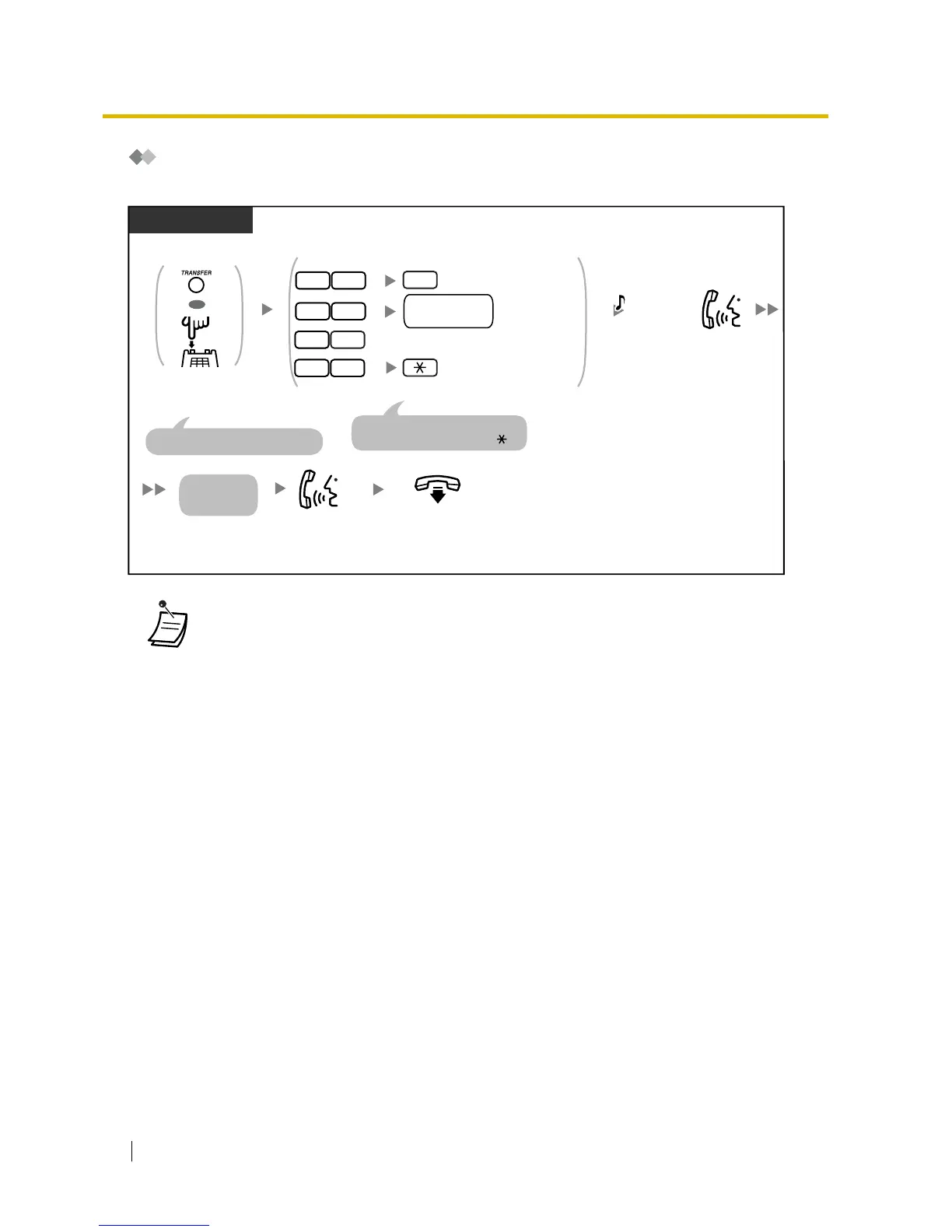
Paging and then Transferring a Call
You can transfer a call after making a paging announcement.
•*
1
You may have to enter the Call Hold feature number after pressing the Recall/
hookswitch on your single line telephone (SLT), depending on the SLT Hold Mode of your
PBX.
Call Hold feature number:
– Plan 1: 20 (United Kingdom/New Zealand: 50)
– Plan 2/Plan 3: #20 (United Kingdom/New Zealand: #50)
Ask your manager or dealer about the mode assigned to your PBX.
•*
2
Enter "#33" when "Plan 2" or "Plan 3" is selected as the numbering plan through system
programming.
•*
3
Enter "#34" when "Plan 2" or "Plan 3" is selected as the numbering plan through system
programming.
• After you go on-hook, the party on hold can talk to the person who answers the page.
Announce.
Talk.
On-hook.
During a conversation
PT/SLT
Wait for an
answer.
The other party is placed on hold.
Press TRANSFER or
Recall/hookswitch.
OR
OR
Enter required number.
extension
group no.
External
All Extensions & External
All Extensions
For "All Extensions & External", you
can enter "339" instead of "33 ".
Group
(1
–
8)
C.Tone
(Optional for
"External" only)
0
3 3
3 3
3
3 3
4
*
3
*
2
*
2
*
2
*
1









 To Next Page