1.7 Setting the Telephone According to Your Needs
96 User Manual
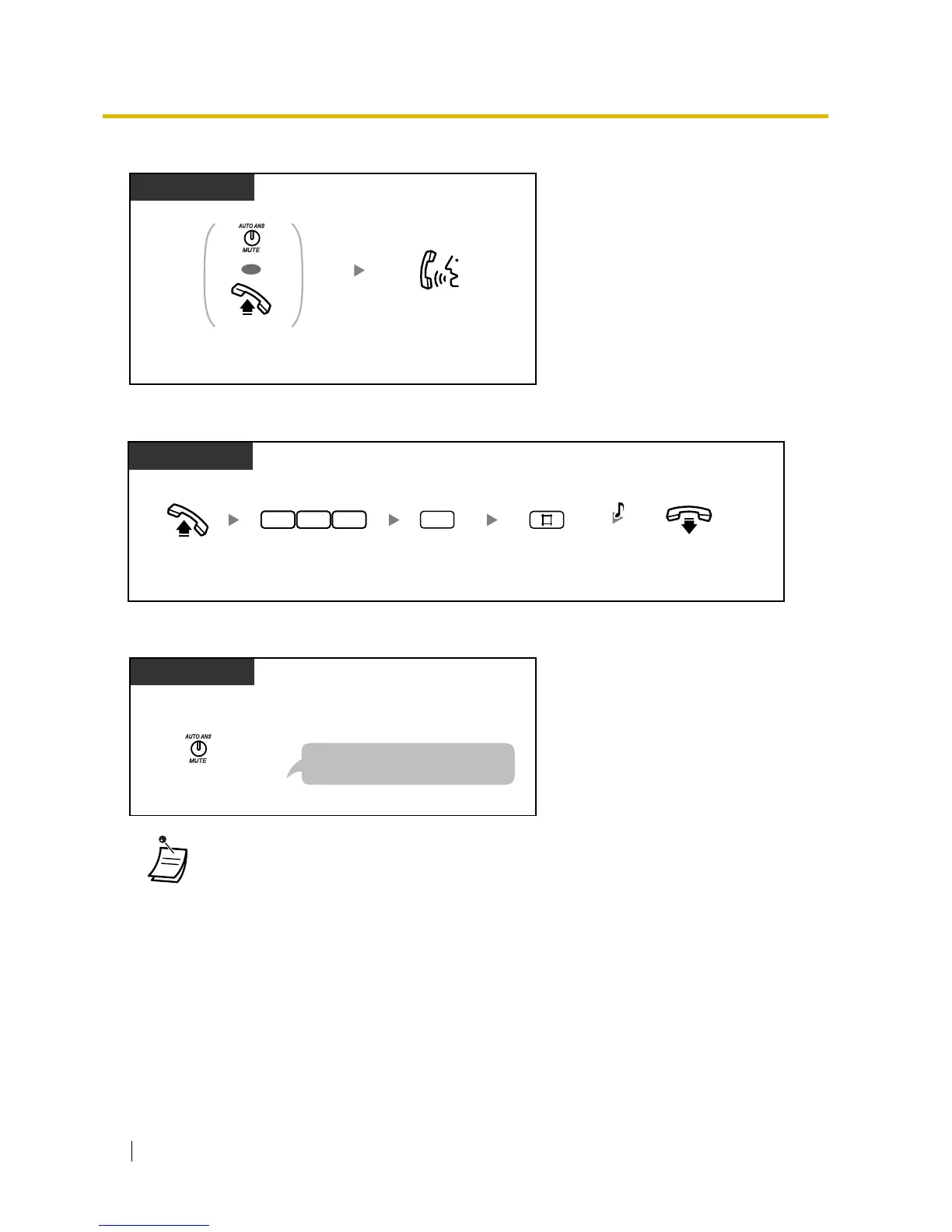
To talk with a person in the monitored room
To cancel a monitor
To stop a monitor temporarily while on-hook
• * Enter "#31" when "Plan 2" or "Plan 3" is selected as the numbering plan through system
programming.
• You can monitor using a PT with an AUTO ANS/MUTE button or a single line telephone
(SLT) with a MUTE button.
• The AUTO ANS/MUTE button light shows the current status as follows:
Off: Not set
Flashing red: Set (Ready for monitoring)
PT
OR
Press AUTO ANS/MUTE
or go off-hook.
Talk.
Off-hook.
On-hook.
PT
0
Enter 735.
Enter 0.
3 57
Enter #.
C.Tone
At the monitored telephone
Press AUTO ANS/MUTE.
PT
At the monitored telephone
Press the AUTO ANS/MUTE button
to start room monitoring again.








 To Next Page