EasyManua.ls Logo

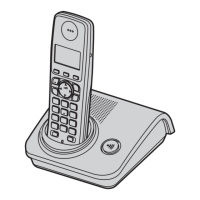
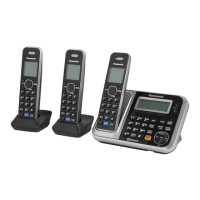
Panasonic KX-TG7220FX - User Manual

Panasonic KX-TG7220FX
52 pages
Print Icon
To Next Page IconTo Next Page
Loading...
This unit is compatible with Caller ID and SMS. To use
these features, you must subscribe to the appropriate
service of your service provider/telephone company.
Charge the batteries for about 7 hours before initial use.
This unit is designed to be used in Czech, Slovakia, and central
Europe. To use this unit in your country, first change the unit’s region
setting to match your country (page 20). Change the unit’s display
language as needed (page 11).
(For Czech and Slovakia)
This cordless telephone is possible to use according to General licence
No.: VO-R/8/08.2005-23 (for Czech), VPR-7/2001 (for Slovakia).
Please read these operating instructions before using the unit and save
them for future reference.
Operating Instructions
Model No. KX-TG7220FX
Digital Cordless Answering System
Model No. KX-TG7200FX
KX-TG7202FX
Digital Cordless Phone
KX-TG7200
TG7200-7220FX(e-e).book Page 1 Friday, June 29, 2007 10:24 AM


Other manuals for Panasonic KX-TG7220FX

Questions and Answers

  • C
    cbennettSep 23, 2025
    Why I cannot operate the answering system with the handset on my Panasonic KX-TG7220FX?
    • J
      John BishopSep 23, 2025
      If you cannot operate the answering system with the handset on your Panasonic Cordless Telephone, the base unit or another handset may be in use, or a caller is leaving a message. Wait for the other user or caller to finish. The handset may also be too far from the base unit, so move closer.
  • S
    Scott WalkerAug 25, 2025
    What to do if Panasonic KX-TG7220FX Cordless Telephone batteries are not charging?
    • J
      Joseph MartinezAug 25, 2025
      If the battery icon doesn't change while charging your Panasonic Cordless Telephone, clean the charge contacts and charge again.
  • J
    Jennifer LyonsAug 25, 2025
    Why do I hear a busy tone when pressing {C} on my Panasonic KX-TG7220FX Cordless Telephone?
    • E
      Edward RoblesAug 26, 2025
      If you hear a busy tone when you press {C} on your Panasonic Cordless Telephone, it could be that the handset is too far from the base unit, so move closer and try again. Alternatively, another handset may be in use, or the answering system is being used, so wait and try again later.
  • S
    Samantha JensenAug 27, 2025
    Why does my Panasonic KX-TG7220FX Cordless Telephone beep intermittently and/or flashes 7?
    • P
      Peter RamirezAug 27, 2025
      Fully charge the batteries.
  • B
    bennettashleyAug 27, 2025
    Why I cannot make or receive calls on my Panasonic KX-TG7220FX?
    • L
      Lindsay GrayAug 27, 2025
      If you're unable to make or receive calls on your Panasonic Cordless Telephone, check that the base unit AC adaptor and telephone line cord are properly connected. If you're using a splitter, remove it and connect the unit directly to the wall socket. Also, ensure the dialling mode is set to “Tone” or “Pulse” as needed, and that the key lock feature is turned off. If this does not help, disconnect the base unit from the telephone line and connect the line to a known working telephone.
  • A
    Alyssa HarrisSep 13, 2025
    Why the answer on indicator flashes when operating answering system on Panasonic KX-TG7220FX?
    • N
      newtonsueSep 14, 2025
      If, when trying to operate the answering system with the base unit, the answer on indicator flashes and you cannot operate the answering system on your Panasonic Cordless Telephone, another handset may be in use or a caller is leaving a message. Wait for the other user or caller to finish.
  • T
    Timothy PatelSep 12, 2025
    Why was SMS message not received on my Panasonic KX-TG7220FX Cordless Telephone?
    • J
      Jimmy WardSep 12, 2025
      If the SMS message centre number is logged in the caller list but a message was not received on your Panasonic Cordless Telephone, someone may have tried to send you a message while SMS was turned off. Turn it on.
  • L
    Linda EllisSep 12, 2025
    Why I cannot send or receive SMS messages on my Panasonic KX-TG7220FX Cordless Telephone?
    • K
      Kristin PowellSep 12, 2025
      If you cannot send or receive SMS messages on your Panasonic Cordless Telephone, you may not have subscribed to the appropriate service; consult your service provider/telephone company. Check that the SMS message centre number(s) are stored correctly. Wait until the message has been sent before using other telephone functions. If your unit is connected to a telephone line with DSL service, your unit is connected to a telephone line with DSL service.
  • J
    jonesbenjaminSep 4, 2025
    Why does '7' still flash on my Panasonic KX-TG7220FX Cordless Telephone after charging?
    • L
      Lindsey GarciaSep 4, 2025
      If '7' still flashes on your Panasonic Cordless Telephone after fully charging the batteries, clean the charge contacts and charge again. If the issue persists, it may be time to replace the batteries.
  • J
    Joshua RojasSep 2, 2025
    How to fix flashing 'w' on my Panasonic Cordless Telephone?
    • B
      brianbrownSep 2, 2025
      If the 'w' is flashing on your Panasonic Cordless Telephone, it could be due to several reasons. The handset might not be registered to the base unit, in which case you should register it. Alternatively, the handset may be too far from the base unit, so move closer. Ensure that the base unit AC adaptor is properly connected. High electrical interference could also be the cause; try placing the handset and base unit away from sources like antennas and mobile phones.

Panasonic KX-TG7220FX Specifications

General IconGeneral
BrandPanasonic
ModelKX-TG7220FX
CategoryCordless Telephone
LanguageEnglish

Related product manuals