EasyManua.ls Logo

Panasonic KX-TG7621 series - User Manual

Panasonic KX-TG7621 series
10 pages
Print Icon
To Next Page IconTo Next Page
Loading...
PNQW2594ZA TT1210MG0
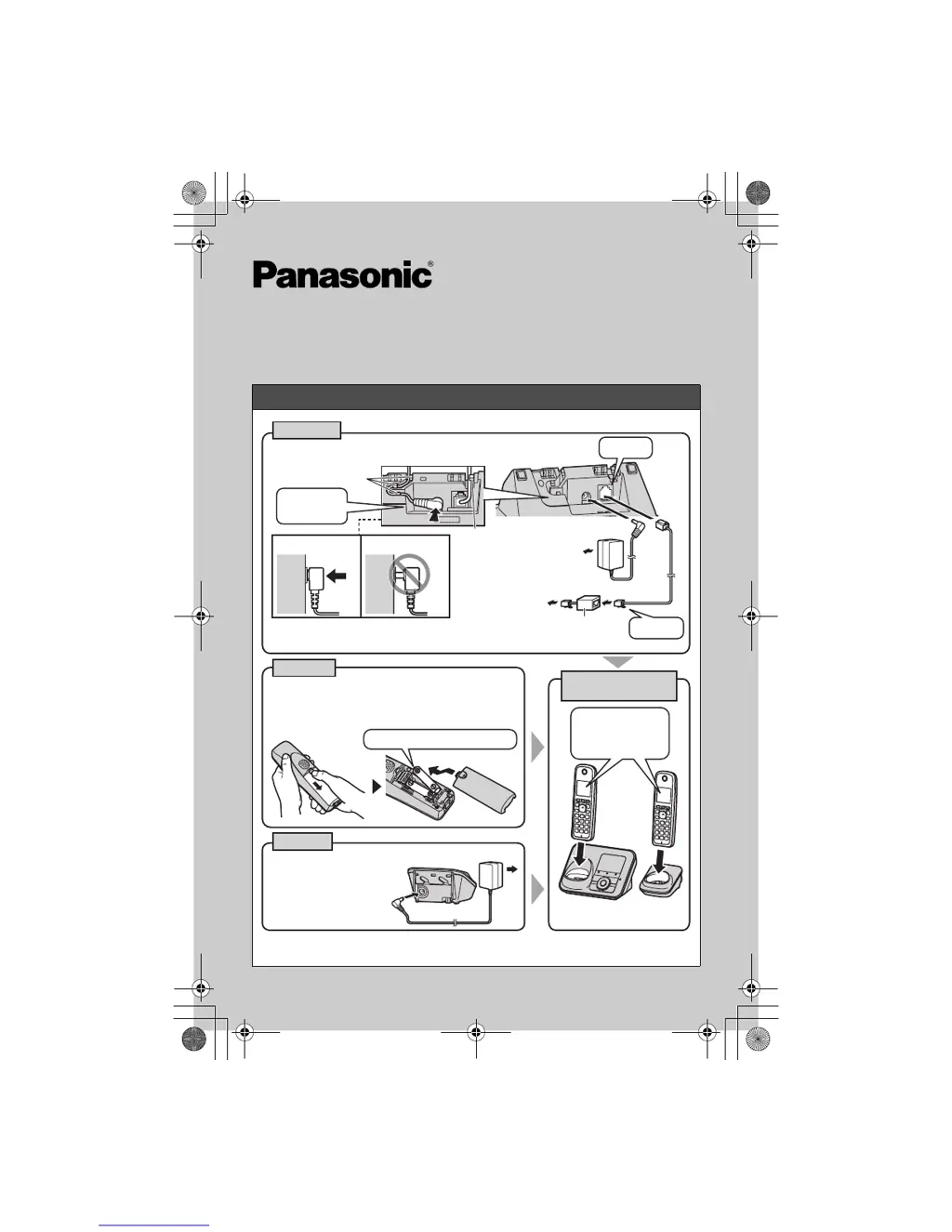
Setting up
KX-TG7641 series: The design of the base unit is different from KX-TG7621 series.
Refer to the operating instructions for connections and battery charge.
Base unit
DSL/ADSL filter*
CHARGE FOR
ABOUT 7 HOURS
Handset
Charger
L Use only the supplied Panasonic AC adaptor PNLV226.
(120 V AC, 60 Hz)
To single-line
telephone jack
(RJ11C)
L Use only the supplied
Panasonic AC adaptor
PNLV226.
L USE ONLY Ni-MH batteries AAA (R03) size.
L
Do NOT use Alkaline/Manganese/Ni-Cd batteries.
L Confirm correct polarities (S, T).
L Model shown is KX-TG7622.
(120 V AC, 60 Hz)
Confirm
Charging is
displayed.
Rechargeable Ni-MH ONLY
Press plug
firmly.
“Click”
“Click”
Hooks
Hook
Correct Wrong
L Model shown is
KX-TG7622.
*DSL/ADSL filter (not supplied) is required if you have DSL/ADSL service.
Model No. KX-TG7622/KX-TG7623
KX-TG7624/KX-TG7642
KX-TG7643/KX-TG7644
KX-TG7645
Quick Guide
TG76xx_(e)_QG.fm Page 1 Tuesday, December 14, 2010 8:38 PM

Questions and Answers

  • R
    Richard GarciaSep 23, 2025
    Why is the 2nd caller’s information not displayed during an outside call on my Panasonic KX-TG7621 Answering Machine?
    • M
      Marissa YoungSep 23, 2025
      In order to use Call Display, Call Waiting, or Visual Call Waiting, you must first contact your service provider/telephone company and subscribe to the desired service. After subscribing, you may need to contact your service provider/telephone company again to activate this specific service, even if you already subscribed to both Call Display and Visual Call Waiting services.
  • J
    Jennifer DavisAug 25, 2025
    Why is caller information not displayed on my Panasonic Answering Machine?
    • C
      Cheryl AndersonAug 25, 2025
      Caller information may not be displayed because you are not subscribed to Call Display service. Contact your service provider/telephone company for details. If your unit is connected to additional telephone equipment, plug the unit directly into the wall jack. If you use a DSL/ADSL service, connect a DSL/ADSL filter between the base unit and the telephone line jack. The name display service may not be available in some areas, so contact your service provider. Also, other telephone equipment may be interfering with this unit; disconnect the other equipment and try again.
  • A
    Alexander GuerreroAug 25, 2025
    What to do if my Panasonic KX-TG7621 Answering Machine is making noise?
    • F
      fbarrettAug 26, 2025
      If you hear noise or the sound cuts in and out, you might be using the handset or base unit in an area with high electrical interference. Try re-positioning the base unit and use the handset away from sources of interference. Also, move closer to the base unit. If you use a DSL/ADSL service, consider connecting a DSL/ADSL filter between the base unit and the telephone line jack.
  • A
    Alison WhiteAug 27, 2025
    What to do if my Panasonic KX-TG7621 handset beeps and/or flashes?
    • C
      Christopher MeyerAug 27, 2025
      If the handset beeps and/or flashes, the battery charge is likely low. Fully charge the batteries.
  • K
    kristen28Aug 27, 2025
    How to fix Panasonic KX-TG7621 when I cannot hear a dial tone?
    • I
      Ian MartinezAug 27, 2025
      If you cannot hear a dial tone, the base unit’s AC adaptor or telephone line cord may not be connected. Check the connections. You can also disconnect the base unit from the telephone line and connect the line to a known working telephone. If the working telephone operates properly, contact our service personnel to have the unit repaired. If the working telephone does not operate properly, contact your service provider/ telephone company.
  • O
    Olivia Woods MDSep 15, 2025
    How to fix Panasonic KX-TG7621 when I cannot operate it remotely?
    • R
      Ronald KelleySep 15, 2025
      If you cannot operate the answering system remotely, the remote access code may not be set. Set the remote access code. You might be entering the wrong remote access code; if you have forgotten your remote access code, enter the remote access code setting to check your current code. Ensure you press each key firmly. The answering system could also be turned off, so turn it on.
  • G
    gomezmarkSep 12, 2025
    Why is the Panasonic Answering Machine operating time shorter than expected?
    • A
      Ashley BrewerSep 12, 2025
      If you fully charged the batteries but the operating time seems shorter, clean the battery ends and the charge contacts with a dry cloth and charge again. It may also be time to replace the batteries.
  • V
    veronica82Sep 14, 2025
    How to fix Panasonic Answering Machine when I cannot operate it?
    • M
      Mrs. Jennifer ThompsonSep 14, 2025
      If you cannot operate the answering system, someone else may be using the unit. Wait for the other user to finish. A caller might be leaving a message, so wait for the caller to finish. The handset could also be too far from the base unit, so move closer.
  • J
    Joseph BryantSep 5, 2025
    What to do if my Panasonic KX-TG7621 handset flashes slowly?
    • R
      Ross Olson PhDSep 5, 2025
      If the indicator on the handset flashes slowly, new messages have been recorded. Listen to the new messages. New Voice Mail messages may also have been recorded, so listen to those as well.
  • S
    Sean GraySep 3, 2025
    What to do if my Panasonic Answering Machine display is in the wrong language?
    • T
      Theresa MooreSep 3, 2025
      If the display is in a language you cannot read, change the display language.

Panasonic KX-TG7621 series Specifications

General IconGeneral
BrandPanasonic
ModelKX-TG7621 series
CategoryAnswering Machine
LanguageEnglish

Related product manuals