z
Before replacing the cartridge, turn o the faucet. Do not run water through the Water Purier with
the cartridge removed.
(Doing so may cause the water to overow.)
z
Dispose of the used cartridge in accordance with the applicable ordinances in the area concerned.
(The material of the cartridge cover is ABS. For the type of the lter materials, refer to P. EN26.)
Replacing method
Replacing the Cartridge
(continued)
Preparation: Please turn o the faucet.
1
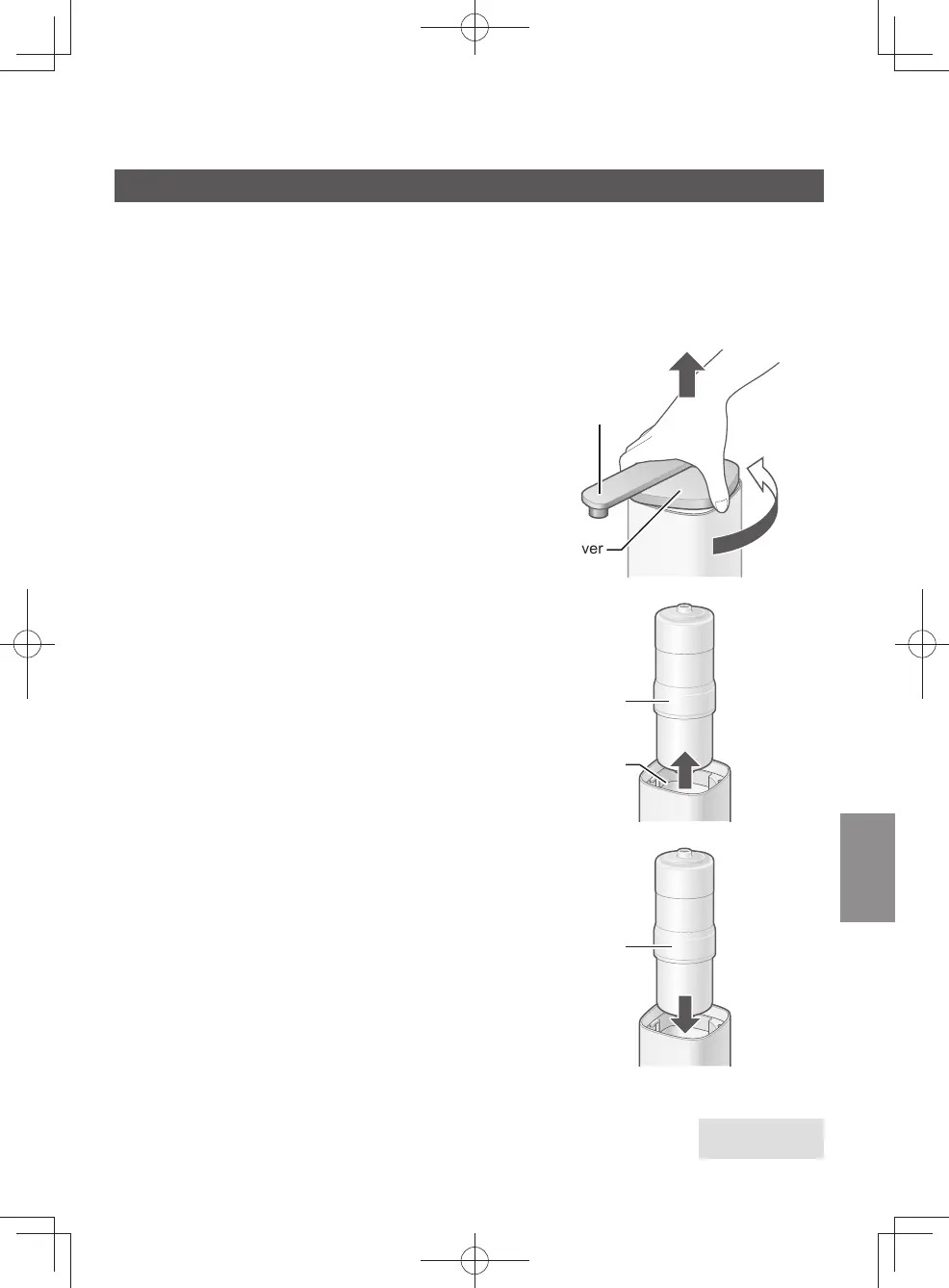
Remove the cover.
❶
Turn the cover until it comes in contact with the
stopper.
❷
Raise the cover.
z
Do not hold the outlet pipe to turn the cover.
(Doing so may cause malfunction.)
Cover
❶
❷
Outlet pipe
2
Remove the old cartridge.
z
If there are water drops inside the main unit,
wipe them o with a soft cloth.
Old cartridge
Inside the main unit
3
Install the new cartridge.
Fit new cartridge into the case.
New cartridge
Proceed to Step 4
on the next page
EN19
TK-CS500_01_EN.indd 18TK-CS500_01_EN.indd 18 2024/03/21 14:52:372024/03/21 14:52:37



 To Next Page