EasyManua.ls Logo

Panasonic NV-RX3A - Page 49

Panasonic NV-RX3A
64 pages
Print Icon
To Next Page IconTo Next Page
To Previous Page IconTo Previous Page
Loading...
0
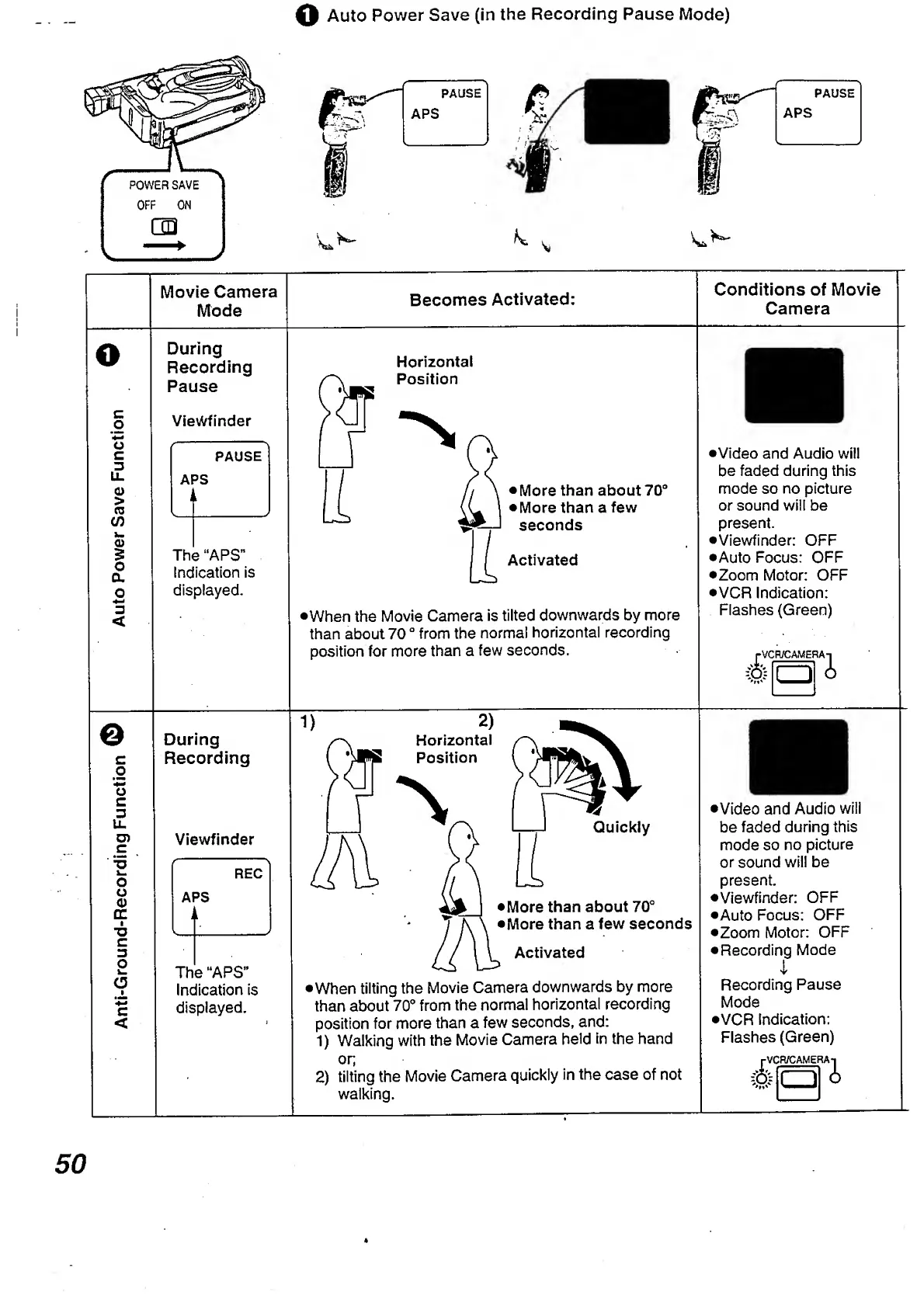
Auto
Power
Save
(in
the
Recording
Pause
Mode)
Movie
Camera
Mode
Becomes
Activated:
Conditions
of
Movie
Camera
O
During
Recording
Pause
Viewfinder
PAUSE
APS
-
l
L_
The
“APS”
Indication
is
displayed.
Horizontal
Position
More
than
about
70°
More
than
a
few
seconds
Activated
•When
the
Movie
Camera
is
tilted
downwards
by
more
than
about
70
°
from
the
normal
horizontal
recording
•Video
and
Audio
will
be
faded
during
this
mode
so
no
picture
or
sound
will
be
present.
•Viewfinder:
OFF
•Auto
Focus:
OFF
•Zoom
Motor:
OFF
•VCR
Indication:
Flashes
(Green)
position
for
more
than
a
few
seconds.
1-VCR/CAMERAt
te
i
a
©
During
c
Recording
Viewfinder
REC
APS
i
The
“APS”
Indication
is
displayed.
•When
tilting
the
Movie
Camera
downwards
by
more
than
about
70°
from
the
normal
horizontal
recording
position
for
more
than
a
few
seconds,
and:
1)
Walking
with
the
Movie
Camera
held
in
the
hand
•Video
and
Audio
will
be
faded
during
this
mode
so
no
picture
or
sound
will
be
present.
•Viewfinder:
OFF
•Auto
Focus:
OFF
•Zoom
Motor:
OFF
Recording
Mode
1
Recording
Pause
Mode
•VCR
Indication:
Flashes
(Green)
or;
2)
tilting
the
Movie
Camera
quickly
in
the
case
of
not
walking.
rVC
R/CAMER
Ai
a
4
50

Table of Contents

Related product manuals