EasyManua.ls Logo

Panasonic NV-RX3A - Page 6

Panasonic NV-RX3A
64 pages
Print Icon
To Next Page IconTo Next Page
To Previous Page IconTo Previous Page
Loading...
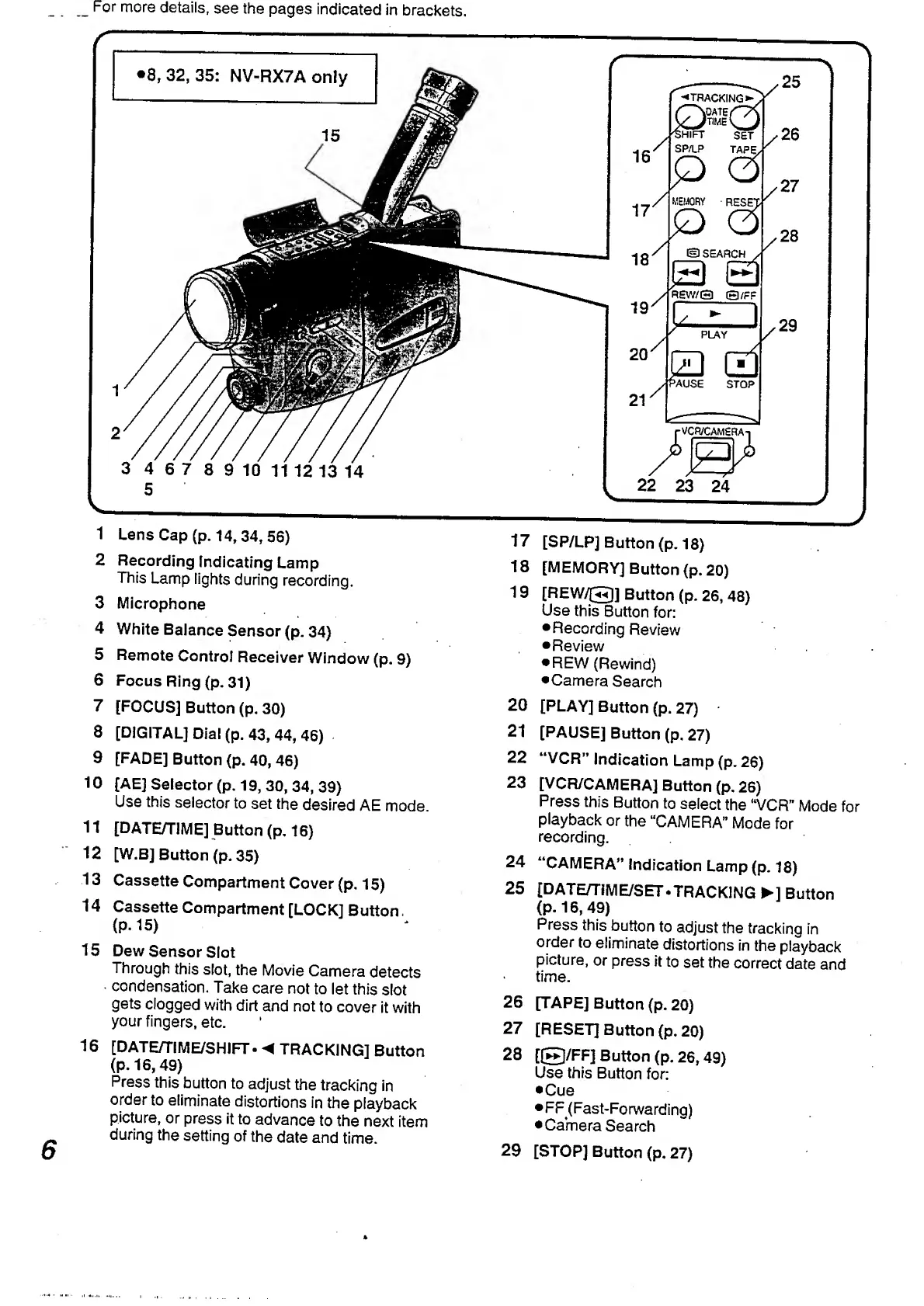
For
more
details,
see
the
pages
indicated
in
brackets.
6
1
Lens
Cap
(p.
14,34,
56)
2
Recording
Indicating
Lamp
This
Lamp
lights
during
recording.
3
Microphone
4
White
Balance
Sensor
(p.
34)
5
Remote
Control
Receiver
Window
(p.
9)
6
Focus
Ring
(p.
31)
7
[FOCUS]
Button
(p.
30)
8
[DIGITAL]
Dial
(p.
43,
44,
46)
9
[FADE]
Button
(p.
40,
46)
10
[AE]
Selector
(p.
19,
30,
34,
39)
Use
this
selector
to
set
the
desired
AE
mode.
11
[DATE/TIME]
Button
(p.
16)
12
[W.BJ
Button
(p.
35)
13
Cassette
Compartment
Cover
(p.
15)
14
Cassette
Compartment
[LOCK]
Button.
(P.
15)
15
Dew
Sensor
Slot
Through
this
slot,
the
Movie
Camera
detects
condensation.
Take
care
not
to
let
this
slot
gets
clogged
with
dirt
and
not
to
cover
it
with
your
fingers,
etc.
16
[DATE/TIME/SHIFT•
TRACKING]
Button
(P-16,
49)
Press
this
button
to
adjust
the
tracking
in
order
to
eliminate
distortions
in
the
playback
picture,
or
press
it
to
advance
to
the
next
item
during
the
setting
of
the
date
and
time.
17
[SP/LP]
Button
(p.
18)
18
[MEMORY]
Button
(p.
20
)
19
[REW/©]
Button
(p.
26,
48)
Use
this
Button
for:
Recording
Review
Review
REW
(Rewind)
Camera
Search
20
[PLAY]
Button
(p.
27)
21
[PAUSE]
Button
(p.
27)
22
“VCR”
Indication
Lamp
(p.
26)
23
[VCR/CAMERA]
Button
(p.
26)
Press
this
Button
to
select
the
“VCR”
Mode
for
playback
or
the
“CAMERA”
Mode
for
recording.
24
“CAMERA”
indication
Lamp
(p.
18)
25
[DATE/TIME/SET‘TRACKING
]
Button
(P*
16,
49)
Press
this
button
to
adjust
the
tracking
in
order
to
eliminate
distortions
in
the
playback
picture,
or
press
it
to
set
the
correct
date
and
time.
26
[TAPE]
Button
(p.
20)
27
[RESET]
Button
(p.
20)
28
[©/FF]
Button
(p.
26,49)
Use
this
Button
for:
Cue
FF(Fast-Forwarding)
Camera
Search
29
[STOP]
Button
(p.
27)

Table of Contents

Related product manuals