EasyManua.ls Logo

Panasonic NV-RX3A - Page 7

Panasonic NV-RX3A
64 pages
Print Icon
To Next Page IconTo Next Page
To Previous Page IconTo Previous Page
Loading...
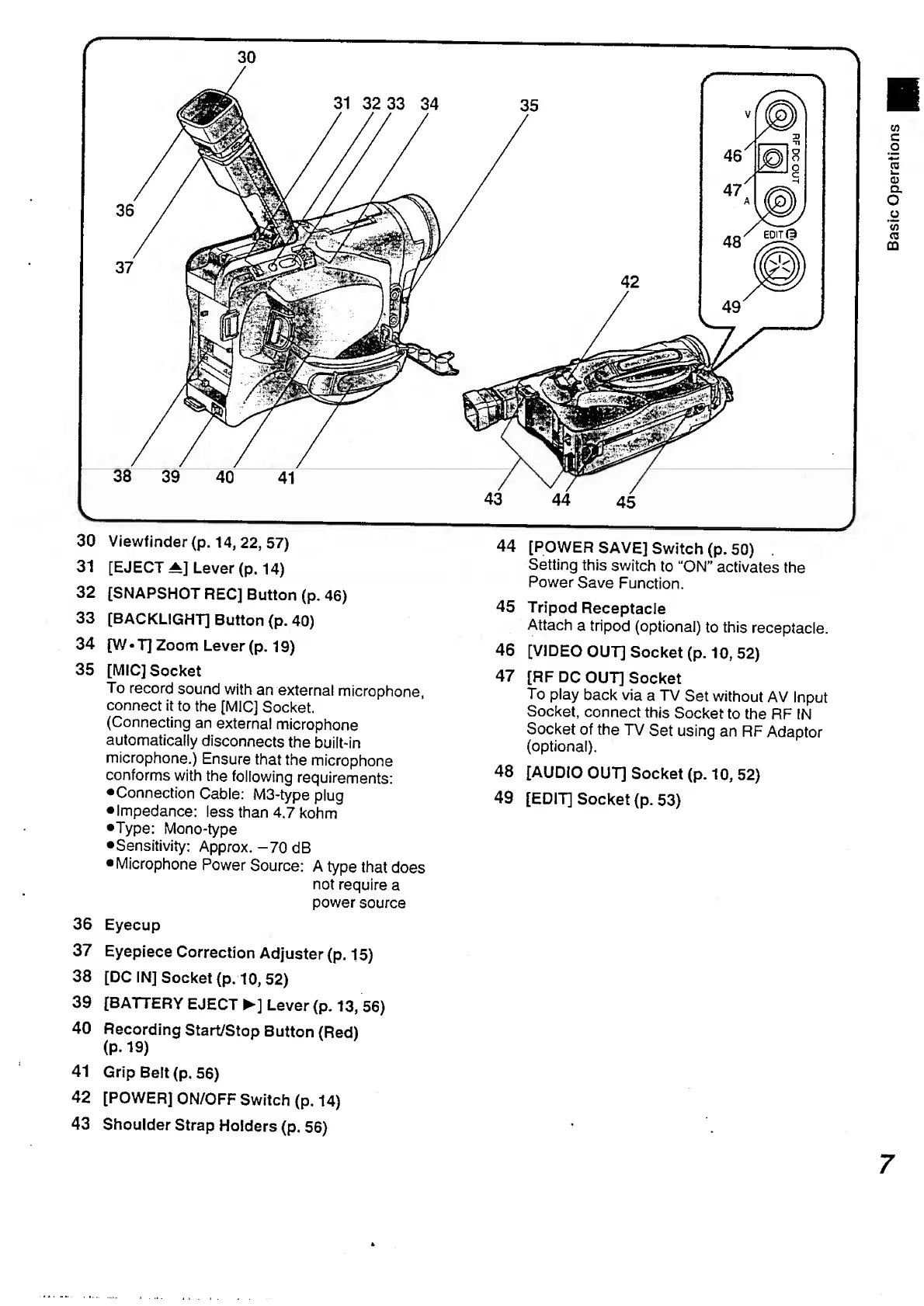
30
Viewfinder
(p.
14,
22,
57)
31
[EJECT
^]
Lever
(p.
14)
32
[SNAPSHOT
RECJ
Button
(p.
46)
33
[BACKLIGHT]
Button
(p.
40)
34
[W*T]
Zoom
Lever
(p.
19)
35
[MIC]
Socket
To
record
sound
with
an
external
microphone,
connect
it
to
the
[MIC]
Socket.
(Connecting
an
external
microphone
automatically
disconnects
the
built-in
microphone.)
Ensure
that
the
microphone
conforms
with
the
following
requirements:
Connection
Cable:
M3-type
plug
Impedance:
less
than
4.7
kohm
•Type:
Mono-type
Sensitivity:
Approx.-70
dB
Microphone
Power
Source:
A
type
that
does
not
require
a
power
source
36
Eyecup
37
Eyepiece
Correction
Adjuster
(p.
15)
38
[DC
IN]
Socket
(p.
10,
52)
39
[BATTERY
EJECT
]
Lever
(p.
13,
56)
40
Recording
Start/Stop
Button
(Red)
(P*
19)
41
Grip
Belt
(p.
56)
42
[POWER]
ON/OFF
Switch
(p.
14)
43
Shoulder
Strap
Holders
(p.
56)
44
[POWER
SAVE]
Switch
(p.
50)
.
Setting
this
switch
to
“ON”
activates
the
Power
Save
Function.
45
Tripod
Receptacle
Attach
a
tripod
(optional)
to
this
receptacle.
46
[VIDEO
OUT]
Socket
(p.
10,
52)
47
[RF
DC
OUT]
Socket
To
play
back
via
a
TV
Set
without
AV
Input
Socket,
connect
this
Socket
to
the
RF
IN
Socket
of
the
TV
Set
using
an
RF
Adaptor
(optional).
48
[AUDIO
OUT]
Socket
(p.10,52)
49
[EDIT]
Socket
(p.
53)
7

Table of Contents

Related product manuals