EasyManua.ls Logo

Panasonic NV-RX3A - Page 8

Panasonic NV-RX3A
64 pages
Print Icon
To Next Page IconTo Next Page
To Previous Page IconTo Previous Page
Loading...
t-omrois
ana
runcuuna
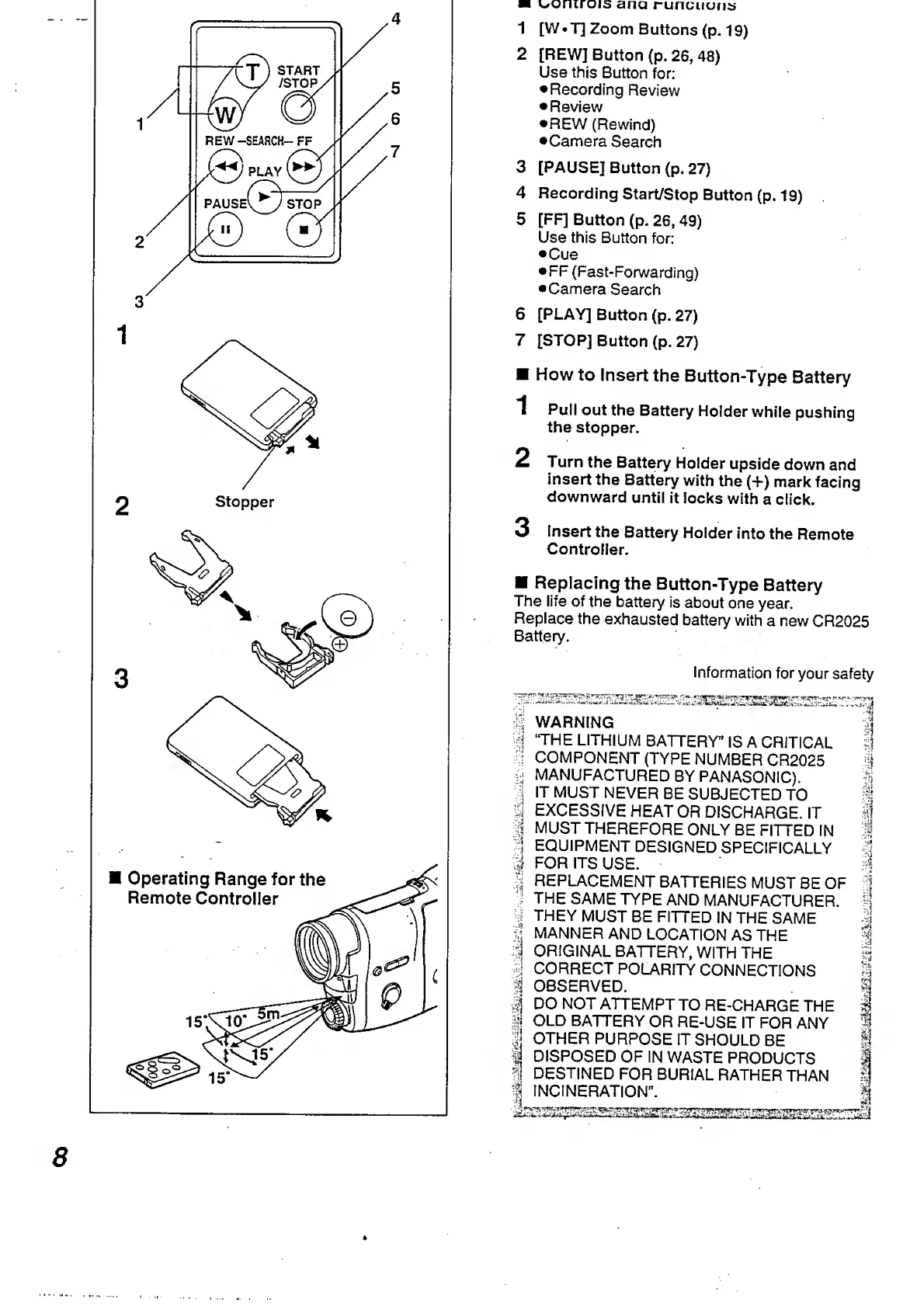
1
[W
Tj
Zoom
Buttons
(p.
19)
2
[REW]
Button
(p.
26,
48)
Use
this
Button
for:
Recording
Review
Review
REW
(Rewind)
•Camera
Search
3
[PAUSE]
Button
(p.
27)
4
Recording
Start/Stop
Button
(p.
19)
5
[FF]
Button
(p.
26,
49)
Use
this
Button
for:
•Cue
FF
(Fast-Forwarding)
Camera
Search
6
[PLAY]
Button
(p,
27)
7
[STOP]
Button
(p.
27)
How
to
Insert
the
Button-Type
Battery
1
Pull
out
the
Battery
Holder
while
pushing
the
stopper.
2
Turn
the
Battery
Holder
upside
down
and
insert
the
Battery
with
the
(+)
mark
facing
downward
until
it
locks
with
a
click.
3
Insert
the
Battery
Holder
into
the
Remote
Controller.
Replacing
the
Button-Type
Battery
The
life
of
the
battery
is
about
one
year.
Replace
the
exhausted
battery
with
a
new
CR2025
Battery.
Information
for
your
safety
|
WARNING
|
%
‘THE
LITHIUM
BATTERY”
IS
A
CRITICAL
’i:
COMPONENT
(TYPE
NUMBER
CR2025
j
{
j
MANUFACTURED
BY
PANASONIC).
;!
IT
MUST
NEVER
BE
SUBJECTED
TO
Sj
S
EXCESSIVE
HEAT
OR
DISCHARGE.
IT
1
|
MUST
THEREFORE
ONLY
BE
FITTED
IN
|
1
EQUIPMENT
DESIGNED
SPECIFICALLY
5
FOR
ITS
USE.
$
|
REPLACEMENT
BATTERIES
MUST
BE
OF
I
J
THE
SAME
TYPE
AND
MANUFACTURER,
n
•|
THEY
MUST
BE
FITTED
IN
THE
SAME
|
§
MANNER
AND
LOCATION
AS
THE
%
ORIGINAL
BATTERY,
WITH
THE
§
4
C
ORRECT
POLARITY
CONNECTIONS
S
|j
OBSERVED.
|
|
DO
NOT
ATTEMPT
TO
RE-CHARGE
THE
I
I
OLD
BATTERY
OR
RE-USE
IT
FOR
ANY
%
lj
OTHER
PURPOSE
IT
SHOULD
BE
*1
$
DISPOSED
OF
IN
WASTE
PRODUCTS
1
DESTINED
FOR
BURIAL
RATHER
THAN
1
I
INCINERATION”.
|
8

Table of Contents

Related product manuals