Chapter 4 Settings — [NETWORK] menu
ENGLISH - 143
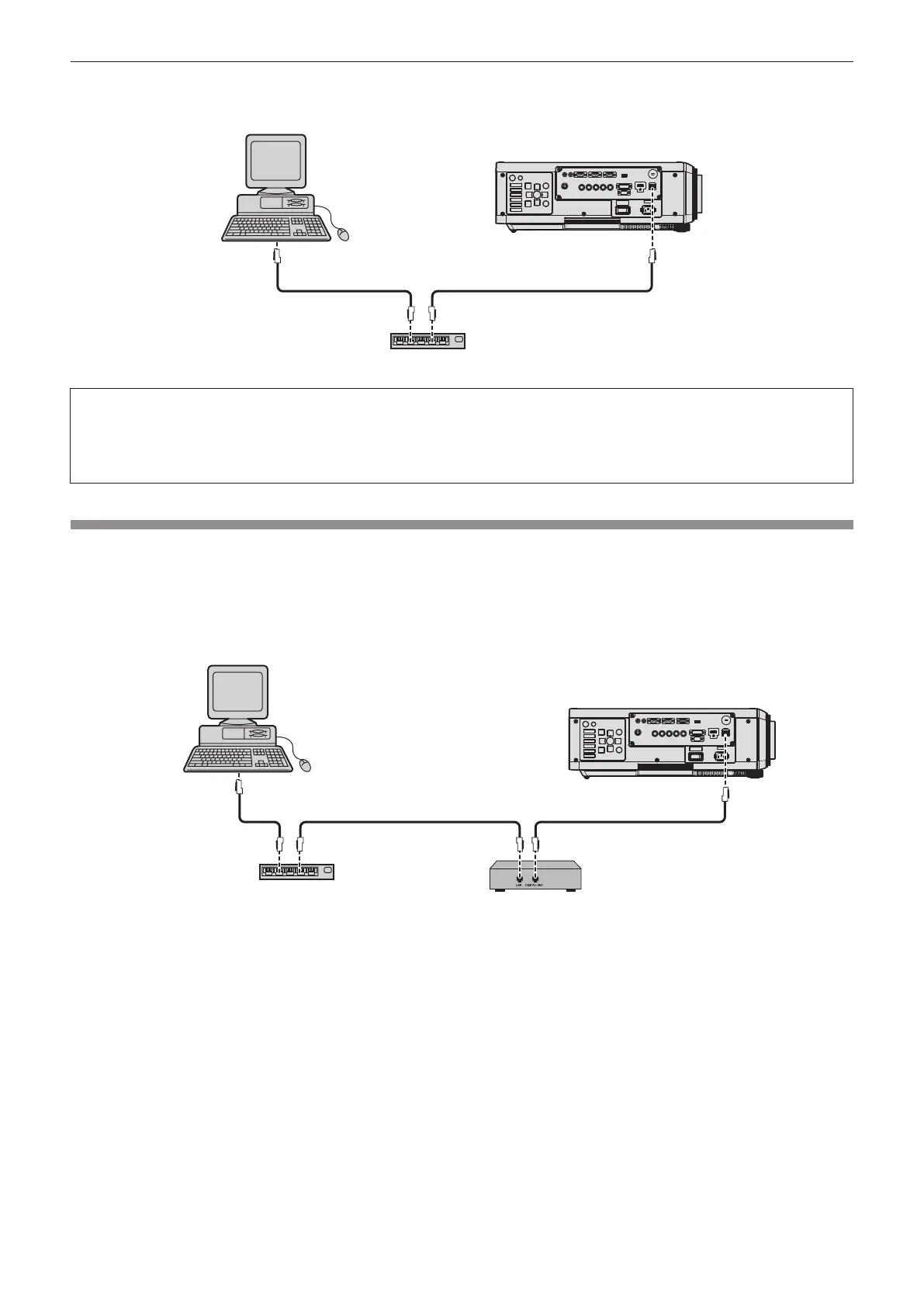
r Example of a normal network connection
Computer
Projector
LAN cable (straight) LAN cable (straight)
Hub
f A web browser is required to use network function. Conrm that the web browser can be used beforehand.
Compatible browser: Internet Explorer 8.0/9.0/10.0/11.0 (Windows OS), Safari 6.0/7.0/8.0 (Mac OS)
f Communication with an E-mail server is required to use the E-mail function. Conrm that the E-mail can be used beforehand.
f Use a LAN cable that is compatible with category 5 or higher.
f Use a LAN cable of 100 m (328'1") or shorter.
Connecting to a twisted-pair-cable transmitter
The projector has a function that can receive Ethernet signals from a twisted-pair-cable transmitter together
with video and audio signals via a LAN cable. Connect a LAN cable to the <DIGITAL LINK/LAN> terminal of the
projector. (x pages 20, 27)
r Example of network connections via a twisted-pair-cable transmitter
Computer
Projector
LAN cable (straight) LAN cable (straight)LAN cable (straight)
Twisted-pair-cable transmitter
Hub




 To Next Page