Troubleshooting
78
- ENGLISH
Maintenance
Problem Cause
Reference
page
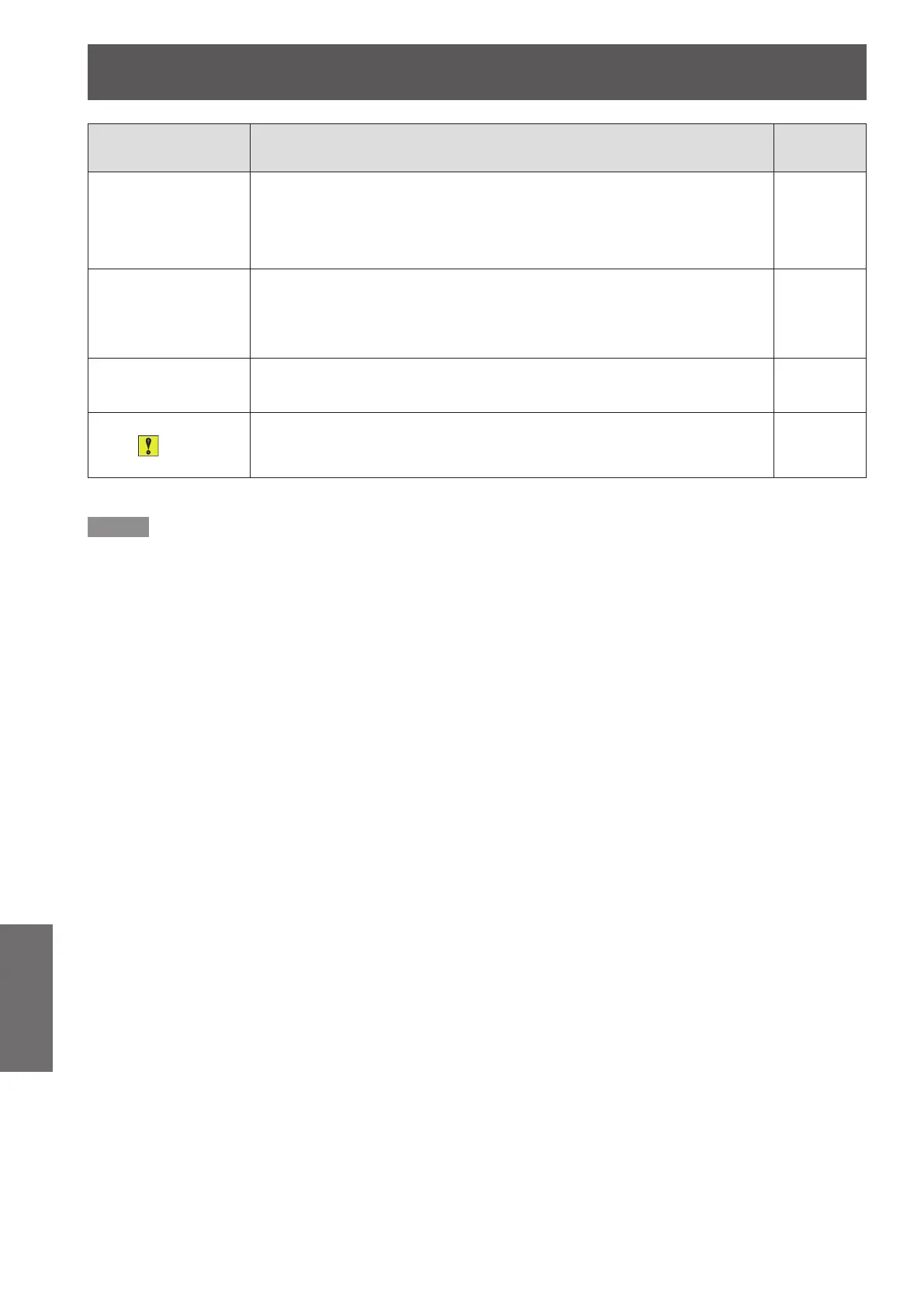
Picture from a HDMI
device does not
appear or picture is
not stable.
Is the HDMI cable securely connected?
z
22
Turn off the power of the projector and the connected devices. Then turn
z
the power of the projector and the connected devices back on.
—
Isn't unsupported signal cable connected?
z
86-89
No sound is output
from a HDMI device.
Set the sound channel of the attached device to Linear PCM.
z
—
If no audio signal is output during HDMI cable connection, connect the
z
audio cable to COMPUTER AUDIO IN 2 terminal and set to "Computer
2" in "Sound" of "Setting" menu.
51
The image is
distorted or runs off.
Check [PC adj.] or [Screen] and adjust them.
z
39, 45
The exclamation
mark appears
on the screen.
Your operation is invalid. Operate correctly.
z
—
Note
If the problem persists, after conrming the contents of the table, please consult your dealer.
z










 To Next Page