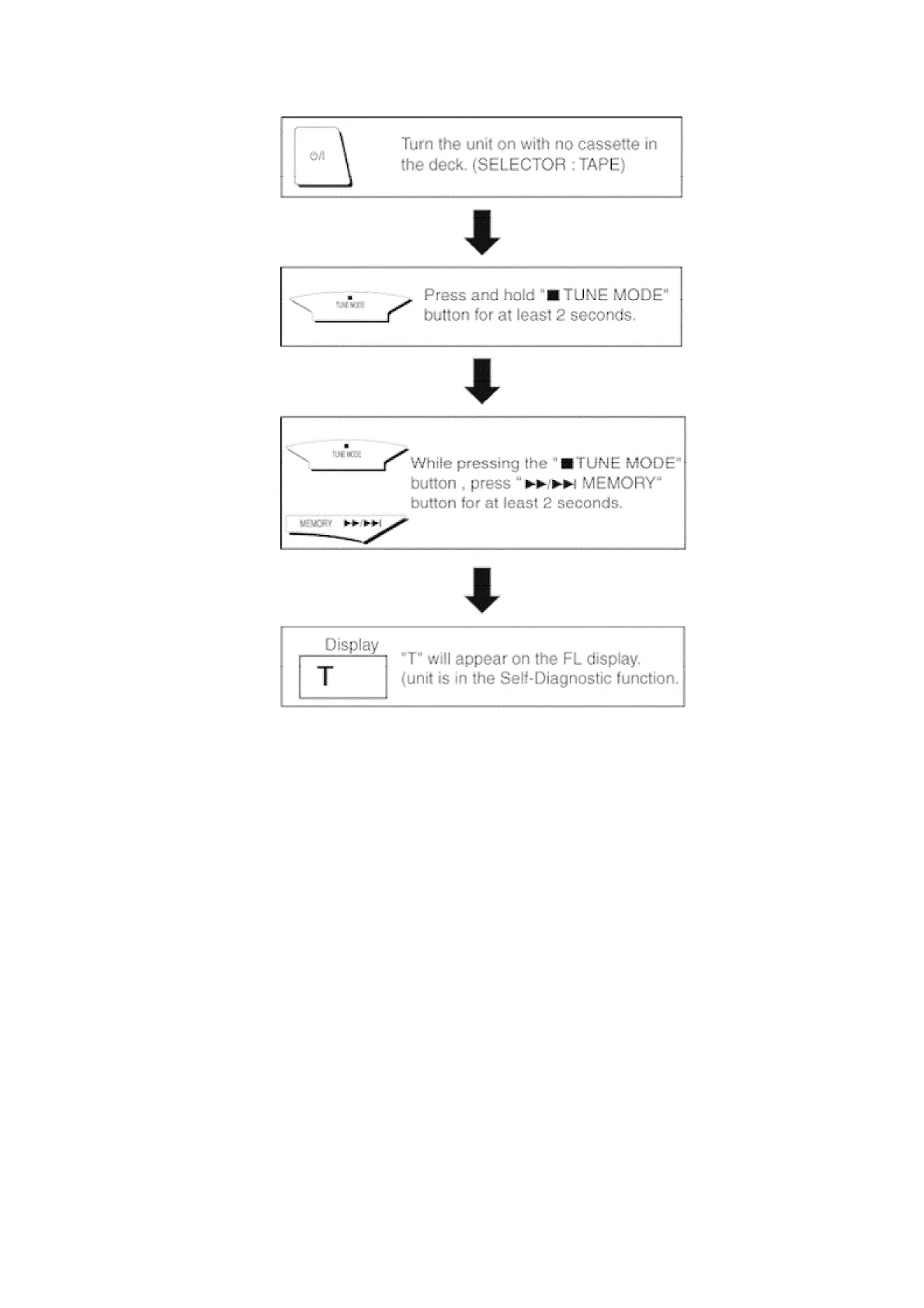
9.3. Cassette Mechanism Test (For error code H01, H02, H03, F01, F02)
1. Press “TAPE, DECK 1/2” to select Deck 2.
2. Load a cassette tape with the erasure prevention tab, remove from left
side only and close the cassette holder.
3. Press “FAST FORWARD MEMORY” (Tape will be stop after 2 seconds)
4. Load a cassette tape with the erasure prevention tab, remove from
right side only and close the cassette holder.
5. Press “REVERSE FM MODE/BP” (Tape will be stop after 2 seconds)
6. Load a pre-recorded tape with both side record tabs intact and close
the cassette holder.
7. Press “PLAY/TUNE/TIME ADJ UP” (After TPS function, tape will stop
automatically)
8. Press “REC/STOP” (Tape will not move)
9. Press “STOP/TUNE MODE” to indicate Error code.
30
www.freeservicemanuals.info
Digitized in Heiloo, Holland







 To Next Page