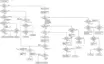
- If several problem exist, error code will change each time when “
/TUNE MODE” is pressed.
(e.g. H01
H03 F01 .....etc.)
10. Press “TAPE, DECK 1/2” to select Deck 1.
11. Repeat step 2 to 9 to test Deck 1. (Tape Deck 1 will not check H02
because of no recording function)
9.4. CD Mechanism Test (F15, F26, F16, F17, F27, F28, F29, H15)
1. Press “CD”.
2. Press “OPEN/CLOSE (1)” and place a CD.
3. Press “OPEN/CLOSE (1)” to close the tray.
4. Press “OPEN/CLOSE (5)” and wait until the tray is open.
5. Press “OPEN/CLOSE (1)” and remove the CD.
6. Press “OPEN/CLOSE (1)” to close the tray.
7. Press “
/TUNE MODE” to indicate Error Code.
- If several problem exist, error code will change each time when “
/TUNE MODE” is pressed. (e.g. F15 F26 F16 ....etc).
9.5. To clear all Error code
1. Press “STOP/TUNE MODE” button for 5 seconds.
2. FL indicator shows “CLEAR” for 1 second and change to “T”.
9.6. How to get out from Self-Diagnostic function
1. Press “Power” button OFF.
9.7. Power Amplifier Failure (F61)
1. When power amplifier fail, F61 will indicate automatically.
10. Description of Error Code
10.1. Error detection for Cassette Mechanism block
31
www.freeservicemanuals.info
Digitized in Heiloo, Holland




 To Next Page