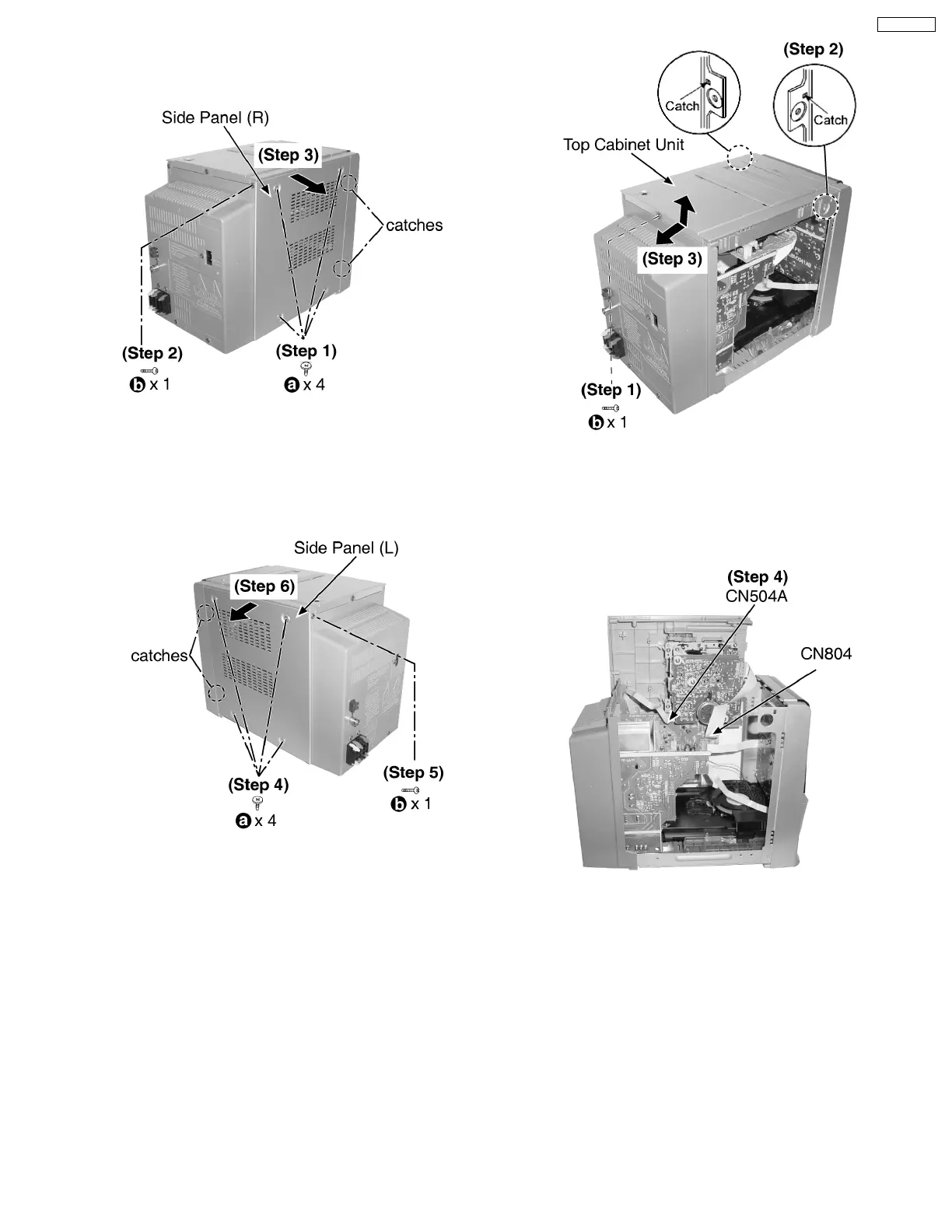
10.2. Disassembly of Side Panel L &
R
Step 1 : Remove 4 screws.
Step 2 : Remove 1 screw.
Step 3 : Remove the side panel (R) as arrow shown (Be careful
of the catches).
Step 4 : Remove 4 screws.
Step 5 : Remove 1 screw.
Step 6 : Remove the side panel (L) as arrow shown (Be careful
of the catches).
10.3. Disassembly of Top Cabinet
Unit
· Follow the (Step 1) - (Step 6) of Item 10.2.
Step 1 : Remove 1 screw.
Step 2 : Release catches at both ends.
Step 3 : Lift up the top cabinet unit, push backward as arrow
shown and flip top cabinet unit sideway.
Step 4 : Detach the connectors CN504A and FFC CN804.
10.4. Disassembly of Deck
Mechanism and Tape Eject
P.C.B
· Follow the (Step 1) - (Step 6) of Item 10.2.
· Follow the (Step 1) - (Step 4) of Item 10.3.
13
SA-PM21PC








 To Next Page