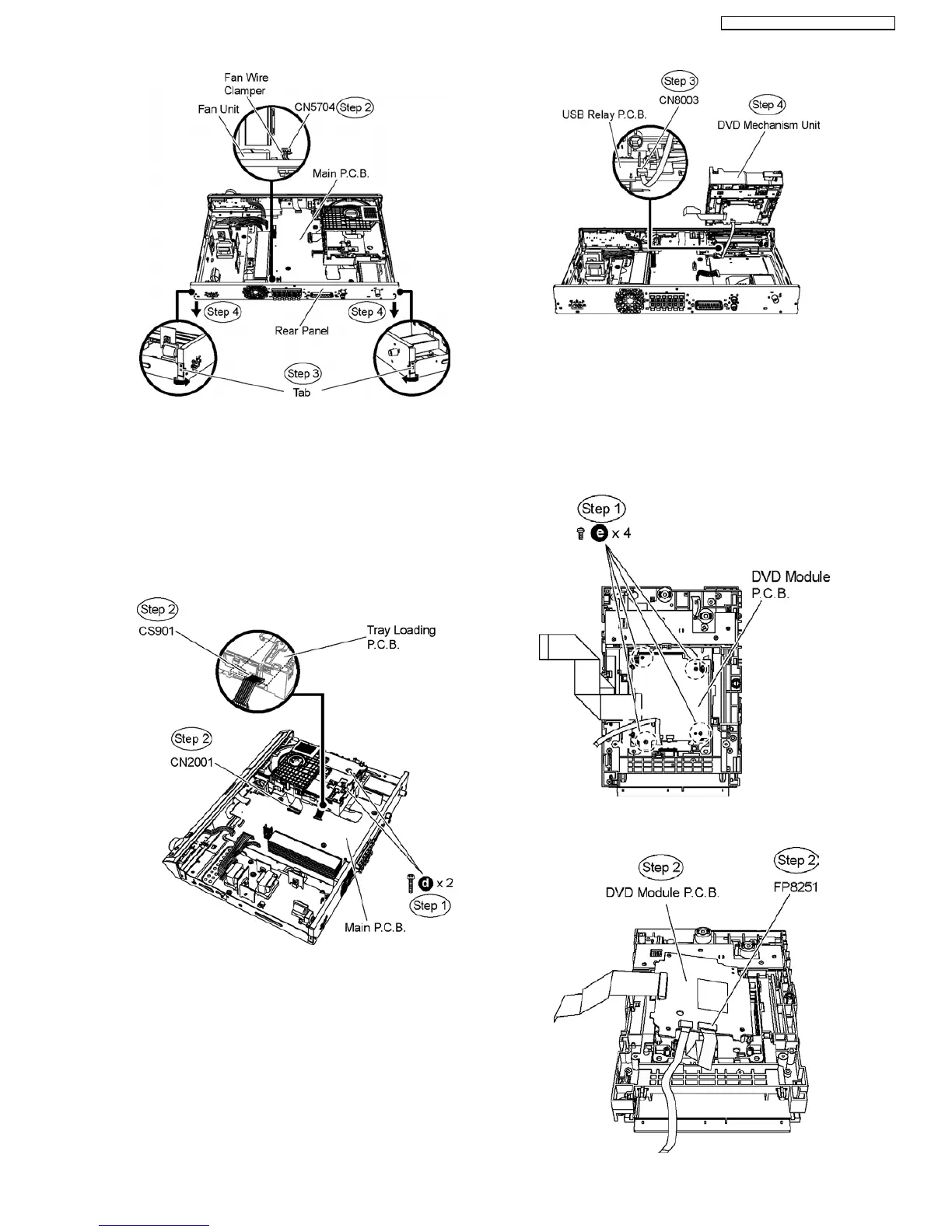
9.10. Disassembly of DVD
Mechanism Unit
•
• •
• Follow (Step 1) to (Step 3) of Item 9.3.
•
• •
• Follow (Step 1) to (Step 4) of Item 9.4.
Step 1 Remove 2 screws from the DVD mechanism unit.
Step 2 Detach FFC cable from the connectors (CN2001) on
Main P.C.B. and (CS901) on Tray Loading P.C.B.
Step 3 Lift up the DVD mechanism unit and detach FFC cable
from the connector (CN8003) on USB Relay P.C.B..
Step 4 Remove DVD mechanism unit.
9.11. Disassembly of DVD Module
P.C.B.
•
• •
• Follow (Step 1) to (Step 3) of Item 9.3.
•
• •
• Follow (Step 1) to (Step 4) of Item 9.4.
•
• •
• Follow (Step 1) to (Step 4) of Item 9.10.
Step 1 Remove 4 screws from DVD Module P.C.B.
Step 2 Lift up DVD Module P.C.B. and detach FFC cable from
the connector (FP8251).
41
SA-PT160E / SA-PT160EB / SA-PT160EG












 To Next Page