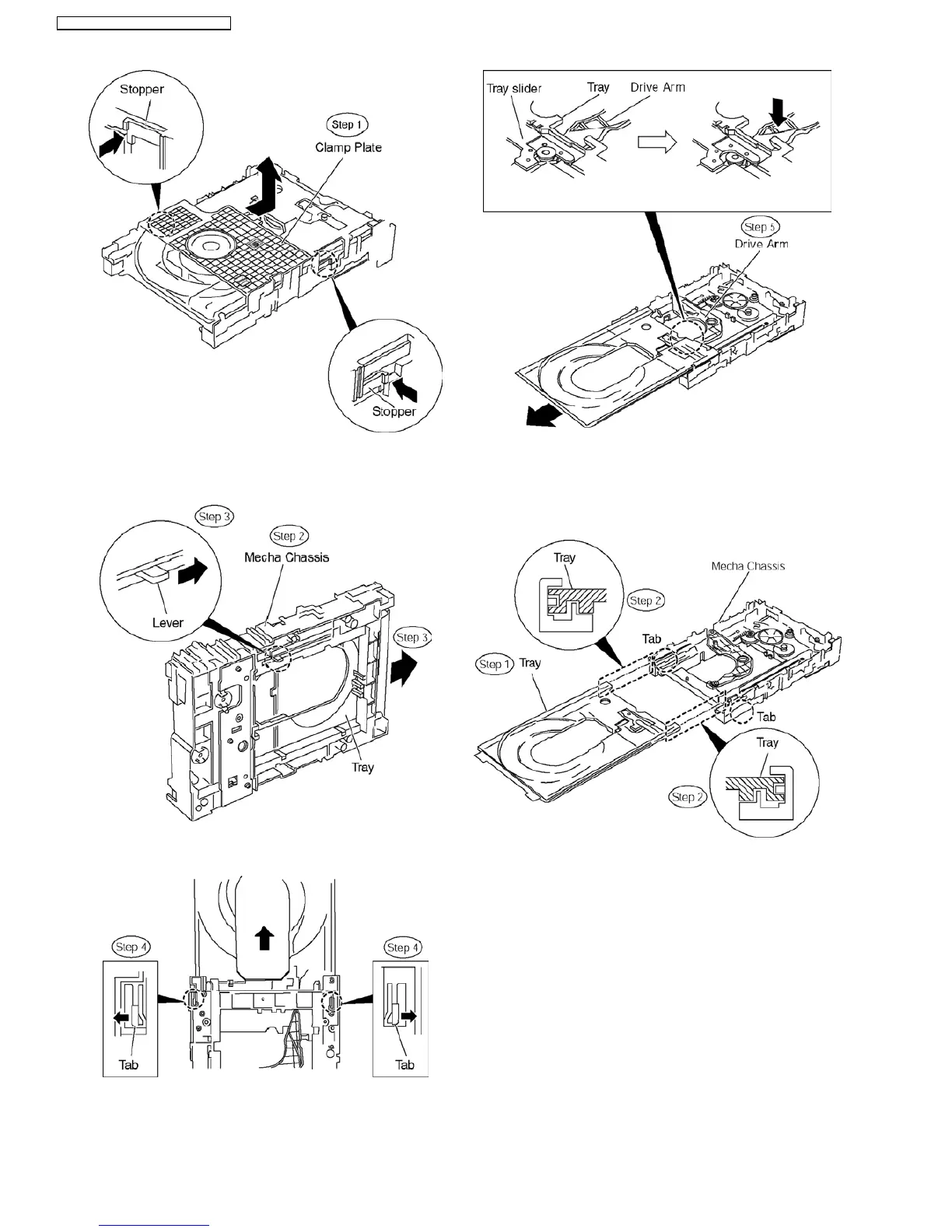
Step 2 Raise the mecha chassis vertically.
Step 3 Slide the lever in the arrow direction till it stops and pull
the tray out.
Step 4 Spread the tabs at the both sides and pull the tray out.
(The tray slides a little forword and stops.).
Step 5 Remove the drive arm concave phase from the tray
slider and tray.
O
OO
O(Assembly of the tray unit)
Step 1 Insert a part of the tray into the unit sliding over the
groove on the mecha chassis.
Step 2 Insert the tray to the point before the tab of the
mecha chassis.
Step 3 Hook the drive arm concave phase over the tray and
the tray slider.
Step 4 Press in the tray.
Step 5 Make sure that the tray and the drive arm move
smoothly.
46
SA-PT160E / SA-PT160EB / SA-PT160EG













 To Next Page