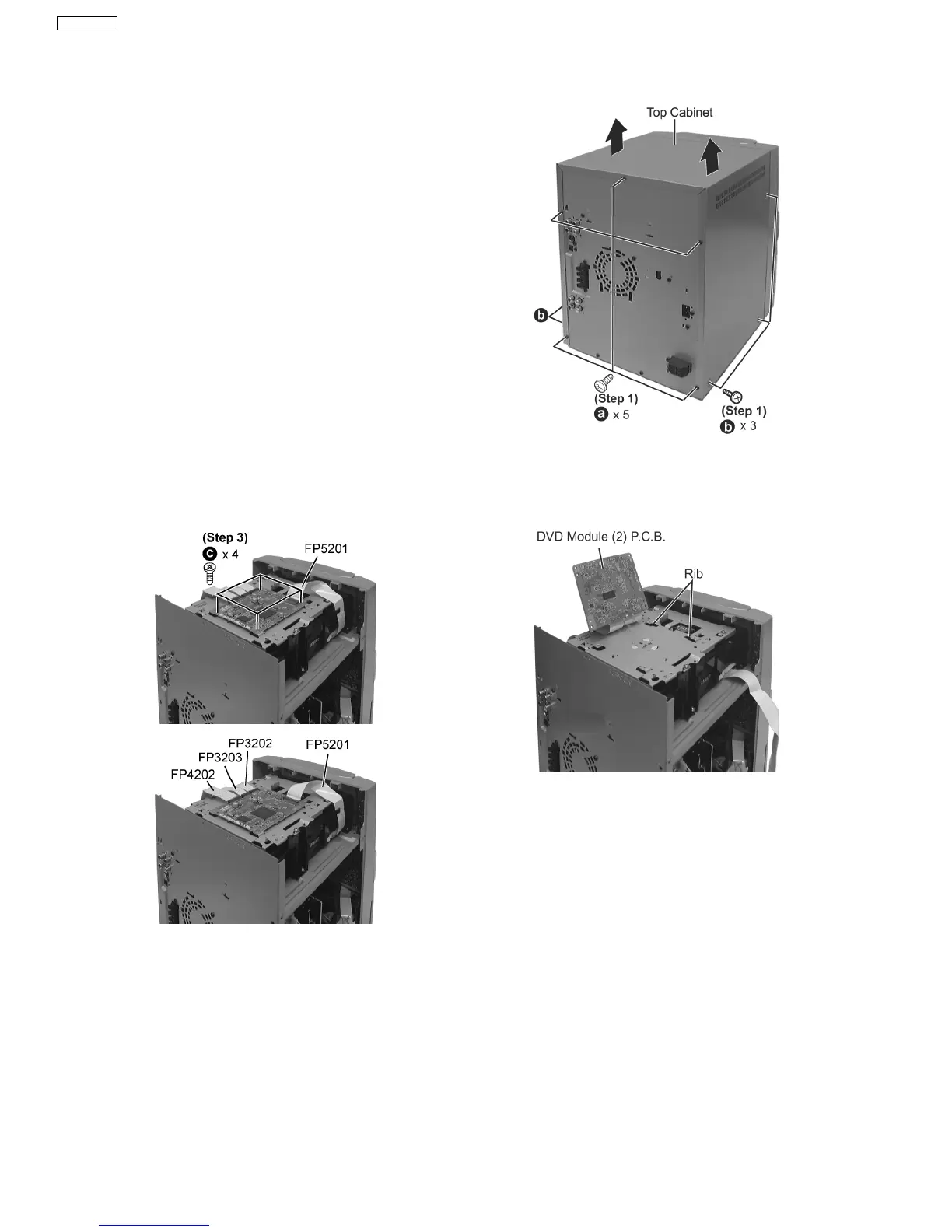
Step 1 Remove 3 screws each side and 5 screws at rear panel.
Step 2 Lift up both sides of cabinet ass’y, push the cabinet
ass’y toward the rear and remove the top cabinet.
·
Follow the (Step 1) - (Step 2) of Item 17.2.
Step 1 Remove 4 screws.
(The DVD changer unit can be removed after the Top
Ornament Unit is removed)
·
Follow the (Step 1) - (Step 2) of Item 17.2.
When opening the disc tray automatically (Using Power
Supply)
Step 1 Connect the AC power cord.
Step 2 Press the power button to power up the main unit.
Step 3 Press the OPEN/CLOSE button, the disc tray will be
open automatically.
Step 2 Detach FFC boards (FP5201, FP3202, FP3203 &
FP4202).
Step 3 Lift up DVD Module (2) P.C.B. as shown to remove it.
17.2. Disassembly of Top Cabinet
17.3. Disassembly of DVD Module (2) P.C.B.
17.4. Disassembly for the Top Ornament Unit
32
SA-VK61DGS











 To Next Page