10
RQT7509
Getting started
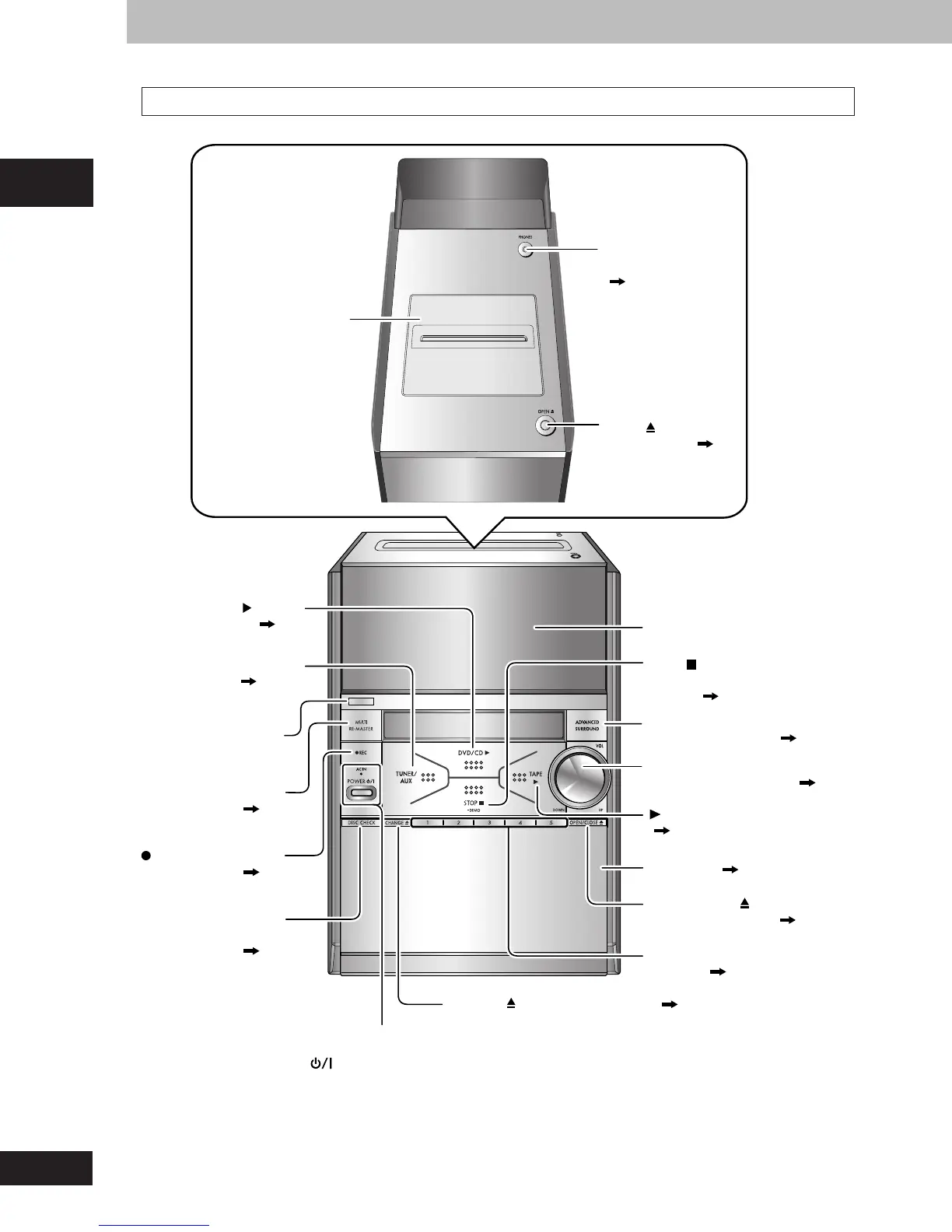
Main unit
OPEN (cassette
open button) ( 23)
Cassette lid
PHONES
(headphone jack)
(
26)
TAPE
( 23)
(tape play button)
CHANGE (disc change button) ( 13)
OPEN/CLOSE (disc tray
open/close button) ( 12)
FL Display
ADVANCED
SURROUND button ( 25)
VOL UP/DOWN
(volume control knob) ( 12, 25)
STOP
(stop, demonstation
button) ( 9, 12)
, –DEMO
1– 5 (disc direct play
buttons) ( 13)
Disc trays ( 12)
TUNER/AUX button
( 22, 32)
Remote control
sensor
DVD/CD button
( 12)
AC IN (AC supply indicator)
This indicator lights when the unit is connected to the AC power supply.
POWER (standby/on switch)
Press to switch the unit from on to standby mode or vice versa.
In standby mode, the unit is still consuming a small amount of power.
MULTI RE-MASTER
button ( 25)
REC (record button)
( 24)
DISC CHECK
(disc check button)
( 13)
Control reference guide
RQT7509_10_11_new 2/10/04, 7:27 PM10















 To Next Page