Other functions
26
RQT7509
SHIFT
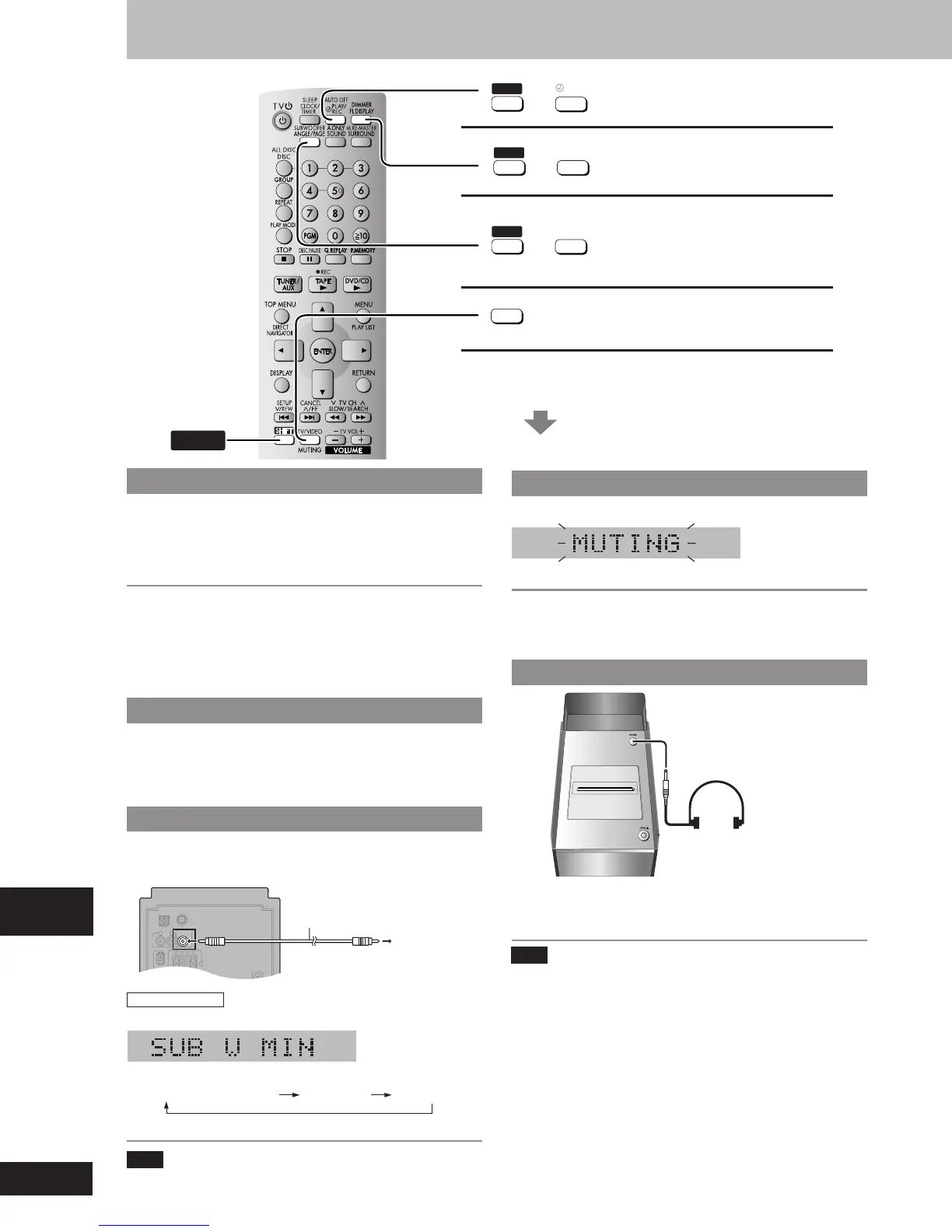
Auto-off function
Adjusting the bass
Muting function
See below for details.
SHIFT
+
AUTO OFF
PLAY/
REC
SHIFT
+
SUBWOOFER
ANGLE
/
PAGE
MUTING
TV/VIDEO
Dimmer function
SHIFT
DIMMER
FL DISPLAY
+
Convenient functions
Auto-off function
When disc or tape is selected as the source
To save power, the unit turns off if it is left unused for 10 minutes.
Press [SHIFT] + [AUTO OFF].
“A.OFF” is shown on the display.
This function does not work if the source is tuner or AUX.
To cancel
Press [SHIFT]+[AUTO OFF] again to clear “A.OFF” from the display.
For your reference
“A.OFF” disappears from the display but continues to function normally
if either tuner or AUX is selected as the source.
“A.OFF” remains displayed if disc or tape is selected as the source.
Dimming the display
Use this when you are going to sleep or any other time you would
prefer to dim the display panel.
Press [SHIFT] + [DIMMER].
To return to the original brightness, press [SHIFT]+[DIMMER] again.
Enjoying more powerful bass
• Connect an active subwoofer (not included). See below for
connection.
• Place the subwoofer as close as possible to the front center.
AM ANT
EXT LOOP
75
Ω
FM ANT
OPTICAL
OUT
AC IN
SUBWOOFER
OUT
R
L
AU
X
HIGH
(6
Ω
)
LOW
(6
Ω
)
R
L
Audio cable
(not included)
To the
subwoofer's
input terminal
Muting the volume
Press [MUTING].
Volume is reduced to minimum.
To cancel
Press [MUTING] again or reduce the volume to minimum (--dB), then
raise it to the required level.
Muting is also cancelled when you switched the unit to standby.
Using headphones
Reduce the volume level and connect the headphones (not included).
Headphones plug type: 3.5 mm (
1
/
8
”) stereo.
Audio is automatically switched to stereo (2-channel).
Note
Avoid listening for prolonged periods of time to prevent hearing
damage.
(not included)
Adjusting the bass
Press [SHIFT] + [SUBWOOFER].
Every time you press the buttons:
SUB W MIN (factory preset) SUB W MAXSUB W MID
Adjust the volume on the subwoofer to suit your preference.
Note
When using headphones, the subwoofer should be switched off.
PHONES
RQT7509_26_32 2/19/04, 4:38 PM26















 To Next Page