Other functions
32
RQT7509
Using other equipment
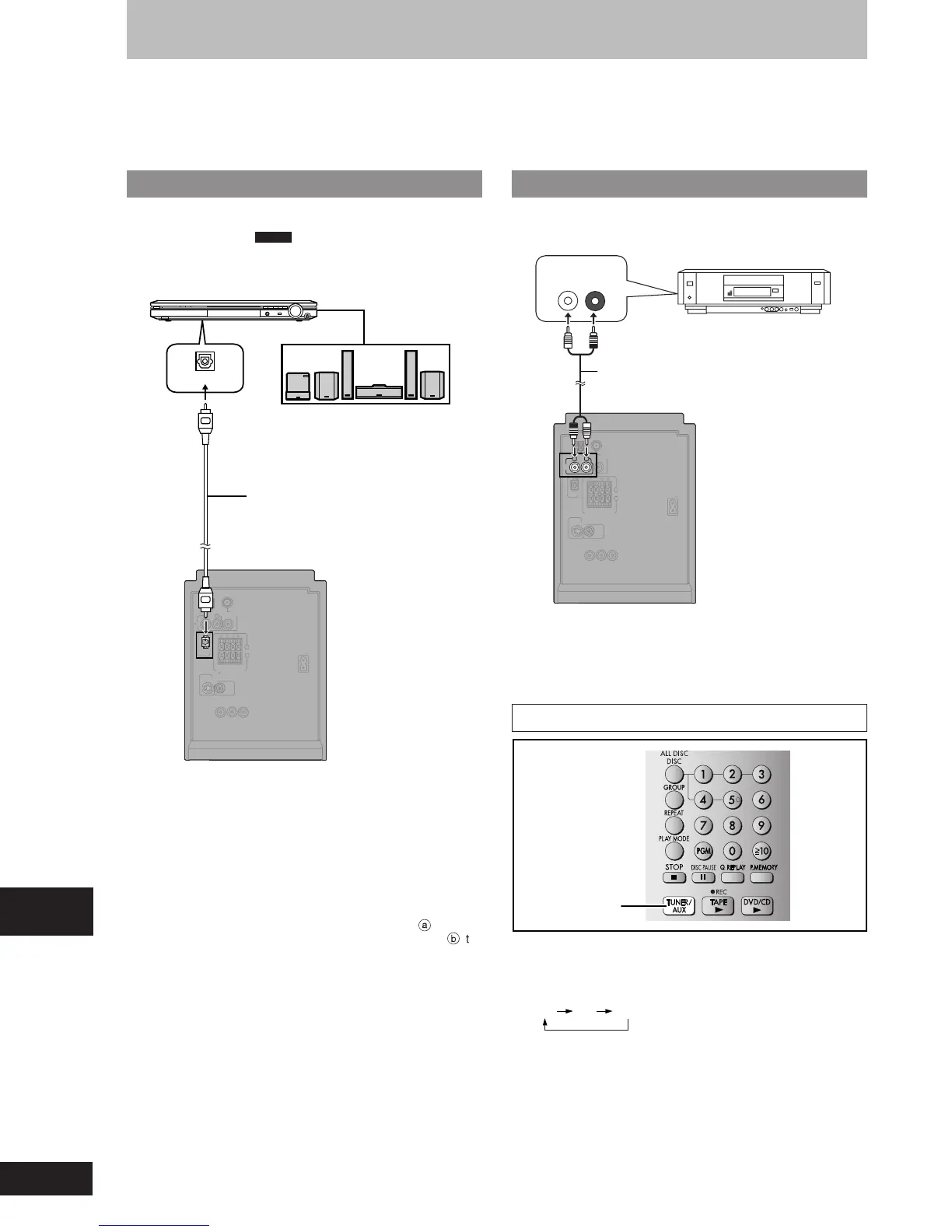
Home Theater — Enjoying more powerful sound
Enjoy the powerful movie theater and hall-like sound available with
multiple channel audio found on DVD-Video by connecting an
amplifier and speakers. (
DVD-A
Even if using this connection, output
will be only 2 channels.)
To enjoy multi-channel surround sound
Connect an amplifier with a built-in decoder or a decoder-amplifier
combination.
Change the settings in “Digital output” (A page 31).
•
You can only use DTS Digital Surround decoders that are
compatible with DVD.
Recording Output
•
With DVD, the following conditions must be met:
a
the disc
doesn’t have protection preventing digital recording, and
b
the
recording equipment can handle signals wth a sampling frequency
of 48 kHz.
•
You cannot record WMA/MP3.
When recording DVDs, make the following settings.
– Advanced Surround: SURR OFF (A page 25)
– PCM Digital Output: Up to 48 kHz (A page 31, Digital output)
– Dolby Digital and DTS Digital Surround: PCM (A page 31, Digital
output)
Before connection
•
Disconnect the AC power supply cord.
•
Turn off all equipment and read the appropriate operating instructions.
•
The equipment connections described are examples only.
•
Peripheral equipment and optional cables sold separately unless otherwise indicated.
Using an external unit
You can playback the sound from a video cassette recorder, tape
deck, laser disc player, etc., through this unit’s speakers.
AUDIO OUT
R
L
Audio cable
(not included)
Video cassette recorder
(not included)
FM ANT
OPTICAL
OUT
S-VIDEO
OUT
VIDEO
OUT
AC IN
SUBWOOFER
OUT
R
L
AU
X
AM ANT
HAUT-PARLEURS
HIGH
(6
Ω
)
SPEAKERS
(SB-PM39)
LOW
(6
Ω
)
R
L
COMPONENT VIDEO OUT
P
R
P
B
Y
EXT LOOP
75
Ω
When connecting a record player
We recommend using a record player with a built-in phono equalizer.
If your player doesn’t have a built-in equalizer, connect it first to a
separate equalizer and then connect that to this unit.
To playback
TUNER/AUX
1 Press [TUNER/AUX] to select “AUX”.
The unit comes on.
Every time you press the button:
FM AM AUX
2 Start playback from the external source.
(For details, refer to the external unit’s instruction manual.)
FM ANT
OPTICAL
OUT
S-VIDEO
OUT
VIDEO
OUT
AC IN
SUBWOOFER
OUT
R
L
AUX
AM ANT
HAUT-PARLEURS
HIGH
(6
Ω
)
SPEAKERS
(SB-PM39)
LOW
(6
Ω
)
R
L
(DVD) IN
VOLUME
Amplifier (not included)
Speakers (example)
Connect three or more
speakers for surround
sound.
Optical digital audio cable
(not included)
Do not bend sharply when
connecting.
COMPONENT VIDEO OUT
PR PB Y
EXT LOOP
75
Ω
RQT7509_26_32 2/19/04, 4:40 PM32















 To Next Page