EasyManua.ls Logo

Panasonic TH-50PH30E - On-Screen Menu Displays

Panasonic TH-50PH30E
50 pages
Print Icon
To Next Page IconTo Next Page
To Previous Page IconTo Previous Page
Loading...
20
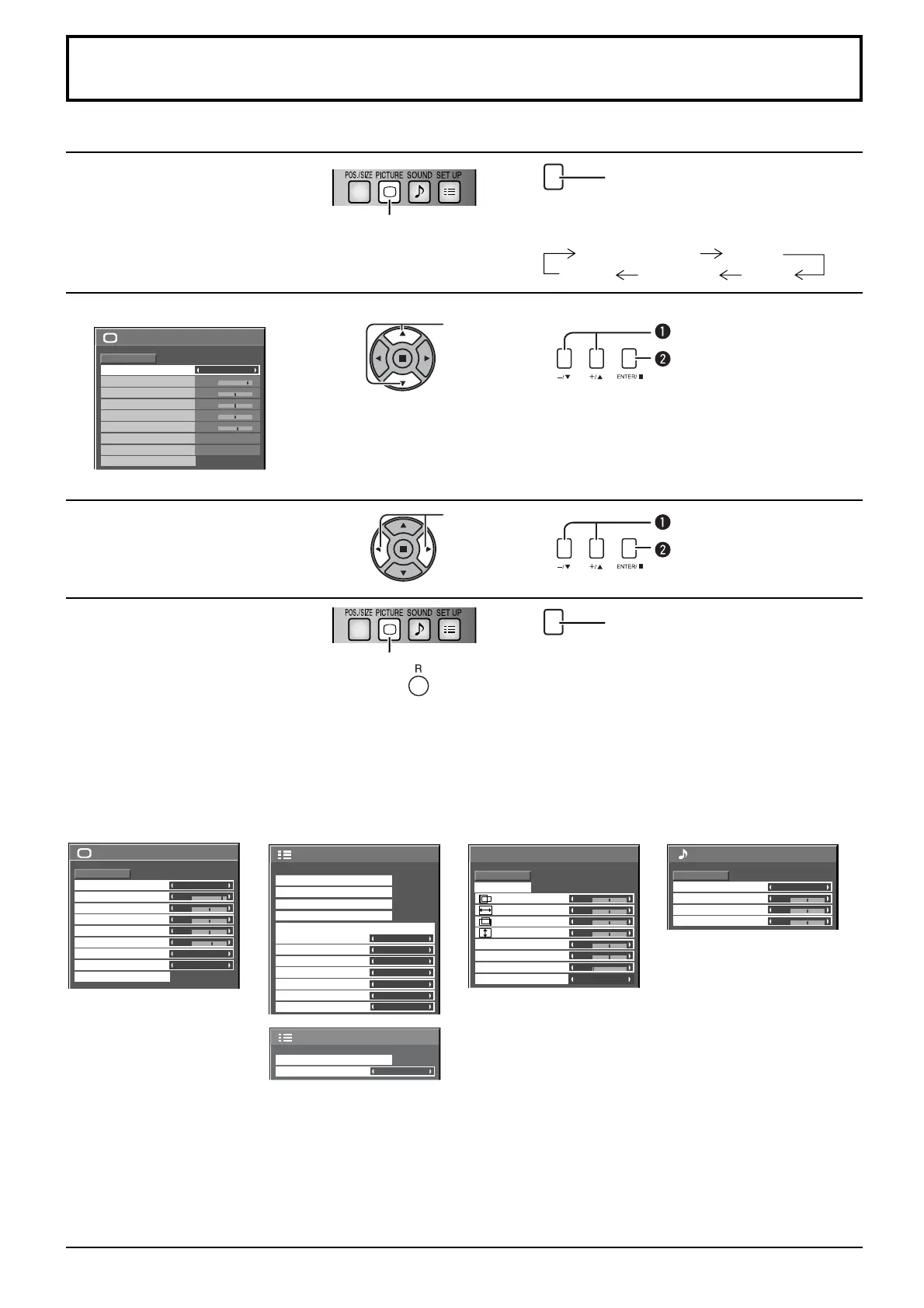
On-Screen Menu Displays
Remote Control Unit
1
Display the menu screen.
Press to select.
(Example: Picture menu)
MENU
Press several times.
Each time the MENU button is pressed, the
menu screen will switch.
Normal Viewing Picture
Sound Pos./Size Setup
2
Select the item.
25
0
0
0
5
Picture
Normal
Normalise
Normal
Brightness
Sharpness
Picture Mode
Colour
Contrast
Hue
Colour Management
Advanced settings
White balance
Normal
Off
(Example: Picture menu)
Select.
Select.
Press.
3
Set.
Set.
Set.
Press.
4
Exit the menu.
Press.
Press to return to the previous menu.
MENU
Press several times.
Menu display list
Note: Menu that cannot be adjusted is grayout. Adjustable menu changes depending on signal, input and menu setting.
Picture menu Setup menu Pos./Size menu Sound menu
see page 23, 24
25
0
0
0
5
Picture
Normal
Normalise
Normal
Brightness
Sharpness
Picture Mode
Colour
Contrast
Hue
Colour Management
Advanced settings
White balance
Normal
Off
1/2
Signal
Screensaver
Extended life settings
Input label
Off
Off
PC Power management
Off
DVI-D Power management
Disable
No signal power off
No activity power off
Enable
OSD Language English
(
UK
)
Component/RGB-in select
RGB
Power save
Setup
2/2 Setup
MULTI DISPLAY Setup
Display orientation
Landscape
see page 26-40
0
Normal
Normalise
Auto Setup
Pos./Size
V-Pos
0
H-Pos
V-Size
Dot Clock
H-Size
Clock Phase
0
Clamp Position
Over scan
Off
0
0
0
0
see page 21, 22
Sound
Normal
Normalise
Normal
0
0
0
Treble
Sound Mode
Balance
Bass
see page 25

Other manuals for Panasonic TH-50PH30E

Related product manuals