English
108
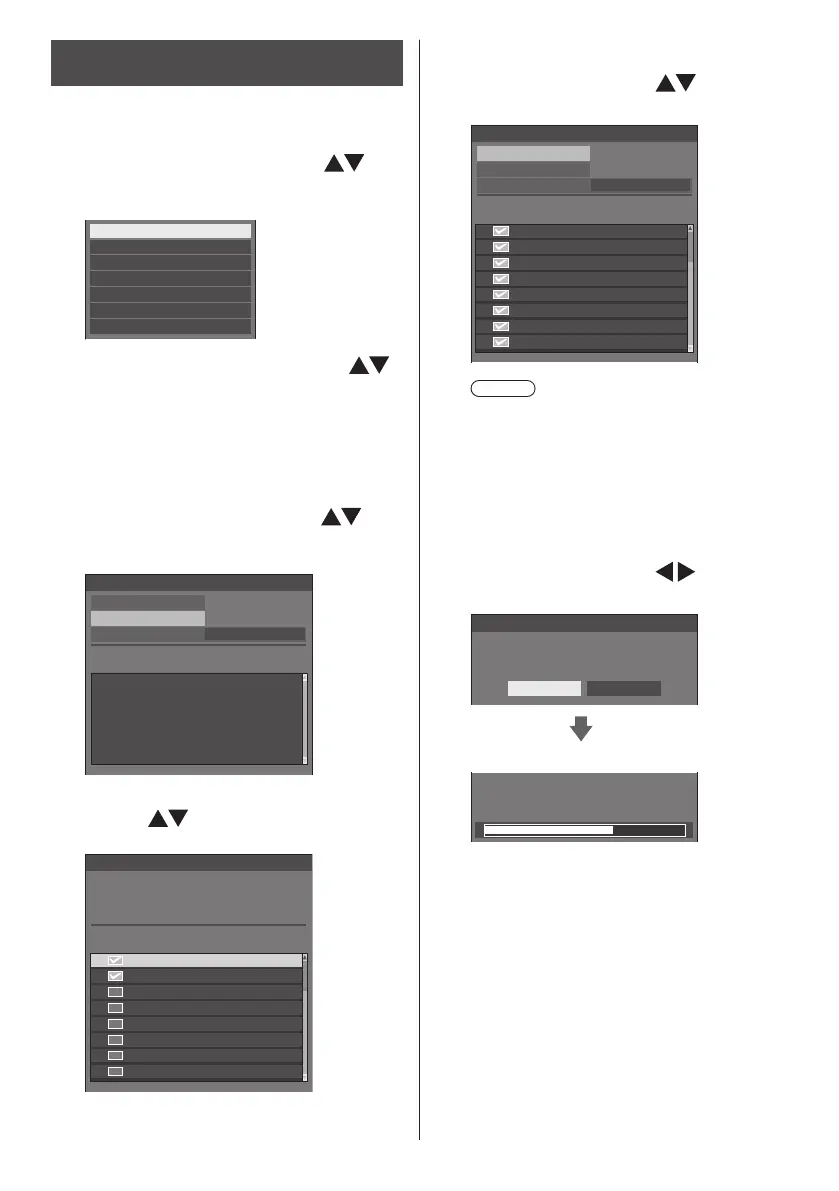
Copying data to other display via
LAN
1
Display [Setup] menu pressing
<SETUP>.
2
Select [OSD language] with and
press <ENTER> for over 3 seconds.
The following display appears.
Options
Display software information
LAN data cloning
USB data cloning
Cloning password
Shipping
Software licenses
3
Select [LAN data cloning] with
and press <ENTER>.
[Cloning password] screen is displayed.
4
Enter the cloning password, and
then press <ENTER>
[LAN data cloning] screen is displayed.
5
Select [Select display] with and
press <ENTER>.
Displays on the same subnet are listed.
LAN data cloning
Execute
Select display
Write protect
Status Display name IP address
Off
6
Select the display to copy the data
to with and press <VOL +>.
Select all the displays to copy the data to.
VF2H-001 192.168. 0. 1
192.168. 0. 2
192.168. 0. 4
192.168. 0. 25
192.168. 0. 31
192.168. 0. 7
192.168. 0.124
192.168. 0.211
VF2H-004
VF2H-005
VF2H-014
VF2H-006
VF2H-041
VF2H-009
VF2H-002
Select display
Please check the display to register.
Check Display name IP address
7
Press <ENTER>.
8
Select [Execute] with and
press <ENTER>.
192.168. 0. 1
192.168. 0. 2
192.168. 0. 4
192.168. 0. 25
192.168. 0. 31
192.168. 0. 7
192.168. 0.124
192.168. 0.211
VF2H-001
VF2H-004
VF2H-005
VF2H-014
VF2H-006
VF2H-041
VF2H-009
VF2H-002
LAN data cloning
Status
Execute
Display name IP address
Select display
OffWrite protect
Note
●
Data cannot be copied to the display for which
[Write protect] is set to [On]. Set this to [On]
to prevent [LAN data cloning] from being
performed mistakenly when data copy is not
necessary.
●
Once [LAN data cloning] is performed, [Write
protect] is set to [On].
9
A confirmation window appears.
Select [Execute] with
and press
<ENTER>.
LAN data cloning
All data for the selected displays will be changed.
Are you sure you want to execute?
Execute Return
Data copy to the display starts.
LAN data cloning
Cloning in progress, please wait.
DO NOT unplug your Display!










 To Next Page