English
50
Setup menu
1
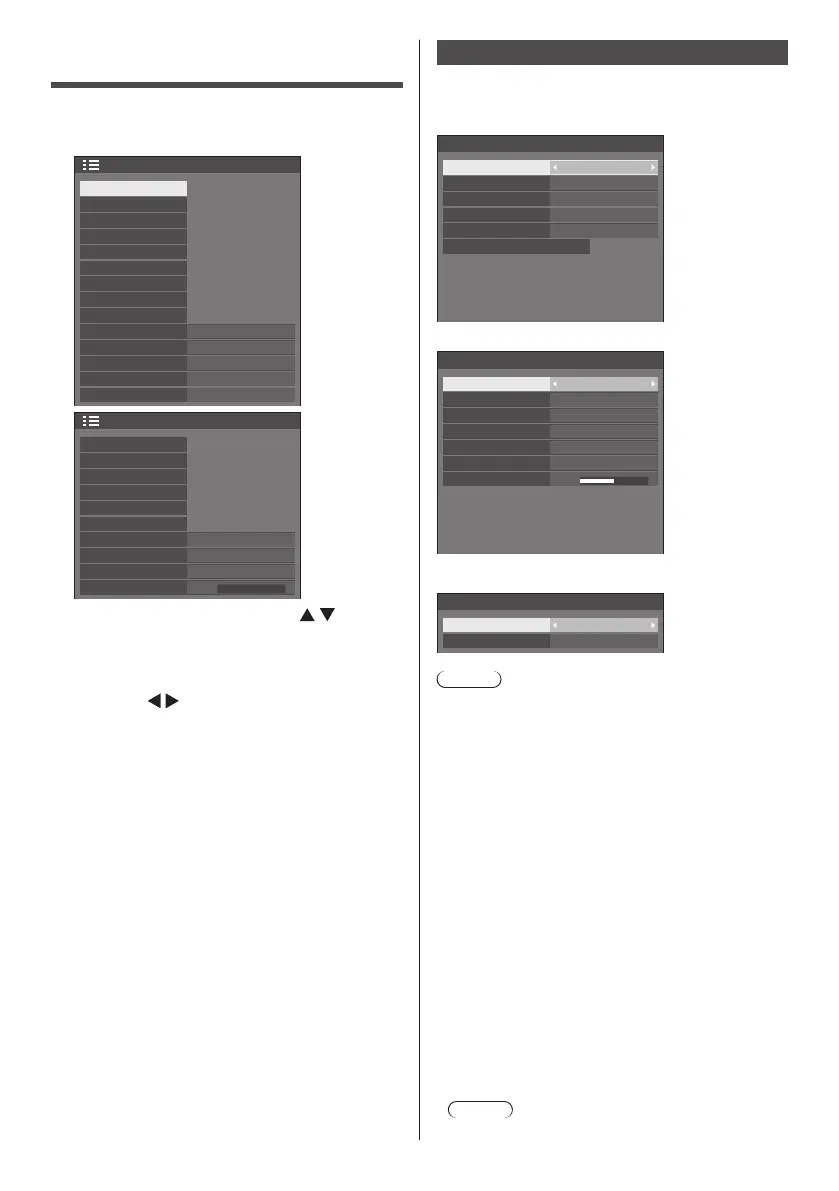
Press <SETUP> to display the [Setup]
menu.
1/2
Setup
Screensaver
Signal
Input label
Power management settings
DIGITAL LINK out
No activity power off
Power ON screen delay
Monitor out(Digital)
Disable
Auto
Colour matching function
Multi display settings
Control settings
OSD language
English(UK)
Input search
Failover/Failback
Wobbling
Off
2/2
0
Setup
Set up timer
Date and time
Network settings
USB media player settings
Function button settings
Display orientation
OSD position
Menu display duration
Menu transparency
Landscape
Right
60 sec
Startup image settings
2
Select the item to set with .
●
Menu that cannot be adjusted is greyed out.
Adjustable menu changes depending on signal,
input and menu setting.
3
Set with .
4
Press <SETUP> to exit from adjust
mode.
■ To return to the previous screen
Press <RETURN>.
Signal
Examples of [Signal] submenu screen
When HDMI / DVI / DisplayPort / DIGITAL LINK is
selected
60.00 Hz
74.18 MHz
1125(1080)/60i
33.72 kHz
Signal
Cinema reality
YUV/RGB-in select
Noise reduction
Signal range
MPEG noise reduction
V-freq.
H-freq.
Dot clock freq.
Signal format
Off
RGB
Auto
Auto
Off
Multi dynamic backlight settings
When PC is selected
60.00 Hz
74.18 MHz
1125(1080)/60i
33.72 kHz
0
Signal
Component/RGB-in select
Sync
Cinema reality
XGA mode
V-freq.
H-freq.
Dot clock freq.
Input level
Signal format
RGB
Auto
Off
Auto
MPEG noise reduction
Noise reduction
Off
Auto
When USB is selected
Signal
Noise reduction
MPEG noise reduction
Auto
Off
Note
●
[Signal] setup menu displays a different setting
condition for each input signal.
●
Menu that cannot be adjusted is greyed out.
■ [Component/RGB-in select]
This menu is displayed at PC IN input.
Select to match the signals from the source connected
to each terminal.
[Component] YP
BPR/YCBCR signals
[RGB] RGB signals
■ [YUV/RGB-in select]
This menu is displayed at HDMI, DisplayPort, DIGITAL
LINK, DVI-D IN 1 and DVI-D IN 2 inputs.
Select to match the signals from the source connected
to each terminal.
[YUV] YUV signals
[RGB] RGB signals
Note
●
Set for each input terminal (HDMI, DisplayPort,
DIGITAL LINK, DVI-D IN 1, DVI-D IN 2).










 To Next Page