47
English
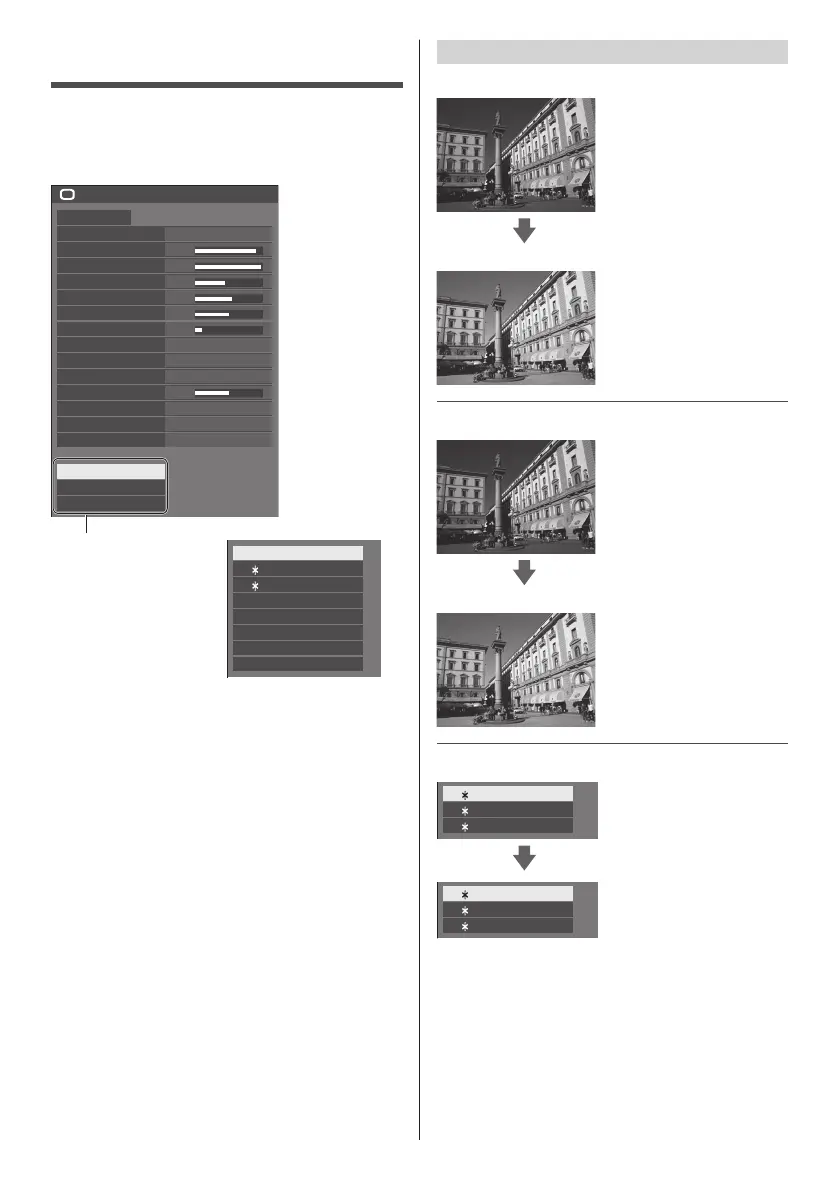
Picture Profiles
Up to 8 combinations of picture adjustment values (in
the [Picture] menu) can be stored in the display memory
as profiles and applied as needed, for a convenient way
to enjoy your preferred picture settings.
5
80
95
40
60
50
20
Picture
Default Default
Picture mode Natural signage
6500K
Backlight
Contrast
Brightness
Colour
Hue
Sharpness
Enhance level
Colour temperature
Colour enhancement
Refine enhancer
Gradation smoother
Memory save
Memory load
Memory edit
Mid
High
On
Low
Dynamic contrast
Gamma
2.2
[Memory save]
(see page 48)
[Memory load]
(see page 48)
[Memory edit]
(see page 49)
1. [ ]
2. [ ]
3. [ ]
MEMORY1
MEMORY2
MEMORY3
4. [ ] MEMORY4
5. [ ] MEMORY5
6. [ ] MEMORY6
7. [ ] MEMORY7
8. [ ] MEMORY8
Overview of Picture Profiles
Original picture
Adjust picture.
(see page 44 - 46)
Custom picture
Example:
Save the picture adjustment
values in the [MEMORY1]
profile.
[Memory save]
Original picture
Example:
Load [MEMORY1].
[Memory load]
Custom picture
[Memory edit] screen
1. [ ]
2. [ ]
3. [ ]
MEMORY1
MEMORY2
MEMORY3
Example:
Change the memory name
to [MY PICTURE].
[Memory edit]
1. [ ]
2. [ ]
3. [ ]
MY PICTURE
MEMORY2
MEMORY3










 To Next Page