31
English
Identifying Controls
Main Unit
1
2
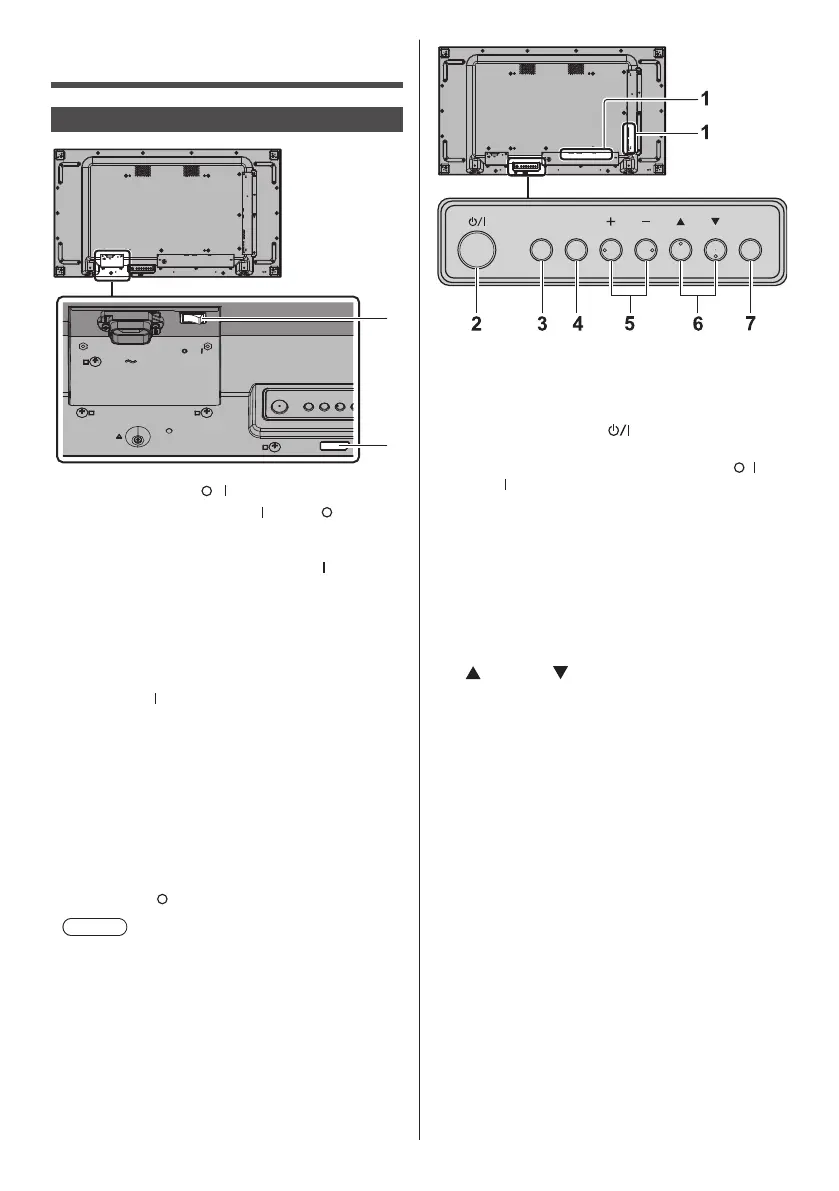
1 Main power switch ( / )
Switches the main power ON (
) / OFF ( ).
●
Turning ON/OFF the <Main power switch> is the
same as plugging or unplugging the power plug.
Switch the <Main power switch> ON (
), and then
turn the power ON / OFF with the remote control or
<Power button (Unit)>.
2 Power Indicator / Remote control sensor (Back of
the unit)
The Power Indicator will light.
When the power of the unit is ON (Main power
switch: ON (
))
●
Picture is displayed: Green
●
Power OFF (Standby) with remote control or
<Power button (Unit)>: Red
•
When [Network control] is set to [On]: Orange
About [Network control] settings, see page 68.
●
Power OFF with “Power management” function:
Orange
About “Power management” function, see page 64.
When the power of the unit is OFF (Main power
switch: OFF (
)): No light
Note
●
When the power indicator is orange, power
consumption during standby is generally larger than
that of when the power indicator is red.
MENU ENTERINPUT
1 External Input Terminal
●
Connects to video equipment, PC, etc. (see
page 19)
2 <Power button (Unit)> (
)
●
Turns the power ON (Picture is displayed.) / OFF
(standby) when the <Main power switch> (
/ ) is
ON ( ).
3 <INPUT (Unit)>
●
Selects the connected device. (see page 35)
4 <MENU (Unit)>
●
Displays the menu screen. (see page 39)
5 <+ (Unit)> / <- (Unit)>
●
Adjusts the volume. (see page 36)
●
On the main screen, switches settings or adjusts
settings level. (see page 39)
6 <
(Unit)> / < (Unit)>
●
Selects the setting item on menu screen. (see
page 39)
7 <ENTER (Unit)>
●
Configures the item on menu screen. (see
page 39)
●
Switches aspect mode. (see page 37)










 To Next Page