English
72
■ Functions assignable to the numeric
buttons
[Input] (Direct input select)
Input can be selected with single-touch operation.
[HDMI] / [DisplayPort] / [DIGITAL LINK] /
[DVI-D1] / [DVI-D2] / [PC] / [USB]
[Memory load]
Memory can be loaded with single-touch operation.
Memory load (see page 48)
[MEMORY1] to [MEMORY8]
●
[MEMORY1] to [MEMORY8] load functions are
already assigned to <1> to <8> respectively.
These settings cannot be changed.
[Shortcut]
[Signal], [Screensaver], [Set up timer], [Power
management settings], [Network settings],
[Multi display settings]
●
Pressing the numeric button displays the menu
screen. Pressing the button again exits the
menu screen.
[AV mute]
●
Pressing the numeric button mutes the audio
and pictures.
To cancel, press any button on the remote
control except power button.
[Digital zoom]
●
Switches to [Digital zoom] mode by pressing
numeric buttons. (see page 38)
[Display ID / Display name]
●
Pressing the numeric button enlarges [Display
ID] and [Display name].
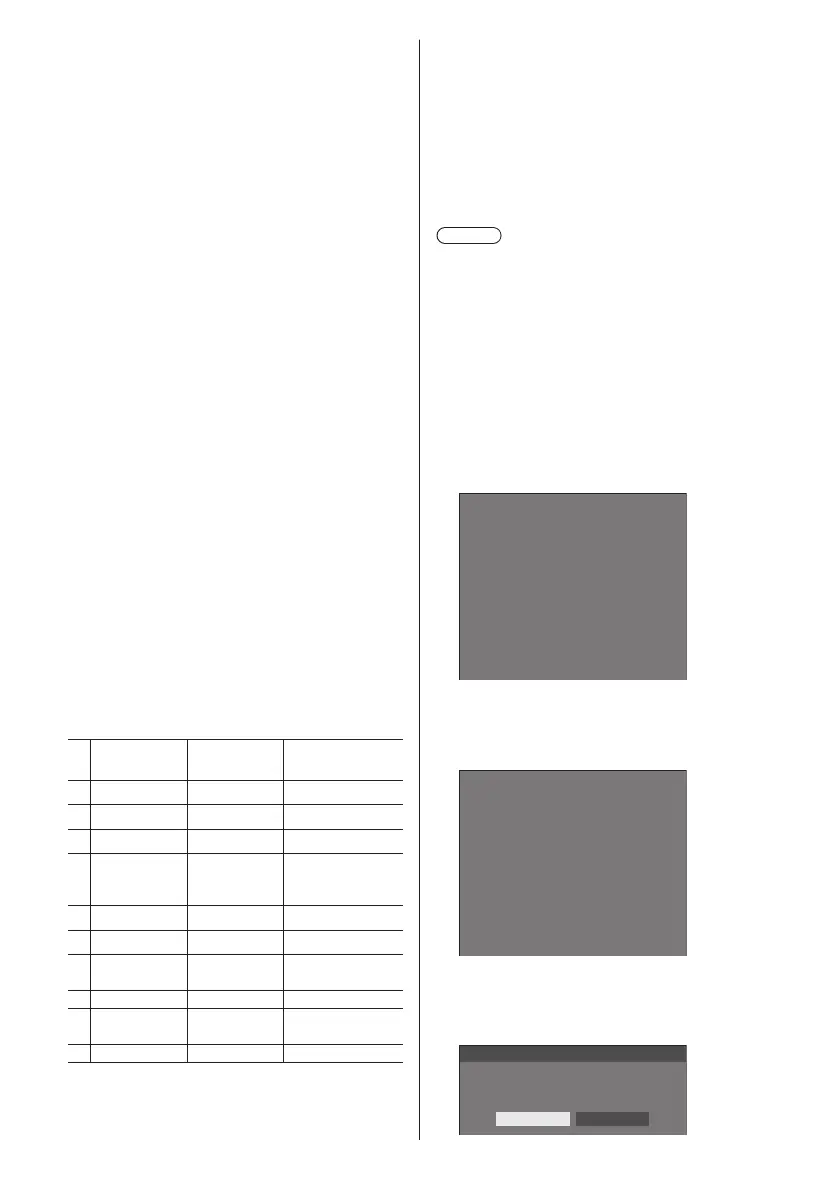
Shipping condition
The following functions are assigned to the numeric
buttons as factory default.
[Input]
[Memory
load]
[Shortcut]
1
HDMI MEMORY1 [Signal]
2
DisplayPort MEMORY2 [Screensaver]
3
DIGITAL LINK MEMORY3 [Set up timer]
4
DVI-D1 MEMORY4
[Power
management
settings]
5
DVI-D2 MEMORY5 [Network settings]
6
PC MEMORY6 [AV mute]
7
USB MEMORY7
[Multi display
setting]
8
– MEMORY8 [Digital zoom]
9
– –
Display ID /
Display name
0
– – –
■ Function button guide
Sets the function display when numeric buttons are
pressed. Set this for each function group.
[On]:
Displays the function list for the numeric buttons.
[Off]:
Does not display the function list. Operation starts
when numeric buttons are pressed.
Note
●
When <FUNCTION GROUP> is pressed, [Function
button guide] will be displayed regardless of the [On]
/ [Off] settings.
■ To use shortcut (numeric buttons)
1
Press <FUNCTION GROUP> or <0> -
<9>.
[Function button guide] will be displayed.
[Function button guide]: When [Off] is set, pressing
the numeric button starts operation.
Example: Input
1.
2.
3.
4.
5.
6.
7.
8.
9.
0. ---
HDMI
DisplayPort
DIGITAL LINK
DVI-D1
DVI-D2
PC
USB
---
---
Input
2
Press <FUNCTION GROUP> to switch
function group.
Example: Memory load
1.
2.
3.
4.
5.
6.
MEMORY1
MEMORY2
MEMORY3
MEMORY4
MEMORY5
MEMORY6
7. MEMORY7
8. MEMORY8
9. ---
0. ---
Memory load
3
Press <0> - <9>.
The function for the pressed button starts to operate.
Example: When <2> is pressed.
Memory load
Load from “MEMORY2”
Ok Cancel










 To Next Page