English
96
●
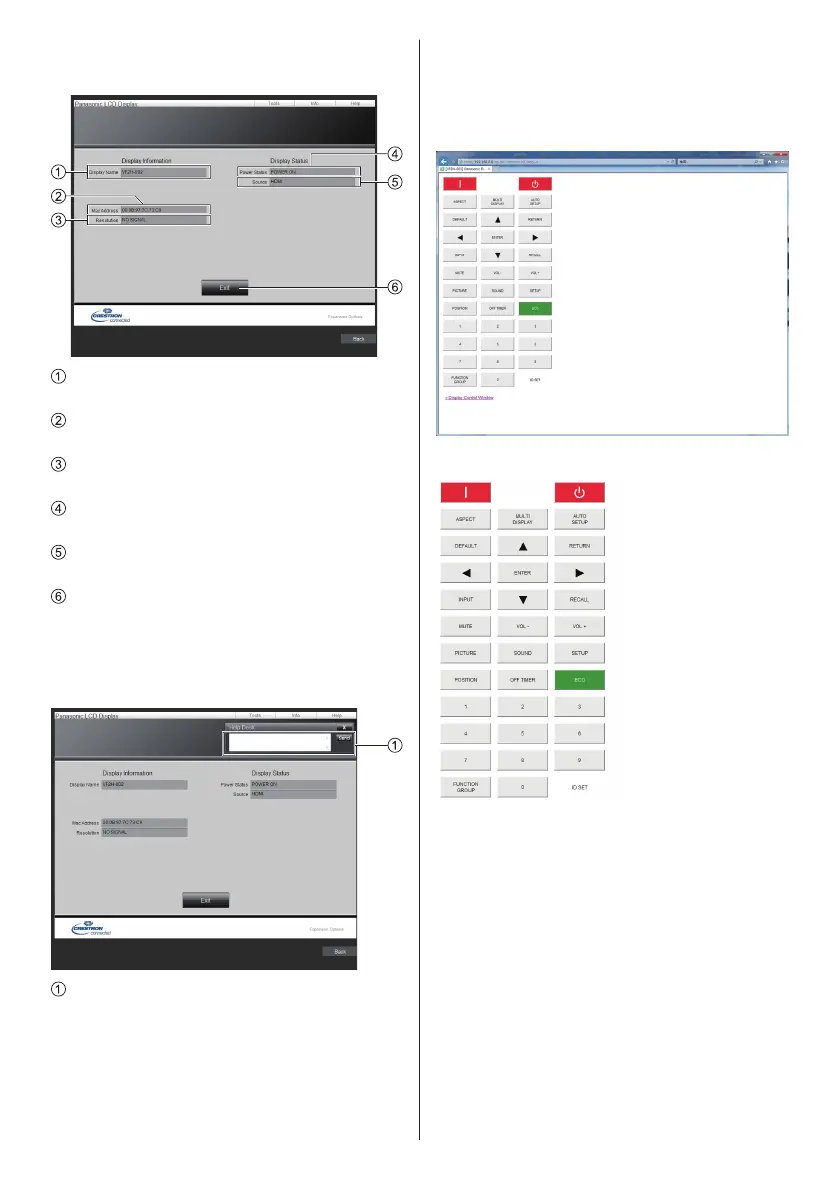
[Info] page
Click [Info] on the operation page.
[Display Name]
Displays the name of the Display.
[Mac Address]
Displays the MAC address.
[Resolution]
Displays the resolution of the Display.
[Power Status]
Displays the status of the power.
[Source]
Displays the selected video input.
[Exit]
Returns to the operation page.
●
[Help] page
Click [Help] on the operation page.
The [Help Desk] screen is displayed.
[Help Desk]
Sends or receives messages to the administrator
who uses “Crestron Connected”.
■ [Browser Remote Control]
It is possible to operate the display with the operation
buttons displayed on the WEB browser.
Click [Browser Remote Control].
The [Browser Remote Control] screen is displayed.
Browser Remote Control
The Browser Remote Control can be operated in the
same way as the supplied remote control.
For allocation / function of each button, see page 32.
To finish the Browser Remote Control, click
[Display Control Window] or exit the browser.










 To Next Page