34 35
Before Use / 使用前
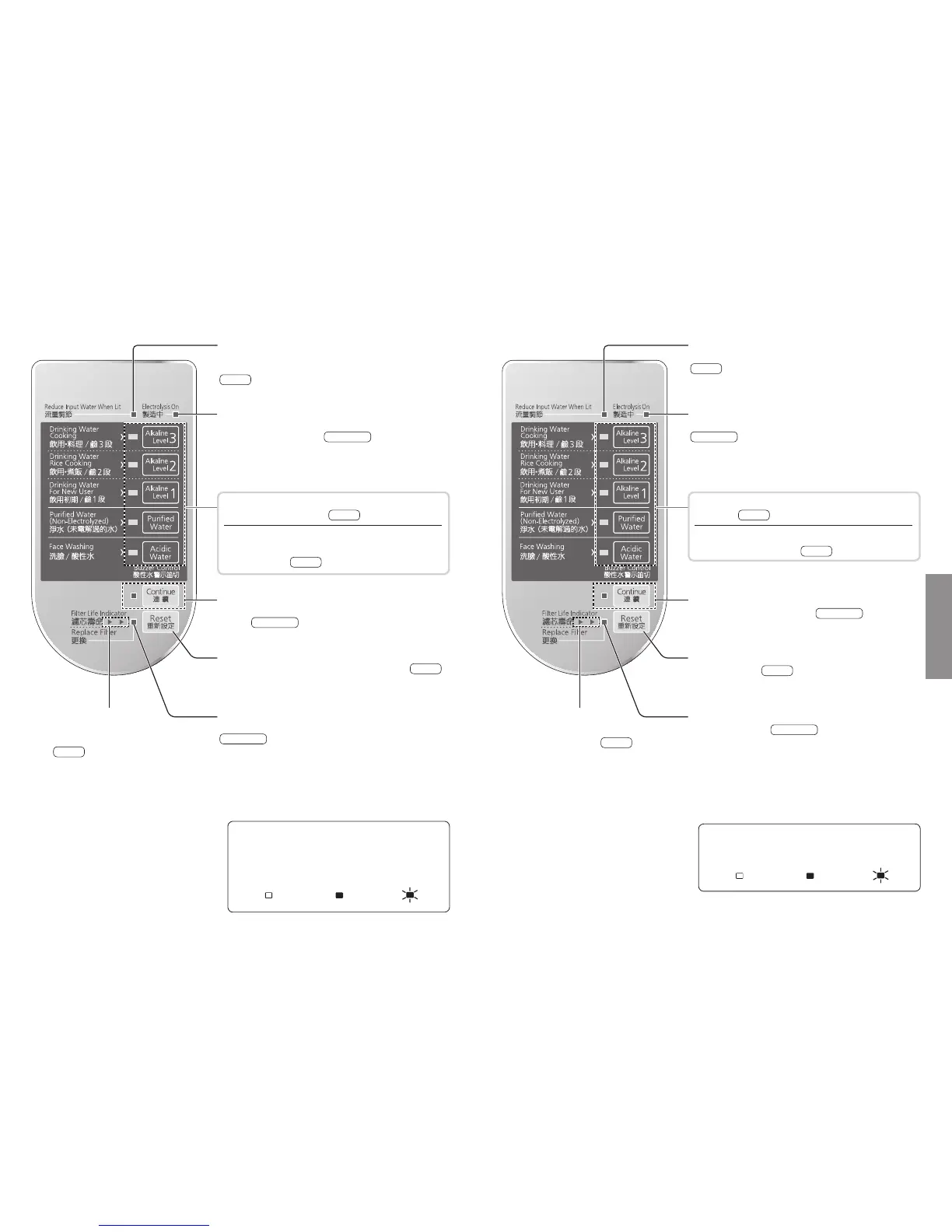
操作面板的名稱和功能Control Panel Parts and Their Functions
Water Flow Adjustment Lamp (Red)
This lamp will blink when the water flow from the main
spout is too large.
P. 3 8
Generating Lamp (Yellowish-green)
This lamp is lit when the main unit is generating alkaline
ion water or acidic water.
P. 36, 37
If it is not lit while water is running through, that means
the main unit is not electrolyzing, so the water coming
out is purified water.
Continue Button • Lamp (Yellowish-green)
Press this button to continue to use the same water
quality.
P. 36, 37
Reset Button
Press this button after replacing the cartridge.
P. 5 3
Cartridge Replacement Lamp (Red)
This lamp informs you when it is time for replacement.
P. 50, 53
Cartridge Life Lamps
(Yellowish-green, Yellow)
These indicate the operating life of the
filter.
P. 5 0
These indicators light up when water
is running through the main unit and
for approximately 30 seconds after
the water flow is stopped.
Water Quality Selector Buttons
Selects the water quality.
P. 3 6
Water Quality Indicator Lamps
This indicates the quality of the water coming from
the main spout.
P. 3 6
OAbout the Indicator Lamps on the Control
Panel
This instruction manual will show the state of
lamps on the control panel as follows:
[Lamp not Lit] [Lamp Lit] [Lamp Blinking]
流 量 調 節 顯 示 燈(紅 色)
從出水管排出的水,如果流量過多時,燈會閃爍顯示。
P. 4 2
製 造 中 顯 示 燈(黃 綠 色)
亮起時表示本機正在製造鹼性離子水或酸性水。
P. 40 、 41
使用淨水、在通水時燈會熄滅,此時未進行電解作用。
連續鈕•顯 示 燈(黃 綠 色)
連續使用相同水質時請按此鈕。
P. 40 、 41
重新設定鈕
濾 芯 更 換 後 按 壓。
P. 5 3
濾芯更換顯示燈(紅色)
告知濾芯更換時間。
P. 50 、 53
濾芯壽命顯示燈
(黃 綠 色、黃 色)
告知濾芯的壽命。
P. 5 0
於水流動時及水停止後約 30秒 鐘 點 亮。
水質轉換鈕
轉 換 水 質。
P. 4 0
水質顯示燈
指示從出水管排出的水質。
P. 4 0
O關於操作面板顯示燈的指示
在本說明書內,操作面板顯示燈的指示如下述所示:
〔熄滅〕 〔點亮〕 〔閃爍〕












 To Next Page