43
ņサઈಙŇ
LCD displays/ ᇘㆴḻ
▼
▼
▼
▼
▼
▼
▼
Example/
When is
pressed
ྈʁ ᆹ
Example/
To set to
“Stronger”
⥑હȵȶ᱿
ᆹα
Example/
Example/
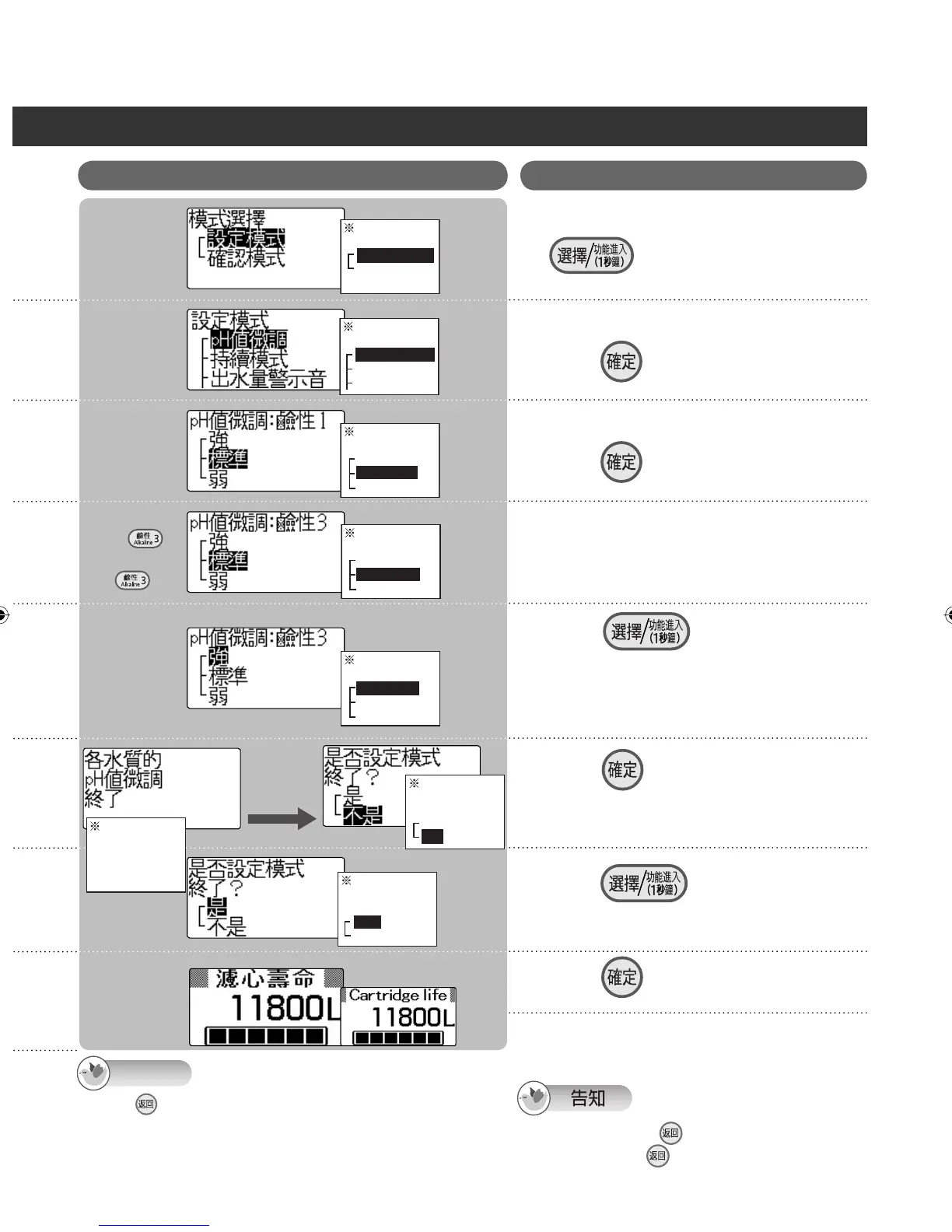
Mode selection
Setting mode
Check mode
Setting mode
pH fine adjustment
Continue mode
Water output buzzer
pH fine adjustment: Alkaline 3
Stronger
Standard
Milder
pH fine adjustment: Alkaline 3
Stronger
Standard
Milder
Fine adjustment of
the water quality
pH level
completed
Exit the
setting mode?
Yes
No
Exit the
setting mode?
Yes
No
〦ᖛ㕻ㆊŊႽㄇኈ᱿
1
Ŋྈʁ 1 ấ⾝ȯ
ྈʁ
⸹
ℋྃ׆ᨊ
2
ྈʁ ⸹
ℋྃ׆ᨊ
3
ྈʁᖛ⫨ӡဘ⸹
െ⦲ pH ϊ
4
ྈʁ ŊⴆႹ pH ϊെ
⦲᱿⥑હ
ト⣬ᓝെ⦲ pH ϊᖛ⫨ӡဘ⸹᱿ᨊᗼ
ᆹŊ⦼⸅⢒Ⴝ4⎞5᱿ㅯȯ
5
ྈʁ ⸹ȹ⥑હરᯃȺ
⥑હ 4Ȯ5 ᱿ㅯര֯રໞሷ pH ϊ᱿
െ⦲ȯ
6
ྈʁ ŊⴆႹȵᆯȶ
7
8
ྈʁ ⸹
⦓ pH ϊ
ņ
א〇 26 ㅪ
Ň
˫ pH ϊᛵ⥶˴
9
When is pressed in steps 2 to 5, the previous screen is
restored. The previous screen will not be restored when it is
pressed after the settings are completed.
Displays on the screens indicated by the asterisks will be in
Chinese even if the English display mode is established.
Note
Ⴝ
߱ൂᔎ㊾2Ɯ5ྈʁ ⸹ŊଔሳߊӷԊɺΤᯉㄇȯ
⥑હʴരŊྈʁ ⸹ʬʃሳߊӷԊㄇ᱿ᯉㄇȯ
ሷƩὪ⚦᱿ᯉㄇŊ֯ᆯᄽㆴḻᑁೣ˜˫ʑᄽㆴḻȯ
After about
3 seconds
₎3ấര
Stronger
Standard
Milder
pH fine adjustment: Alkaline 1
ZGS0TK7585HKE0Z.indb 43ZGS0TK7585HKE0Z.indb 43 2009/12/09 9:50:392009/12/09 9:50:39












 To Next Page