64
1
2
3
Replacing the Cartridge/ሩဘᡇൔ
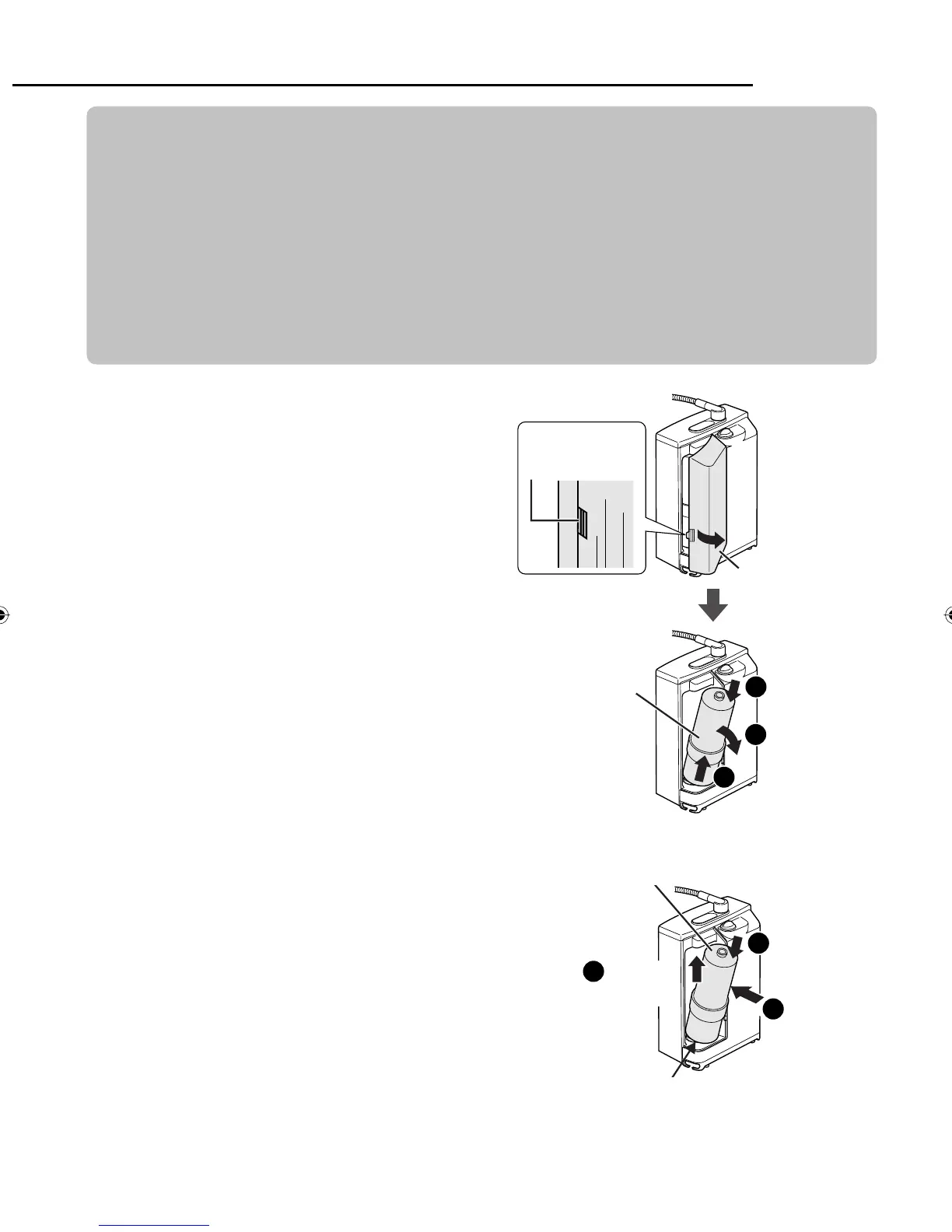
2
Install the new cartridge
મ⡶ᅘᡇൔ
After putting the cartridge in place, push
it up.
મ⡶രŊ⦼૽ᡇൔʀȯ
1
2
3
Align the center of the bottom of the
cartridge with the center of the cartridge
hole, and while pressing it down, push the
cartridge in.
ଃಎⵒʑൔɺⴗࣱɺⴗ⡶Ҙ
New cartridge
ᅘᡇൔ
1
Cover
╾
Push down
on the top
ഺʀㄇദʁࣱ
Pull toward
you
ദԊཚ
Cartridge
ᡇൔ
Pull up and out
ദʀཚӛ
Replace the cartridge without disconnecting the power plug.
(The cartridge life cannot be reset when the power plug is disconnected.)
Before replacing the cartridge, turn off the faucet. Do not run water through
the Alkaline Ionizer with the cartridge removed. (Doing so will cause the
water to overflow.)
Do not replace it with the condition of main unit flat.
⦼խཥ࿚ヅတㆊŊⳖ⠗ሩဘȯņཥ࿚ヅတㆊŊ͵ᤀᘍⳖ⠗ᡇൔل⸅ᅘ⥑હŇ
⦼〦ʀᖛ㕻ㆊരŊҪⳖ⠗ሩဘŊᡇൔབྷֲᨊ๗ʁŊ⦼խⳇᖛᮢȯņᖛሳᝉӛŇ
⦼ӡխ߱㋤⚠ᅠᄍΪᨊ๗ʁሩဘᡇൔȯ
Remove the cover, and then
remove the cartridge.
༌㋤╾Ŋབྷʁᡇൔ
Take care since water will drip from the
cartridge. Water may also emerge from the
bottom of the unit (this does not indicate
that there is a leak).
Do not place the unit on its side or upside
down with the cartridge removed (since
water may get inside the unit and cause
malfunction).
ᡇൔҙ᱿ᖛሳᝉӛŊ⦼ᘜาȯᖛˇሳഺ
㋤ಎⵒᙟӛȯņʏភᖛŇ
૽ᡇൔབྷʁᆹŊ⦼խ૽㋤Ϊ┮ᄍוᅞ
მ┮ȯ
ņⴍ҉ᖛⲻᙟӷᑨݽҙŊ⎐ᄑゃ᱿׆ߌŇ
Push slightly
ɺⴗỆെࣱɺʁ
Push up
ʀ
ZGS0TK7585HKE0Z.indb 64ZGS0TK7585HKE0Z.indb 64 2009/12/09 9:51:082009/12/09 9:51:08












 To Next Page