42
Operation (continued)/ ᮢᅞᘍņ↲Ň
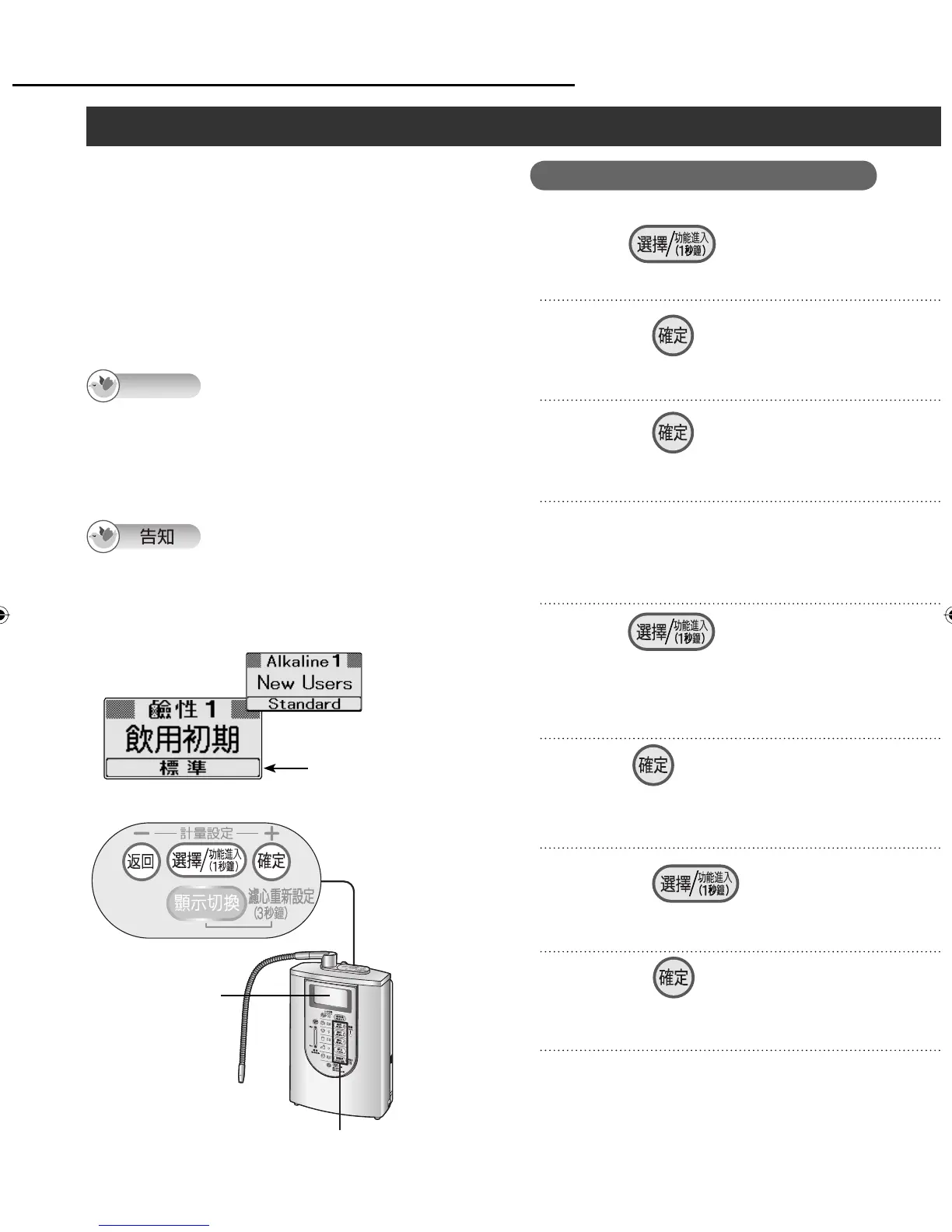
Finely adjusting the pH level (ion concentration)/െ⦲pHϊ
To bring the pH level of the water processed
through the Alkaline Ionizer closer to the pH
standard (water quality indicator number), the pH
levels set for the “Alkaline” or “Weak Acidic” water
quality selector buttons can be finely adjusted in 3
steps: “Stronger”, “Standard” or “Milder”.
ᣅʴሩⲖᮝໞʑ᱿ pH ϊȵpH ϊ᱿ᐻņᖛ⫨ㆴḻᥨ᱿
ᄲϊŇȶŊ≟૽ȵ㓇ඖȶȵඖȶ᱿ᖛ⫨ӡဘ⸹⥑હໞ pH
ϊᐻŊʏ֒Ӡᣅȵȶȵᐻȶȵȶɿᕀೣെ⦲ȯ
Operation
Turn off the faucet, and
press on the control
panel for 1 second.
Press .
1
2
Press .
3
To finely adjust the pH level,
press one of the water quality
selector buttons.
4
Press , and select
“ ᆯ ”.
8
Press , and select the pH
fine adjustment setting.
If there is more than one button for which
the pH level is to be finely adjusted,
repeat steps 4 and 5.
5
7
Press .
<The setting is finished>
Adjustment of all the water quality pH
levels set in steps 4 and 5 is completed.
6
Press .
Check the pH level using
the pH test kit.
(See page 26.)
9
LCD display
ᇘㆴḻ
Control panel/ Ⴝㄇኈ
Water quality selector buttons
ᖛ⫨ӡဘ⸹
Note
The pH level fine adjustment changes the pH level
in a range from 0.2 to 1.5 for “Stronger” or “Milder”
from the “Standard” setting. (Depending on the water
quality and usage conditions, there is some latitude
in the amount of the change.)
pH ϊെ⦲᱿ߣŊଃᤫȵᐻȶ᱿⥑હӠӲ˫
ȵȶȵȶpH ϊ 0.2 Ɯ 1.5 Ễಙ⩐ջȯ ņᖛ⫨
ᮢጻ˴᱿ʃŊ≟⩐ջ⸇ሷʃ᱿ౘಙŇȯ
When it is purchased,
“Standard” is selected.
⫵⫀ᆹ⥑હᣅȵᐻȶȯ
ZGS0TK7585HKE0Z.indb 42ZGS0TK7585HKE0Z.indb 42 2009/12/09 9:50:382009/12/09 9:50:38












 To Next Page